The post Why You Need a Professional Website Development Company first appeared on Read Our Blog – Webguru Infosystems.
]]>According to a study by Portent, the average conversion rate for pages loading in 1 second is almost 40%. At a 2-second load time, the conversion rate already drops to 34%. This is not a small number. A slow website costs you almost half of your potential customers before they even see what you offer.
Today, people turn to the internet before making almost any purchase decision. Your website is often the first impression of your business. And in a digital-first world, first impressions are decisive.
It is one of the reasons why businesses prefer a professional website development company. Yes, DIY website builders and freelancers can put together a site too. But in a competitive market, it’s rarely enough. Amateur coding can create security holes, and templates look generic. Moreover, you don’t want to risk missing SEO fundamentals if you want your customers to find you.
In this article, we’ll cover what defines a professional partner, the benefits of working with one, the risks of skipping professional help, and what to look for when hiring to make the right choice for your business.
What a Professional Website Development Company Actually Means
When people hear ‘web development’, they often think of coding alone. But professional website development is far more holistic. A true website development company doesn’t just put together code. It’s a team effort. Designers, UX specialists, frontend and backend developers, QA testers, SEO professionals, and security experts all work together.
What makes them professional? Clear processes, structured project management, modern technologies, and industry best practices. You don’t just get a website. You get a planned, reliable, and scalable digital asset.
They also provide a wide range of services. From website development services to mobile app development services, branding, and digital marketing, a professional firm provides everything under one roof. This cross-functional expertise ensures consistency and efficiency.
Key Benefits of Using a Professional Web Development Company
Your website is your 24/7 storefront. Every aspect of it impacts how customers perceive your business. Don’t make the mistake of treating it like a brochure. Here’s where a professional partner makes a real difference.
1. Quality, Functionality, and Performance
A site that loads slowly or crashes under traffic is a liability. Visitors won’t take the time to reload your website multiple times. You need fast load times to improve user retention. With a professional website development company, you get exactly that.
A professional company’s website development services include responsive design to ensure the site works on all devices and browsers. You also get a solid architecture that allows the site to handle high traffic without breaking. This is more than just technical work. It’s business-critical.
2. User Experience (UX) & Conversion Optimisation
A well-built site doesn’t just look nice but guides users. Professionals know how to do that. They design with intent so that visitors know where to click and how to proceed. The ease of navigation and speed of the website reduce friction and keep people engaged. Clear CTAs encourage conversions, too.
A professional website design company does not use templates to design your website. They use custom designs that are made solely to fit your goals and identity. This gives you brand consistency, builds trust, and gives your brand professional credibility. The result? More leads, better engagement, and higher revenue.
3. Scalability & Future-Readiness
A growing business needs a website that grows with it. With a professional company, you get a clean, modular code. This makes updates easy in the future. The scalable architecture supports new features, pages, or integrations. And the database optimisation, as the traffic increases, ensures smooth performance. This keeps your digital presence aligned with your long-term strategy.
4. Security & Compliance
Security isn’t optional. A breach can cost money, customers, and trust. Professional firms keep security at the core. You get protection against hacking and data leaks. Compliance with legal and regulatory standards is a given. There are also regular updates to patch vulnerabilities. For e-commerce websites, you also get secure payment gateways with SSL certificates.
5. SEO & Visibility
A website without visitors is like a store without foot traffic. With the competition rising every day, SEO-friendly architecture is necessary. This includes technical SEO basics: site speed, metadata, and structure.
A professional will design your website to integrate with broader digital marketing. This includes PPC, content, and social media. As a result, it becomes easier for Google to index, leading to better rankings. Moreover, they also add a professional setup of analytics and conversion tracking. In this way, they seamlessly blend SEO services with design and development.
6. Time & Cost Efficiency in the Long Term
A professional development is an upfront investment. But don’t let it scare you. It pays off in the end. You get solid foundations, which in turn means lower maintenance costs. There is no time wasted on trial and error. A dedicated team gives you fast delivery. You get the time to focus on business while the company handles the tech.
7. Mobile App Development Integration
Web and mobile are no longer separate. Professional firms that also provide mobile app development services deliver ecosystems, not just standalone products. You get a seamless integration between your website and app. They bring to you native or cross-platform mobile solutions. You also get APIs for connected, unified experiences.
8. Post-Launch Support, Maintenance & Updates
A site isn’t “done” at launch. It needs regular bug fixing, technology upgrades, and platform migrations. With time, you will also need to integrate the website with new systems or devices. A website development company ensures compatibility with the latest browsers and OS updates. With ongoing support, your website stays current and competitive.
Risks of Ignoring Professional Development
Skipping professional help may save money at first. DIYs may seem like a good idea until a few years down the line, when problems start to arise and costs pile up. Let’s break down what you’re risking with shortcuts.
1. Poor User Experience
On websites, user experience means everything. A cluttered layout, confusing navigation, and broken links frustrate users. This leads to higher bounce rates. When users leave without engaging, you lose potential customers. A professional ensures every touchpoint is optimised for engagement and conversion.
2. Security Vulnerabilities
Unsecured websites are frequent targets for hackers. DIY-built or amateur-coded websites often lack proper encryption, firewall setup, or data handling practices. It results in risking customer data. Your reputation is at stake, too. You don’t want to lose the trust of your customers. Furthermore, failure to comply with data protection laws may result in legal penalties.
3. Difficulty Scaling
Your digital needs grow with your business. Integrating new features, pages, and handling more traffic are some of the common needs. Cheap or poorly built websites often can’t handle scaling. You end up rebuilding the site from scratch. This results in wasted time and resources.
4. SEO Penalties
Search engines prioritise well-structured, fast-loading, mobile-friendly sites. DIY tools and low-cost developers may ignore technical SEO basics. You end up missing out on clean code, proper tags, schema markup, or optimised images. This makes it hard for your site to rank, regardless of how good your product or service is.
5. Brand Damage and Hidden Cost
Bad impressions are nearly impossible to undo once set online. A poorly designed or broken-down site gives you the added disadvantage of presenting yourself as untrustworthy and unprofessional. Unstable code, malfunctioning plugins, or updates are simply rendered incompatible, which strikes down the average uptime a lot. These can snowball into bigger problems and damage your brand’s credibility. Add to it the cost of frequent redesigns and constant fixes.
Your Digital Success Starts with the Right Partnership
Your website is too important to leave to chance. Professional development offers technical strength, business strategy, ongoing support, and long-term savings. The return isn’t just financial. It’s trust, credibility, and growth.
When it comes to building a strong digital presence, trust a professional website development company. With 150+ mobile apps and clients across 32+ countries, Webguru has the experience and reach to deliver results. Our portfolio spans multiple industries. From website development services to mobile app development services, we provide end-to-end digital solutions.
Contact us today at enquiry@webguru-india.com and talk to a professional about how to enhance your website.
The post Why You Need a Professional Website Development Company first appeared on Read Our Blog – Webguru Infosystems.
]]>The post Why hire WordPress Developers with AI Expertise first appeared on Read Our Blog – Webguru Infosystems.
]]>Traditional WordPress development still builds static templates and fixed flows. This worked when pages were brochures. But in 2025, automation, user-behaviour analysis, and real-time adaptation are standard. Today, users expect tailored journeys, fast load times, relevant content, and help that feels immediate. It is one of the reasons why a report by Gitnux shows that in 2025, 85% of website developers utilise AI tools to enhance their development processes.
Businesses today want modern sites that learn and react. Most of them choose to hire a WordPress developer who is familiar with AI. AI-savvy WordPress developers integrate systems that learn from visitors, automate tasks to reduce manual updates, and utilize models and services that enable sites to respond in real-time. The result? Better experience, less maintenance, and quicker wins.
The Current Landscape of WordPress AI Revolution
WordPress has evolved fast. It now supports design systems and developer workflows that weren’t common a few years ago. The platform moved from single-page edits to site-wide block control. This change opened doors for AI-driven editing and content assembly.
Key trends for 2025
Several patterns now shape WordPress work. From content tools to developer assistants, AI moves through every phase of a build. Where teams once relied only on plugins, they now combine plugins, APIs, and models. Some of the top trends in 2025 are.
1. Plugins use AI to generate full landing pages based on user input –
New plugins can create entire landing pages from a description. They wire meta tags, images, and layout into WordPress automatically. Some white-label builders offer a chat-based site generator that produces a ready site from a short brief.
2. AI tools like GitHub Copilot help developers write custom functions and troubleshoot bugs
Developers use AI tools that suggest code snippets, helper functions, and test stubs. Advanced tools can even inspect a repo and propose fixes, or generate documentation for review. These tools speed development and reduce trivial errors.
3. AI empowers faster page loading, smarter content generation, advanced SEO, and enhanced user engagement
In 2025, AI does more than write copy. It optimises images, adjusts lazy-loading strategies, and recommends SEO improvements based on live data. It also powers chat and recommendation systems that lift engagement.
Business impact
AI’s spread into WordPress carries clear business effects. Personalised content reduces bounce, and chat assistants cut support loads while keeping visitors on site. This means your sites perform better, teams move faster, and customers stay longer. AI integration affects website performance and user experience, too. AI-driven caching and asset optimisation can lower load times.
Market demand
Demand for AI-savvy developers is now growing. Companies now want to hire a WordPress developer who can combine WordPress skills with AI know-how. The market values people who can integrate ML services, tune APIs, and keep sites secure and fast.
Core Benefits of Hiring AI-Expert WordPress Developers
Hiring the right developer changes outcomes. AI skills broaden what WordPress can do. You can expect faster builds, smarter features, and future-ready architecture. Let’s break down the main wins.
1. Enhanced Development Speed & Efficiency
Speed matters. Faster development means quicker testing and faster revenue. AI-powered development tools enable faster custom function writing and bug troubleshooting. These tools suggest code snippets and entire functions. They reduce boilerplate and flag potential bugs before committing.
With the help of AI, developers can automate routine tasks. This helps in moving the launch dates earlier so that marketing teams get more time to plan campaigns. Another advantage of this is cost-efficiency. Less manual work lowers hourly costs, and faster iterations reduce costly rework.
2. Advanced Functionality Implementation
AI opens doors to features that were expensive before. It helps in creating custom themes and plugins that are specific to particular business needs. Developers can scaffold bespoke themes and plugin logic quickly. This keeps code lean and fit for purpose.
AI also tracks user signals and serves tailored headlines, product lists, and promotions. Machine learning models spot patterns in clicks and scrolls. They suggest layout tweaks and content priorities. Moreover, automatic image compression, adaptive loading, and CDN rules improve perceived performance without manual tuning.
3. Future-Proof Solutions
You want systems that last. AI helps split complex projects into manageable parts and makes maintenance simpler. It also enables scalable architecture planning and allows developers to design modular systems. This supports growth without a costly rework.
The emerging AI technologies also prepare developers for new models and APIs that can add features without full rebuilds. Another one of the long-term advantages of AI is that automated monitoring and anomaly detection reduce downtime and manual patching.
Business ROI: Why AI WordPress Development Matters
Investing in AI development isn’t just tech for tech’s sake. It affects metrics that matter. With AI, you can expect gains in speed, cost, conversions, and future readiness. Here are the measurable benefits.
1. Competitive Advantage – AI helps in staying ahead in the digital marketplace. It helps sites learn and adapt so that they can keep users longer. This gives your business a clear edge over static competitors.
2. Cost efficiency – With AI’s involvement, you can automate repetitive tasks. This means reduced development time and maintenance costs. Plus, with repetitive tasks automated, you also now pay less for routine tasks.
3. Improved Conversions – Integration of AI in website development services means you get a better understanding of your audience. You can build personalised journeys and smarter CTAs. Better user experience leads to higher conversion rates, and more visitors turn into leads or buyers.
4. Scalability – Technology and AI are always growing. An AI-aware stack accepts new models and services with minimal friction. Unlike static websites, with AI, you don’t have to worry about modifying it every time a feature needs to be expanded. AI solutions that grow with your business.
5. Data-driven decisions – AI provides actionable insights, like which blog posts drive qualified leads or which product pages need updates. These analytics and insights help in building better business strategies.
6. Customer satisfaction – AI tools give customers instant answers and support, leading to happier visitors. This helps create trust.
Future-Proof Your Business with AI-Driven WordPress Solutions
AI-ready developers build speed, add smart features, and protect performance. They help you serve people better and run leaner operations. Integration of AI in website development services emphasises flexibility, efficiency, and AI-driven simplification. Adopting these patterns now reduces rework later.
Hire a WordPress developer to build your website so that you can stay ahead of the curve. AI-assisted development and AI-driven site generation are shaping how teams build and scale. So be careful while hiring. Skills, proofs, and communication matter. Focus on technical depth, relevant work, and clear explanations.
If you want to stay ahead with AI-powered WordPress development, consult the experts. Webguru Infosystems is a long-standing web partner with more than 19 years in the field. As a seasoned website development company, we can map AI capabilities into your existing stack. We offer website development services that span CMS customisation, eCommerce, APIs, and ongoing optimisation.
If your business needs smarter WordPress work, start with a free consultation. Get in touch with Webguru Infosystems at +918420197208 or drop an email at enquiry@webguru-india.com to get started.
The post Why hire WordPress Developers with AI Expertise first appeared on Read Our Blog – Webguru Infosystems.
]]>The post Best CMS for Small Business Websites first appeared on Read Our Blog – Webguru Infosystems.
]]>Digital marketing and SEO services have changed the approach of business. For small businesses that aim to grow, an online presence is an absolute necessity. And websites make up an integral part.
If you are seeking to build credibility, drive growth, and most importantly, connect with your customers, your business must have a website. A study indicates that 91% of digital marketers have seen improved website traffic from social media campaigns.
However, a minor problem that small businesses or brands face is the need to code while making or managing their website. But, with the growth of CMS, or Content Management Systems, website creation and management have become simple. You do not have to be a technical expert to manage or update your website.
With a reliable CMS platform paired with expert website development services, maintaining your website will be as easy as a breeze. But first, let us understand what are CMS platforms.
What is a CMS, and Why Do You Need One
A CMS or Content Management System is a software that makes it easier for a user to create, manage, and update websites without having to manually code anything. It functions through a dashboard or admin panel, where content, images, and appearance can be managed with a click.
For small businesses, CMS platforms are affordable and easy to use. Choose from a plethora of pre-made templates with simple drag-and-drop features, add-ons, and a plethora of plugins that help you to integrate your site with third-party applications or websites. All you have to do is understand what you require and it will be presented to you.
Developing your website from scratch takes time and money, but a CMS can be integrated in as little as 2 days for a one-page website. You must pay a minimum monthly subscription fee and a hosting fee. And you are ready to go!
Some agencies offer such professional website development services to small businesses. Tell them your requirements, and they will help you pick the right CMS that would complement your business, making the entire process work smoothly.
Key Features to Look for in a CMS for Small Businesses
Choosing a CMS is much more than picking a name. Small businesses must look for specific features that are important in their daily needs.
Ease of Use
Running a business is already a lot of work. The CMS should not be an added feature that overcomplicates things. A good CMS enables owners and employees to make updates to their websites easily without needing a manual or a developer’s support every time.
Customization Options
A template might get things started, but every business is different. A good CMS allows flexibility. Check for themes, plugins, and widgets that allow you to customize how your site looks and works based on your industry.
SEO-Friendliness
Business growth comes from connecting with a larger audience. This means that you must take the number one spot in the search results. To do this, your CMS must get the SEO basics right. Explore SEO methods that help you reach more people online.
Integration with Marketing Tools
Marketing is utmost in today’s time, and your CMS must integrate with the tools you need. Google Search Console, Mailchimp, and Google Analytics are a few to name. Once integrated, data analysis will be smooth, and you will have a full picture of the incoming traffic.
Security and Support
Websites face threats every day, and your website must be safeguarded. A dependable CMS comes equipped with security features, not to mention regular updates to meet ever-growing threats. Keep a backup of your website in case of any major attack or threat.
Must-watch trends of 2025 in web design.
Best CMS Platforms for Small Business Websites
Not every CMS works for every business. There is no right or wrong, but each has its strengths and limits. The right CMS for your business depends on your industry and goal.
WordPress
WordPress powers over 40% of websites on the internet. It’s flexible, powerful, and has thousands of templates and plugins. It suits small blogs, service-based websites, portfolios, and even medium e-commerce stores. It’s scalable as well.
Pros:
- User-friendly dashboard
- Massive plugin library
- Strong SEO features
- Large community support
Cons:
- Requires regular updates
- Needs some technical knowledge for complex features
For those looking to do more — say, add booking systems, payment portals, or multilingual options — it may be smart to hire a WordPress developer. This way, the site is tailored without breaking anything.
Shopify
If your main goal is to sell products online, Shopify is your choice. It’s built specifically for e-commerce. One of the best features of Shopify is its easy management of inventory, payments, shipping, and customer data – all in one dashboard.
Pros:
- Secure and reliable
- Supports multi-channel selling (Instagram, Amazon)
- Integration of various applications
Cons:
- Monthly cost can add up
- Less freedom in design
- Major customization needs developer help
Shopify is ideal for small businesses with 10–100 products. As the store grows, so do the platform’s features. Hire a Shopify developer to make your e-commerce website stand out through seamless shopping experiences for your customers.
Squarespace
For artists, photographers, or boutique shops, the best CMS must provide modern templates with fine design. Squarespace is neat with no messy plug-ins or cluttered dashboards. It also includes tools for blogging, selling, and showcasing work.
Pros:
- Beautiful templates
- Built-in analytics
- Mobile-optimized themes
Cons:
- Fewer integrations
- Less third-party app support
- Custom coding is limited
Joomla and Drupal
Joomla and Drupal are powerful content management systems that come with a steeper learning curve. It is ideal for business owners who are tech-savvy or are working with developers. Best for content-heavy websites or where custom features are key.
Pros:
- Strong backend control
- Good for multi-language sites
- Advanced user roles and permissions
Cons:
- Not beginner-friendly
- Smaller support communities
- Setup can take time
How to Choose the Right CMS for Your Business
When there are too many choices, it’s easy to get overwhelmed. List down your requirements and understand what your website needs, and accordingly choose the right CMS for your business.
Think About Your Comfort with Technology
Some platforms require setup and customization. Others are just drag and drop.
Start with Your Business Needs
Is the site for selling products? Showcasing services? Booking appointments? Listing blog posts? Each CMS has a goal, and it must align with your business goals.
Understand Your Budget
While the CMS software and the tools might be available for free, hosting, plugins, and themes have an additional charge. Some charge monthly, while some need you to pay annually. The charge is very nominal as opposed to a website from scratch.
Growth Plans Matter
If you want to expand your business later, your choice of CMS should support that. Otherwise, rebuilding from scratch on another CMS will be expensive.
Is your website AI-friendly? Get in touch with us for a free website audit.
DIY vs Professional Help: What’s Best for You?
Building a site on your own feels rewarding. Many CMS platforms allow that. But it comes with limits.
DIY works well when –
- The site is small and simple
- The budget is tight
- Business owner enjoys learning tech
But as the site grows or features get complex, it easily gets stressful. Broken layouts, slow speeds, or bugs hurt the user experience.
When you hire website development services, you simply state your requirement, and the work is done. No time or resource allocation, no downtime, but clean results.
Hiring professionals helps when you need –
- A polished, unique design is needed
- The site must connect with other systems
- SEO and performance are the utmost
Save your time and hire a WordPress developer or a full web development team. We ensure the site is secure, responsive, and easy to manage.
If you are seeking website development services, at Webguru Infosystems, we have years of expertise in custom CMS development. We work closely with your business goals to deliver high-functioning websites. Apart from delivering, we advise, plan, support, and listen.
Final Thoughts
As a small business owner, you can’t afford to ignore the digital space. A well-built website gives you a voice, a brand identity, and a way to engage with your customers.
The right CMS makes this process easier. WordPress offers power and flexibility. Shopify handles e-commerce like a pro. Squarespace delivers clean design. Joomla and Drupal suit more complex needs.
The important thing is to match the CMS with your business goals. Do not think about the name, but what it encompasses. Our professional website development services match your business with the right tools, saving you time and reducing risks. Choose wisely. Save time, money, and energy.
Get in touch with us at 084201 97208 or email us at enquiry@webguru-india.com.
The post Best CMS for Small Business Websites first appeared on Read Our Blog – Webguru Infosystems.
]]>The post Is Your Website AI-Friendly? Audit It to Find Out first appeared on Read Our Blog – Webguru Infosystems.
]]>
So many things business owners need to consider to ensure optimal health of their websites. Now, they also need to check whether AI likes their website or not!
Many of us believe that AI is there to do things faster, but AI can actually help to do things better. Artificial intelligence is an incredible ally that can help find deficiencies and make things better.
Websites that fail to align with AI standards often struggle with search rankings, accessibility, and user engagement. Businesses investing in website development services should ensure their sites are perfectly optimized for AI-driven technologies. Conducting an AI-friendliness audit can help identify areas that require improvement to enhance overall website performance.
What Makes a Website AI-Friendly?
AI programs analyze websites differently than humans do. They assess many technical factors beyond visible material. Search algorithms check loading speeds, mobile-friendliness, and structured data adoption. Your site needs to communicate well with these advanced systems.
Modern AI gives higher priority to user experience when ranking. Voice search compatibility has become more relevant as 71% of consumers now prefer to use voice commands instead of typing queries. The technical foundations of your website directly impact how AI will read your pages. Sites built with AI optimization in mind can gain improved visibility across search engines.
Essential Components of an AI Website Audit
A thorough audit tests several levels of performance and structure of your website. Begin by assessing your content quality using tools such as MarketMuse or Clearscope. These tools analyze topic coverage and semantic relevance against leading-performing competitors.
Verify your structured data implementation so that AI systems are able to comprehend your content context. Test page speed with Google PageSpeed Insights to determine performance bottlenecks.
The website design company you hire should include schema markup on all applicable pages. Mobile responsiveness is still essential since Google uses mobile versions predominantly for indexing and ranking. Check your site architecture for a rational information hierarchy that assists AI systems in navigating and comprehending page-to-page relationships.
| Audit Component | What AI Evaluates | Impact Level | Recommended Tools |
| Content Quality | Topic coverage, semantic relevance, depth | High | MarketMuse, Clearscope, Surfer SEO |
| Technical Performance | Page speed, server response, mobile optimization | Critical | Google PageSpeed Insights, GTmetrix |
| Structured Data | Schema implementation, markup accuracy | Medium-High | Schema Markup Validator, Google Rich Results Test |
| User Experience | Engagement metrics, click behavior, session duration | Medium | Google Analytics, Hotjar, Clarity |
| Site Architecture | Navigation logic, internal linking, crawlability | High | Screaming Frog, Sitebulb |
| Mobile Responsiveness | Layout adaptability, touch target sizing | Critical | Mobile-Friendly Test, BrowserStack |
| Security | HTTPS implementation, safe browsing status | Medium | SSL Checker, Google Security Issues |
| Voice Search Readiness | Question-answer format, featured snippet potential | Medium-High | Answer the Public, SEMrush |
Technical SEO Factors That Can Affect AI Perception
Technical optimization is the building block of an AI-friendly website. Your server response time should remain below 200 milliseconds to please both users and algorithms. Use correct header tags (H1, H2, H3) in a sensible hierarchy that indicates content priority. The URL structure must follow clear patterns that communicate page relationships to crawlers.
A website development company realizes how crucial canonical tags are in avoiding duplicate content. Robots.txt must be configured with precision to navigate crawler actions without shutting out key resources. XML sitemaps need to be kept up to date and lodged correctly via search console programs. These technical aspects form the context through which AI understands your entire presence.
Also Read: How AI is Affecting SEO? Things You Need to Know
AI Audit: Steps to Assess Website Readiness
Auditing whether a website is AI-friendly or not involves certain critical steps. Identifying weak areas early can help with better optimization and lead to improved overall performance.
- Check Mobile Responsiveness—Check how well the website responds on various screens.
- Analyze Structured Data—Verify schema markup is properly done.
- Evaluate Voice Search Optimization—Use conversational terms and direct answers.
- Measure Page Speed—Optimize page load times for better AI compatibility.
- Test AI-Powered Features—Roll out chatbots and personalized suggestions.
- Improve Content Readability—Keep it clear and simple to understand.
- Improve Security Measures—Update encryption, firewalls, and authentication methods.
- Make Accessibility Standards—Implement AI-friendly assistive technologies.
Expert Tips to Make Your Website AI-Friendly
If your site was built long ago and it can’t compete with modern-day AI-friendly sites, a redesign can be an effective way out. However, recently built sites can consider these factors to enhance their sites and ensure a competitive edge in this AI age.
a. Content Optimization for AI Algorithms
AI technology has progressed from simple keyword matching to recognizing context and semantic relationships. Your content strategy has to keep pace. Develop in-depth resources that address topics thoroughly instead of creating many superficial pages. Answer questions your audience actually asks based on search intent analysis.
Incorporate supportive multimedia components such as images, videos, and infographics with the right alt text and descriptions. Use tables and lists to present difficult information in digestible formats pleasing to algorithms.
Natural language needs to flow in a conversational manner but include relevant jargon. Topic clusters linking associated pieces of content help AI understand your site’s topical authority and expertise within domains.
Also Read: Google’s AI Now Chooses Your Local Ad Photos – Here’s How It Works
b. User Experience Signals That Influence AI
User behavior metrics have a strong influence on how AI judges your website’s quality. Minimize bounce rates by making content directly respond to the needs and expectations of visitors. Page load time has a direct effect on user satisfaction, and any delay in seconds raises abandonment rates. Navigation should remain intuitive with clear pathways to important information.
Interactive features need to work properly on every device and browser. Use sticky elements with care since they can make or break the user experience based on implementation. Forms should employ validation methods that avoid mistakes without limiting required fields. These user-centric improvements send positive signals to AI algorithms about your site’s overall quality.
c. Mobile Optimization Requirements
Mobile experience now determines search rankings for the majority of websites in all industries. Responsive design has to adapt flawlessly to any screen size without compromising functionality. Touch targets should have sufficient spacing to avoid accidental touches on mobile screens. Font sizes should be readable without zooming on smaller screens. Page elements should stack logically when moving from desktop to mobile layouts.
Mobile page speed needs extra attention because connection constraints enhance performance problems. The viewport setup must effectively manage how content is presented on various devices. These mobile optimizations should satisfy both human users and the AI tools assessing your site.
d. Structured Data Implementation
Structured data gives clear signals to search algorithms about your content intent. Schema markup enables AI to comprehend business details, products, services, and other important information. Reviews and ratings data boost visibility in rich search results that drive more click-throughs.
Event information is enhanced by structured data to be displayed in specialized search features. Product schema provides a thorough depiction in shopping results with price and availability.
FAQ schema permits content to be shown in expandable search results that increase visibility. Local business markup enhances representation in map-based searches and business panels. These structured deployments virtually convert your content into formats that AI systems can easily interpret.
Conclusion
An AI-compatible website is now a necessity for online success in the algorithmic age. Periodic audits uncover areas to enhance how artificial intelligence understands and indexes your online presence. Technical infrastructure, content quality, and user experience all play a role in your overall AI compatibility.
Having an experienced website development services partner can make the audit and implementation process easier. The investment in AI optimization returns measurable value in the form of better visibility, more traffic, and better user satisfaction. Take affirmative action today to keep your site prosperous in the AI-driven future of search and discovery.
The post Is Your Website AI-Friendly? Audit It to Find Out first appeared on Read Our Blog – Webguru Infosystems.
]]>The post How to Make Your React + WordPress Website Faster first appeared on Read Our Blog – Webguru Infosystems.
]]>
Introduction
If your website is built using WordPress and React, we must say you have chosen a quite good tech stack! This combination brings a multitude of benefits—enhanced user experience, improved performance, more control over the frontend, and so on. Even if you have deployed the best technologies, issues like slow loading time can appear. If your site is facing performance issues, it’s important to take action quickly—after all, 53% of mobile users abandon websites that take longer than 3 seconds to load. Don’t wait for your visitors to leave; hire WordPress developers and start optimizing your website.
Why Speed Matters in React + WordPress Websites
A study revealed that a site loading in 1 second has a 5 times higher conversion rate compared to a site that loads in 10 seconds. Being a reliable provider of different website development services, we always prioritize speed optimization since search engines extensively factor website performance in their ranking algorithm. The success of your site is directly proportional to its loading speed, user experience, and conversion rates.
Also Read: 14 Kinds of Amazing Websites You Can Create in WordPress
Tips to Optimize React + WordPress Website for Faster Loading and Better Performance
Hiring an efficient website design company with a proven track record of delivering similar solutions is the ultimate choice. Yet, knowing the ways/tips can help you plan the journey better and set realistic expectations.
1. Optimize Core Web Vitals
Google’s Core Web Vitals are essential measurements of contemporary website performance.
- Largest Contentful Paint should take place within 2.5 seconds of page loading
- First Input Delay should remain under 100 milliseconds.
- Cumulative Layout Shift should have a score below 0.1 for the best user experience.
Leading website design firms keep these metrics at the top of their priority list while developing React + WordPress solutions. Monitoring them regularly allows early detection of performance bottlenecks.
2. Smart Asset Management
React components need careful structuring to avoid redundant downloads. The WordPress media library must be configured correctly to deliver optimized images. New image formats such as WebP compress file sizes heavily without compromising quality. Asset concatenation merges several files into one request. Browser caching stores frequently accessed resources locally. CDN deployment sends content to worldwide servers for quicker delivery.
3. Deploy Server-Side Optimization Techniques
The server environment has a great influence on website performance. PHP version upgrades usually introduce significant speed enhancements. Database optimization eliminates unnecessary tables and old entries. Correct cache configuration decreases server load by a huge margin. Most website development services concentrate on server-side adjustments because they yield core performance improvements. Periodic database maintenance also helps with avoiding performance degradation over time.
4. Try React-Specific Performance Enhancements
Code splitting splits big bundles into small, manageable pieces. Lazy loading postpones non-critical component rendering until it’s required. The React.memo() method stops unnecessary re-renders of components. Virtual DOM optimization minimizes actual DOM manipulations. All website development companies must use these React-specific optimizations. Component architecture needs proper planning in order to get the most performance benefits.
A Sample Guide to Optimizing React + WordPress Integration
Theoretical understanding of performance optimization is realized by its practical application. Contemporary web development services frequently need tangible instances of optimization practices. The below implementation illustrates how to develop performant React components in WordPress without compromising code quality.
Set Up a WordPress Plugin for Lazy Loading
Create a new folder ‘react-lazy-loading’ in your WordPress plugins directory (wp-content/plugins). Create a new PHP file named react-lazy-loading.php inside this folder and include the following plugin header details:
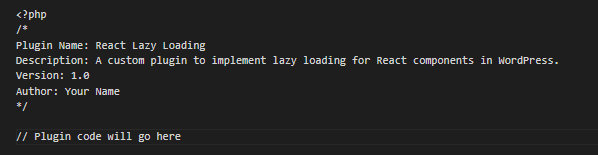
Set Up the Plugin Structure
Within the react-lazy-loading directory, create a src directory to contain your React components and a build directory for your compiled files. Compile your React code with tools such as Webpack or Babel into production JavaScript.
Install necessary dependencies:
npm install react react-dom @babel/preset-env webpack webpack-cli babel-loader
Set up your webpack.config.js to ensure React components are bundled correctly:
js
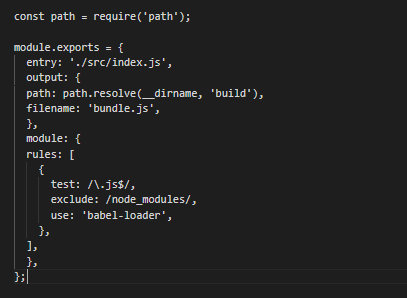
Develop React Components
Develop a React component, LazyLoadPostList, which will load recent WordPress posts lazily as the user scrolls down the page. This will enhance page loading times and user experience.
Develop LazyLoadPostList.js within the src directory:
jsx

Let’s Integrate React with WordPress
Enqueue your React and ReactDOM scripts within your plugin’s PHP file to load your React components correctly.
php
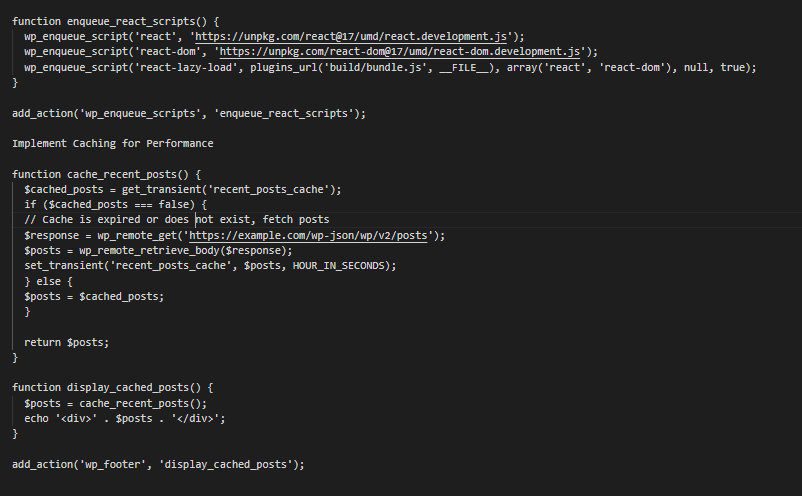
Build WordPress Widget
Craft a WordPress widget area in order to display the recent posts. In the plugin’s PHP file, you should register a new widget:
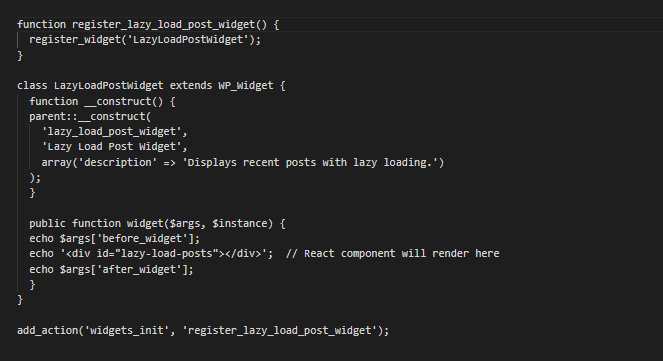
Test the Plugin
Once you’ve installed everything, go to your WordPress admin area and activate the plugin. You can add the Lazy Load Post Widget to any widget space of your theme. Go to your site’s front end and look at the posts loading lazily as you scroll.
If your caching system is working, you should see the posts load faster on subsequent page visits.
5. Don’t Skip WordPress Performance Tuning
Plugin optimization begins with eliminating nonessential additions.
- Theme customizing should consider performance over excess features.
- Database queries must be optimized to slow down server response time.
- Caching plugins set up several levels of performance increase.
- WordPress REST API must be properly set up for maximum React integration.
6. Use Advanced Caching Strategies
Browser cache policies have to be configured meticulously for the best performance.
- Server-side caching decreases database queries tremendously.
- Dynamic content delivery speed is enhanced through object caching.
- Database performance can be improved with Redis or Memcached implementation.
Also remember that static content generation returns pre-rendered pages directly, and advanced caching necessitates constant monitoring and tweaking.
7. Mobile Performance Optimization
Mobile-first development ensures consistent performance on all devices. Progressive enhancement delivers basic functionality prior to loading other features. Touch event optimization enhances mobile interactivity. Apart from this, responsive images automatically adjust to varying screen sizes. Network performance optimization takes into account changing connection speeds. However, mobile optimization needs ongoing testing on different devices.
8. Give a Room for Monitoring and Maintenance
Performance monitoring software gives instant feedback on website speed. A leading website development company, Webguru Infosystems, makes regular testing a part of their maintenance strategy to reveal new opportunities for optimization. Error monitoring keeps performance at optimum levels. Load testing verifies robustness under load. Analytics can help with identifying user experience issues much earlier.
Considering these factors while continuous monitoring turns into a proactive performance management approach that reduces downtime and ensures a better customer satisfaction rate.
Conclusion
React + WordPress website optimization demands a holistic strategy for performance improvement. Users today demand lightning-fast loading and seamless interactions. Expert developers combine technical expertise with performance optimization strategies to produce remarkable outcomes.
When you hire WordPress developers, make sure they are proficient in both React and WordPress optimization techniques. Regular maintenance and monitoring help maintain optimal performance levels over time.
Keep in mind that website speed optimization is a continuous process that needs constant monitoring and fine-tuning. Follow us to stay updated with the latest performance optimization techniques and get expert web development services to ensure your website maintains its competitive edge.
The post How to Make Your React + WordPress Website Faster first appeared on Read Our Blog – Webguru Infosystems.
]]>The post The 9 Essential Features for an Effective Website Homepage first appeared on Read Our Blog – Webguru Infosystems.
]]>Website usability is key in terms of gaining conversions as well as revenue. If a visitor is turned off by poor navigation, layout, or design of your website, particularly your home page, it can cause them to leave instantly. Thus, websites not only lose potential customers, but it could cause them to visit your competitor instead. In fact, 38% of people will stop exploring a site if the content or layout is unattractive.
Another report says accessibility and usability always go hand in hand. Without one, it’s hard to achieve the other. And that’s why it’s important to have a website that is user-friendly and appeals to customers.
A website development company can help you design an effective homepage or the entire website that includes all the essential elements to capture attention and keep users engaged.
Features That Make an Effective Website Homepage
Whether you outsource web design services or let your in-house team handle it, some features are mandatory to be on your homepage. Let’s explore them!
1. A Clear and Concise Menu
When people visit your website, they usually have something in mind, whether it is to buy a product, find information, or get support. Keeping them on track is important through a well-organized and easy-to-navigate menu. Clear headers and dropdowns allow users to find what they are looking for without frustration. Experts suggest making their journey easy and enjoyable with a simple menu structure.
2. Emotional Appeal
Emotions are a big factor in making decisions. A neuroscientist named Antonio Damasio has conducted research on people who cannot feel emotions and has found that such people struggle to make buying decisions. Your homepage should be emotionally responsive to the visitors. Be it imagery, storytelling, or tone, a website that gives an emotional response has more chances of converting visitors into customers. If your page does not trigger an emotional response in visitors, then it is less likely that they will convert.
3. Key Products and Services
Visitors should get an easy understanding of the products and services your company provides. Offer them an easy way to figure out what your company does and what makes you unique in your industry. It doesn’t have to be specific, but there should be sufficient generic information so that visitors can understand and take the next steps. This information also helps websites rank better on search engines.
4. A Clear Message
Your website homepage should convey a crystal clear message about what your company does and how you help people solve challenges. In terms of language, use one of your target audiences, not your CEO or developers. Establish clear roads for each persona to educate visitors based on their requirements and stage of the buyer’s journey.
5. Supporting Images
People tend to remember pictures better than words. Expert web designers make use of images or even short videos to make the homepage look appealing and clearly convey what you offer. Use images that are able to capture emotion, drive action, and visually tell the story you are writing about.
Don’t forget to optimize images for mobile users and add alt text to make them more accessible for visitors who use screen readers and streamline your SEO efforts.
6. A Subscription Option
Offer subscription options on your homepage so that you can keep in touch with your potential customers. Collecting email addresses will help you to maintain relationships through newsletters or promotional emails. Email collection does not only help companies stay in touch with their customers but also target them with digital ads. It is a great way to build a loyal audience base.
7. A Strong Call to Action (CTA)
Every effective homepage should have a strong call-to-action (CTA). The CTA must be clear, compelling, and placed above the fold. Whether you are using ‘Buy Now,’ ‘Learn More,’ or ‘Get Started’—the CTA should encourage visitors to take the next step. These elements are effective in driving further action on a site and directing people further down the sales funnel.
8. Search Engine Optimized Page Title Tag
Your homepage is an essential component of search engine rankings. Optimizing your page title tag is probably one of the best ways to enhance the SEO on your site. Use a keyword that describes your business or service instead of just using something generic. This will bring in more inbound traffic from the search engines. You can also substitute the standard page title with a more descriptive keyword to improve SEO.
9. Customer-Centric Message
Your homepage should be focused on the customer, not just products or services. Instead of talking about your awards or company features, talk about how you can solve the problems of your visitors. A website, especially a homepage, should be about the customer, not features, benefits, or company awards. It’s like an opportunity to show your customers how you can resolve their problem.
When it comes to getting a top-notch website with an effective homepage, you should connect with the best website development company with a track record of delivering exceptional websites for global clients. Webguru Infosystems is more than a two-decades-old company (ISO 9001:2015 certified) and offers an extensive range of website designing services to small and large-scale companies.
Their panel of professional web developers and professional digital marketers leverages advanced technology and proven tactics for building engaging business websites and rich web applications. In addition, they market those websites (digitally) to help the website owner expand its customer reach. Thus, by availing themselves of website development services from this proficient company, business enterprises can achieve a sound online presence leading to future success.
Conclusion
A well-crafted homepage is the gateway to your online presence. It acts as an entry point to your business and lets visitors get a smooth, engaging experience. Using these important features—clear navigation, emotional appeal, clear messaging, and more—you will be much closer to converting your visitors into loyal customers.
A website development company like Webguru Infosystems can help you design a homepage that incorporates these elements and ensure that your website not only looks good but also functions effectively. Whether you need website development services to optimize your homepage or a complete redesign, investing in these features will lead to better user engagement and higher conversion rates.
The post The 9 Essential Features for an Effective Website Homepage first appeared on Read Our Blog – Webguru Infosystems.
]]>The post Is Slow Page Speed Affecting Your UX? Here’s How to Improve It Quickly first appeared on Read Our Blog – Webguru Infosystems.
]]>A sluggish or underperforming website is bound to negatively impact user experience (UX) in today’s fast-paced digital world. This in turn takes a toll on engagement, conversions, and client loyalty. Page performance can be assessed by its usability, responsiveness, smooth interaction, and speed. It’s essential to deal with your page performance problems immediately if there is an increase in bounce rates or reduction in dwell times. Some unfavourable reviews can also be an indication.
Usually, getting help from a reputed website design company to address performance issues can be the best solution for you. Specifically if you don’t own in-house tech support. This blog explores the effects of subpar page performance, practical solutions, and long-term approaches to successfully improve user experience.
Why Page Performance Matters for UX
First Impressions Count: It is assumed that users form an opinion about your website within the first 0.05 seconds after clicking on its link. A slow-loading page or sluggish interactions can affect visitors’ impressions of your site.
Impact on Conversions: Conversion rates might drop by up to 7% for every second that a page delays to load. Performance is crucial to reaching your objectives, and it is independent of the type of page you’re managing, be it a blog or an e-commerce website.
SEO and Rankings: Google prioritises speedy and responsive websites in its search rankings. Poor performance has a direct influence on your visibility, so your site does not get a place on the first search results page. This also reduces traffic and discoverability.
Common Causes of Poor Page Performance
- Large File Sizes: Videos, pictures, and other media items that aren’t compressed can slow down your website. So be sure to compress them before the page goes live.
- Excessive HTTP Requests: Every component on your website, including scripts, stylesheets, and graphics, needs to make an HTTP request. These requests can add up over time and thus are an issue.
- Inefficient Code: You can experience unnecessary delays frequently if there is an overloaded JavaScript, CSS, or out-of-date plugin. Therefore, this is another thing that can reduce performance.
- Unoptimised Hosting: You can hire a good website development company to prevent your hosting service from being subpar, as it can result in slow server response times.
- Lack of Caching: Repeat visitors have to load the full website repeatedly in the absence of caching mechanisms. This can frustrate the user, and they may not consider visiting again, further adding to the poor performance.
How to Fix Poor Page Performance: Quick Wins
1. Optimise Images and Media
Images are most often the main cause leading to slow page speeds. You can benefit from using next-gen formats like AVIF or WebP. Compress the images on your page using tools like ImageOptim or TinyPNG. Try implementing lazy loading to ensure that the images load only when they appear on the screen.
2. Minimise HTTP Requests
Fewer HTTP requests will let your page load faster. Companies that create and manage websites usually combine JavaScript and CSS files so that the number of requests goes down. They generally suggest using CSS sprites for icons and small graphics. Also, it is best to remove unnecessary third-party scripts.
3. Enable Browser Caching
Caching lets websites store static resources locally on users’ devices. So you are required to set up cache control in the .htaccess file. Website developers leverage tools such as WP Rocket for WordPress or Cloudflare to enable better content caching.
4. Improve Server Response Time
A standard server should be able to respond to requests within 200 milliseconds. It is best if you upgrade your hosting plan for better resources. If you hire a website design company, they would usually suggest you use a Content Delivery Network (CDN) to serve content faster globally. They can also help you optimise database queries if you are using platforms like Drupal or WordPress.
5. Minify Code
If a code is large and not optimised, it is also a factor that slows page rendering. Remove unnecessary white spaces, line breaks, and comments from CSS, HTML, and JavaScript files. Your web developer may suggest you use tools like UglifyJS or even online minifiers. These tools are known for their ability to streamline your code.
Advanced Strategies for Long-Term Page Performance Improvements
1. Implement Responsive Design
While mobile traffic dominates, establishing a responsive design guarantees that your website functions well on all devices.
- It is best if you use fluid grid layouts with adaptable pictures.
- You can also benefit from tools like Google’s Mobile-Friendly Test that help assess your website’s usability.
2. Optimise Core Web Vitals
There are three important performance indicators that act as Google’s Core Web Vitals that further prioritise UX for page ranking. These include Cumulative Layout Shift (CLS), First Input Delay (FID), and Largest Contentful Paint (LCP).
- CLS: Consider using dimensions for media and avoid dynamic content that causes layout changes.
- FID: It is suggested that you optimise JavaScript to reduce latency in user interactions.
- LCP: You should also speed up server response time and decrease render-blocking resources.
3. Use a CDN
If you consider using a CDN, it helps you distribute your website’s content to multiple servers throughout the globe. Even better if they are fresh content for search engines to prefer your page over others.
- Common benefits are less server burden and quicker load times for customers from other countries.
- Some well-known CDN providers include AWS CloudFront, Akamai, and Cloudflare.
4. Regular Audits and Updates
Performance optimisation is a continuous process. So regular audits are a must to be aware of the website’s performance, functionality, and features.
- Regularly analyse your website using tools such as GTmetrix or Google PageSpeed Insights.
- Update plugins, themes, and frameworks to avoid compatibility concerns.
Testing Your Page Performance
If you hire experts from a website development company, they will actively test your website both before and after making modifications to gauge its progress. So you might not have to do it yourself, but you should know about it.
- Google PageSpeed Insights: Offers thorough performance reports for desktop and mobile devices.
- GTmetrix: Provides useful recommendations by analysing requests, page sizes, and load times.
- Pingdom: Tracks performance from various global locations.
The Role of UX in Page Performance
Lastly, UX too plays an important role that you would never want to miss out on. While technical changes are necessary, the UX aspect of performance is also a significant part.
Intuitive Navigation
You should make sure that users are able to find what they’re looking for faster and easily. Simplify menus and buttons while also avoiding clutter. Use easy-to-locate call-to-action buttons and make sure that they load instantly.
Reduce Frustration with Micro-Interactions
Micro-interactions like loading spinners or progress bars reduce perceived wait times. So even if the network is bad or your page’s performance is a bit low, this aspect may help sometimes.
Accessible Design
It is even better if you deliver an inclusive experience for users with disabilities. Follow Web Content Accessibility Guidelines (WCAG) to include appropriate features to increase visitors. Some companies may also implement semantic HTML to ensure that all elements are keyboard-navigable.
Final Thoughts: Speeding Toward Success
Enhancing page performance is a strategic advantage as well as a technical requirement. Delivering an outstanding user experience that keeps visitors interested and improves your business results is easy. You just need to combine short-term tactics like image optimisation and caching with long-term methods like Core Web Vitals optimisation.
For this, you can hire experts from trusted web design and development companies like Webguru Infosystems. We offer global services and solve all types of website-related issues for you. Take action now to make your sluggish website a quick and easy-to-use online experience!
The post Is Slow Page Speed Affecting Your UX? Here’s How to Improve It Quickly first appeared on Read Our Blog – Webguru Infosystems.
]]>The post 5 Ways to Prevent Site Crashes During Sales Season first appeared on Read Our Blog – Webguru Infosystems.
]]>
Can you believe online marketplaces sold items worth $6.5 billion in just one week of festive sales? Or can you imagine for the 2024 holiday season, Amazon alone was projected to generate 112.3 billion U.S. dollars in sales?
Both stats highlight the incredible opportunities in this sector and can inspire modern eCommerce business owners.
The sales season is one of the most critical times of the year for eCommerce businesses. These events define the success of an eCommerce platform. Whether it’s Black Friday, Cyber Monday, or any other time of the year with a sale, digital merchants must be ready for the massive influx of traffic. An unexpected rise in traffic can overload a website’s systems, causing delays, crashes, or even a total shutdown. Such problems can lead to lost revenue, damaged brand reputation, and frustrated customers.
Effective Tips to Prevent Site Crashes During Sales Season
Site crashes during the sale season are the nightmare for all eCommerce businesses out there. And this nightmare can turn into a reality if they are not prepared well. There are multiple ways to prevent such a heartbreaking situation; partnering with an efficient website development company can help you implement the right strategies.
1. Optimize Website Performance for Speed
Website speed significantly influences user experience, particularly during the sales season when traffic surges; slow loading times can frustrate visitors, prompting them to abandon their shopping carts and exit the site. A mere one-second delay in page load time can lead to a 7% decrease in conversions. This represents a substantial setback for any eCommerce enterprise, particularly during sales events when every moment is critical.
To prevent slowdowns, optimize your website for speed by compressing images, minimizing HTTP requests, and employing browser caching; additionally, eCommerce platforms should implement a content delivery network (CDN) to ensure rapid content delivery, particularly for customers in diverse geographical locations. An eCommerce website development company can assist you in implementing these performance optimization techniques, ensuring your site maintains its speed and responsiveness even amidst substantial traffic.
2. Implement Load Balancing
Load balancing is like setting multiple checkout counters in a physical store. Instead of letting all customers use a single entrance, it distributes incoming traffic across several servers. Thus, you can prevent any single server from becoming overwhelmed and crashing under heavy load.
Key implementation steps:
- Set up multiple server instances across different geographic locations
- Configure automatic traffic distribution
- Implement health checks to detect and bypass failing servers
- Use cloud-based load balancing solutions for scalability
3. Optimize Database Performance
Your database is the backbone of your eCommerce platform. During sales events, an eCommerce store needs to handle thousands of simultaneous transactions without buckling under pressure. Here are some key optimization techniques that a website development company can take care of for your site:
- Implement database caching
- Index frequently accessed data
- Optimize database queries
- Set up database replication
- Regular maintenance and cleanup of unnecessary data
4. Stress Test Your Site Before Sales Events
Stress testing is one of the ideal ways to identify potential issues in the system before they turn into a real problem. Via the stress test, you can simulate high traffic loads on your site and check how well it performs under stress. Conducting stress testing well in advance can help you identify bottlenecks in your site’s infrastructure and make the required adjustments.
For example, stress tests can help identify pages that load slowly, plugins or features that consume too many resources, and at which point your eCommerce site experiences crashes. Also, don’t forget to test payment gateways to ensure they can handle a large volume of transactions during the sales season.
5. Ensure Your Hosting Infrastructure Can Scale
Your website’s ability to manage increased traffic largely depends on the quality of your hosting infrastructure. While shared hosting plans are wallet-friendly, they might struggle with high traffic during peak sales seasons. This could cause slow loading times or even result in a total crash of your website.
To stop this, you might think about investing in a hosting solution that can scale with your requirements. Dedicated hosting, cloud hosting, or VPS hosting could provide more control, flexibility, and the capacity to manage growing traffic. A lot of cloud-hosting providers give auto-scaling features that add server resources automatically when there is high traffic, making sure your site stays reachable even at times of strong demand.
A website development company can evaluate your hosting infrastructure and make necessary upgrades to ensure that your website has the resources needed to handle the sales season without crashing.
Bonus Tips:
- Monitoring in real-time is very important to spot and solve problems before they turn into a big crisis. By utilizing tools that keep track of your website’s analytics and server condition, you have the ability to recognize issues with performance, threats to security, or traffic congestion as they occur.
Google Analytics, along with server checking tools such as New Relic and Datadog, gives information about website performance, where traffic is coming from, and how much load the server is handling in actual time. These tools can also send alerts when performance levels are surpassed to let your team solve problems right away. - A prevalent reason for deserted carts in sales events is a complex or sluggish checkout process. A site crash is not the sole problem that could repel customers; vexing checkout experiences have similar effects. Make certain your checkout procedure is adjusted to be fast and easy, with few steps necessary to finalize a purchase. This will enhance the rate of conversions and prevent customers from abandoning their carts due to delays.
Conclusion
The sales season poses a critical challenge for eCommerce businesses, and a website crash could lead to significant revenue loss and harm to brand reputation. However, implementing these strategies can help prevent site crashes and maintain stability during peak traffic periods.
Collaborating with a seasoned website development company is essential for the effective implementation of these strategies, as a professional development team evaluates your website’s performance, enacts requisite enhancements, and offers continuous support to prepare your site for the sales season; thus, by investing in the appropriate technical infrastructure, you can facilitate a seamless and prosperous sales period, enhancing both revenue and customer satisfaction.
The post 5 Ways to Prevent Site Crashes During Sales Season first appeared on Read Our Blog – Webguru Infosystems.
]]>The post 5 Ways Python Web Development Cuts Costs and Boosts Business Efficiency first appeared on Read Our Blog – Webguru Infosystems.
]]>Companies can utilise Python’s scalability to effectively handle growing user bases, while its versatility allows for seamless integration with various technologies. Businesses can hire skilled Python developers and tap into a language that’s not only cost-effective but also future-proof. Whether for startups or established companies, the advantages of using Python make it a smart choice for web development in today’s competitive market.
Today, every second counts, and every dollar matters. Businesses are constantly searching for innovative ways to streamline their operations, boost their online presence, and improve their bottom line. One technology that has proven to be highly effective in this regard is Python. It is known for its versatility and simplicity and has become a popular choice for web development.
Partnering with a Python web development company can significantly help businesses streamline their operations and reduce costs. For them, it is actually a strategic move rather than just a technical decision.
The Surging Demand for Python in Modern Businesses
Did you know the demand for Python has just jumped by 27%? This is quite expected, especially when popular mobile apps such as YouTube, Instagram, Netflix, Spotify, Dropbox, and Quora are built on Python. As a result, other companies also started to see its value.
Python, a programming language used in the backend, is frequently used for constructing software and business websites. This language also excels at performing data analysis and automating repetitive jobs. Python is known as a general-purpose language– it can be used to create various types of programs. The multipurpose and easy-to-understand characteristics have resulted in its popularity among programmers. Even research done by MarketSplash states that Python is used in 66% of Google’s important projects.
Why Choose Python Development for Your Business?
Many companies prefer to hire Python developers for their projects because of the numerous benefits offered by the language. This high-level programming language helps you to work on the major functionality of the apps with consideration of common ideas on a programming factor. Unlike other languages with complex coding mechanisms, Python uses a simple syntax to code. Python comes with several toolkits and ensures benefits like robust security, cross-platform capabilities, and so on. Let’s dig a bit deeper!
I. Rapid Development and Prototyping
Python’s simplicity and clarity of structure make it perfect for quick development and prototyping. This quality helps in reducing time-to-market for your web applications, assisting you to keep ahead of competitors and respond promptly to market requests.
Key benefits
- Faster development cycles
- Reduced debugging time
- Easier collaboration among team members
Python development projects are commonly accomplished 30–50% faster than those utilising languages such as Java or C++, resulting in significant time efficiency, particularly for enterprises operating within fast-paced industries.
Instagram deliberately selected Python as its go-to programming language for backend development, citing its exceptional speed in the development process. This strategic choice paved the way for swift scale and seamless management of millions of users.
Many businesses choose Python developers who can promptly produce satisfactory outcomes in order to capitalise on these advantages.
II. Cost-Effective Development and Maintenance
Python’s simplicity and extensive library ecosystem contribute to efficient and cost-effective development and maintenance processes. By reducing development time, Python helps lower labour costs. The inclusion of a comprehensive standard library minimises the reliance on external dependencies. Additionally, Python’s clean and readable code enhances ease and affordability in maintenance efforts.
Key benefits
- Reduced development time and labour costs
- Extensive standard library
- Clean, readable, and easy-to-maintain code
The abundance of libraries and open-source frameworks makes Python the preferred language among AI/ML developers at 75.5%, followed by JavaScript at 58.8%.
Furthermore, the Python Package Index (PyPI) hosts an extensive collection of 350,000 packages, offering a wide range of free and open-source resources. This vast network allows developers to leverage existing solutions instead of starting from scratch, thereby reducing development costs.
III. Scalability and Performance
Python’s versatility and adeptness make it a superior option for enterprises of any size, from startups to established corporations. It can handle high-volume websites and intricate programmes without compromising speed or reliability, which can be advantageous for businesses in terms of resource optimisation.
Benefits
- Easily scalable to accommodate growing user bases/li>
- Efficient handling of complex computations/li>
- Excellent performance for data-intensive applications/li>
The 2021 Stack Overflow Developer Survey reveals that Python has secured the coveted third spot as the most widely used programming language, followed closely by its position as the second most desirable language among developers. With this commendable level of recognition comes a substantial pool of skilled talent and ongoing support for the language, making it a safe and scalable choice for business.
Python effectively manages large-scale operations, as evidenced by its usage on prominent websites and applications such as YouTube, Reddit, and Dropbox. These platforms cater to a vast number of users on a daily basis.
IV. Versatility and Recognition
Python’s adaptability allows it to seamlessly integrate with a wide range of technologies and frameworks, making it an excellent choice for enterprises with diverse technological ecosystems or those planning for future expansion.
Key advantages
- Compatibility with multiple platforms, including Windows, macOS, and Linux.
- Easy integration with other languages and technologies.
- Supports various programming paradigms, such as object-oriented and functional programming.
According to a survey conducted by JetBrains, 85% of Python programmers use the language in web development and 58% for data analysis. This adaptability enables businesses to utilise Python across several functions, possibly reducing the requirement for multiple specialised teams or technologies.
When you hire Python developers, you’re not just getting web development expertise. They can potentially contribute in diverse business areas, such as data analysis or machine learning projects.
V. Strong Community Support and Continuous Improvement
Python has a large, active community that constantly contributes to its improvement and provides sufficient resources for developers. This helps businesses save time and money by offering quick solutions to common problems.
Key benefits
- Extensive documentation and learning resources
- Community forums ensure quick problem-solving
- The language gets regular updates and improvements
GitHub’s 2021 Octoverse report reveals that Python ranked as the second most prevalent language on the platform, showcasing a remarkable 22.2% year-over-year increase in repositories. This tangible progress highlights a flourishing ecosystem that enterprises can depend on for continuous support and innovation.
Python, being supervised by the Python Software Foundation, is constantly growing and can adapt to changing requirements in technology. This dedication to progress implies that if you choose Python web development for your business, it has solid chances of bringing a lasting advantage.
Conclusion
Businesses can benefit from Python web development in various ways. It offers fast development and cost-effective maintenance, as well as scalability, adaptability, and strong community support.
Python is not just a theoretical concept but a proven technology with impressive statistics and success stories from top tech companies. By choosing a reputable Python web development company, businesses can take advantage of these benefits and position themselves for success in the digital era.
Python web development offers a compelling solution for businesses looking to enhance their digital presence. By leveraging the adaptability and capabilities of the language, companies can drive efficiency, reduce costs, and foster innovation. Given the dynamic nature of the online world, choosing Python as a cornerstone of a web development strategy is wise, as it allows for proactive measures and maximises return on investment.
The post 5 Ways Python Web Development Cuts Costs and Boosts Business Efficiency first appeared on Read Our Blog – Webguru Infosystems.
]]>The post Why Switching From Wix to WordPress Is a Smart Choice? first appeared on Read Our Blog – Webguru Infosystems.
]]>Understanding the Limitations of Wix
For the longest time, Wix has been a popular option for those looking for an easy and quick way to create a digital presence. The dragging and dropping interface and built-in templates make it incredibly easy to use, even for non-technical users. However, as companies expand and their requirements change, Wix’s limitations become evident.
Lack of Customization
Although Wix offers readily editable templates, there isn’t much room for modification. This can make it more difficult to create a website that accurately captures your business identity and is genuinely one-of-a-kind.
Limited SEO Capabilities
SEO or Search Engine optimization, is essential for the search engine ranking of a website. Although Wix has some basic SEO elements, it is not as strong as WordPress when it comes to SEO skills. WordPress makes it possible to use more sophisticated SEO techniques to raise the search engine rankings of your website.
Scalability Issues
Wix might be a problem for companies looking to grow and enhance their web presence. On the contrary, WordPress is more future-proof. Since it is highly scalable it can meet a company’s expanding needs.
Top Benefits of Choosing WordPress Development Services
As per recent data, the market share of WordPress has grown exponentially to 63.3%, while Wix lags at 3.7%. This makes it important for us to delve in to find out why the gap between these two content management systems has widened. Hence, let’s take a look at the benefits of choosing WordPress development services.
Unparalleled Customization with WordPress
The unmatched customization that WordPress provides is one of the strongest arguments for switching from Wix to WordPress. You may have a website that is not only aesthetically pleasing but also specifically suited to your brand with the help of a respectable web development company in Indiathat specializes in bespoke custom web design services. WordPress gives developers the ability to make unique themes and plugins, opening up countless options for a unique online presence.
SEO-Friendly Architecture
WordPress was created with search engines in mind from the beginning. With its clean code and easy-to-use URLs plus integrated SEO plugins, WordPress is one of the choicest options for companies looking to improve their online presence. WordPress makes extensive SEO optimization possible, which raises search engine ranks.
If you have a WordPress site and you want it to rank well on search engines, then follow this comprehensive guideand do the needful.
Improved Efficiency and Expandability
Because of its sturdy and expandable architecture, WordPress may be used by companies of all sizes. WordPress can easily manage more traffic and content as your company expands without sacrificing functionality. Scalability is a critical component for companies hoping to increase their online presence.
Vast Plugin Ecosystem
WordPress has a robust ecosystem of plugins that improve functionality and expand your website’s possibilities. There is a plugin for practically any need, including social media integration, e-commerce functionality, and sophisticated SEO tools. Because of its adaptability, your website will be able to change to suit your company’s evolving needs.
Community Support and Regular Updates
A sizable and vibrant user and developer community supports WordPress. WordPress is continuously updated with security fixes, new features, and enhancements thanks to the community’s support. Frequent updates keep your website up-to-date with industry standards while also improving its security.
Check out more advantages you can get when you choose the WordPress CMS.
Seamless Migration Procedure
Although switching from Wix to WordPress may seem like a difficult undertaking, it may actually be rather easy if you take the proper approach. The secret is to seek the help of a WordPress development services supplier who is knowledgeable about the nuances of migration. This is a step-by-step tutorial to assist you in completing the migration:
1. Comprehensive Website Evaluation
Perform a comprehensive assessment of your current Wix website before starting the move. Determine which features, photos, and material must all be moved to the new WordPress website. To make sure that nothing is missed during the migration, this step is essential.
2. Looking at Domain and Hosting Issues
Select a trustworthy web host for your WordPress website. This choice has a significant impact on your website’s security and functionality. Make sure that your domain is pointed to the new hosting environment correctly.
3. Content Migration
Convert your Wix content to WordPress. Text, pictures, movies, and other media files are all included in this. Make sure your information is categorized and organized carefully so that the new WordPress site has a logical structure.
4. Theme Selection and Customization
Choose a WordPress theme that complements the aesthetics and specifications of your brand. Consider hiring a web development business in India for custom web design services if you want a distinctive and customized look. This guarantees that the functioning and appearance of your website are unique.
5. Plugin Integration
Choose and add the plugins that you need in order to duplicate and improve the features that are available on your Wix website. WordPress plugins offer a wide range of options to fulfill your individual demands, whether they be for e-commerce, SEO, or contact forms.
6. Testing and Quality Assurance
Make sure everything works properly on your brand-new WordPress website. Verify the user experience overall, responsiveness on different devices, and broken links. It is essential to find and fix any problems during this testing phase before the website goes live.
7. Redirects and SEO Optimization
Implement 301 redirects from your Wix URLs to the relevant WordPress URLs. This guarantees that users are effortlessly transferred to the new site while maintaining your current SEO rankings. Additionally, use tools and best practices to optimize your WordPress website for search engines.
8. Go Live
When you are happy with the optimization and testing, launch your WordPress website. Once you update your DNS settings to point to the new hosting environment, your WordPress site that has been migrated is available for public viewing.
To ensure that your website will function optimally, here is a checklist of all the important things that should be done for a successful launch.
Conclusion
Elevate Your Online Presence With WordPress To sum up, switching from Wix to WordPress is a wise choice for companies trying to improve their online visibility. WordPress development services are powerful because of their unmatched versatility, SEO potential, and scalability. Your website might surpass the expectations of your target audience by utilizing the skills of a respectable web development company in India that specializes in creating custom websites. Take advantage of WordPress’s versatility and potential to create an exceptional, potent, and long-lasting web presence for your company.
The post Why Switching From Wix to WordPress Is a Smart Choice? first appeared on Read Our Blog – Webguru Infosystems.
]]>The post The Significance of Cybersecurity in Web Development first appeared on Read Our Blog – Webguru Infosystems.
]]>Websites Can Either be Secure or Vulnerable
In the current digital era, web development is essential to our everyday existence. For banking, networking, shopping, and data access, end-users rely on websites and web-based apps. But there’s a cost to the ease of the digital age: the ongoing danger of cyberattacks. Varonis found that 94% of web apps contain at least one high-severity flaw, and 85% contain an XSS issue. It is also alarming that a lot of business websites are now being compromised due to cyberattacks. For this reason, cybersecurity in development is crucial. In this post, we’ll examine the importance of it and its role in protecting user information, companies, and the internet economy. Read on to gain valuable insight into how online users can be better protected by developers incorporating key cybersecurity-related actions.
Protecting User Data is Essential
Most websites offering access to services and products to consumers now handle high volumes of sensitive data related to their users. Protecting and keeping all this information secure is a key concern for businesses and their IT departments. Developers can integrate features that prevent the leakage of valuable data, such as the personal or financial details of their clients, customers, etc. Some of the methods to drive up security across online resources include encryption, authentication, and access control.
Data breaches can result in significant financial losses, damage to a company’s reputation, and potential legal consequences. Therefore, it is crucial for businesses to invest in robust cybersecurity measures and regularly update their security protocols to stay ahead of evolving threats. Additionally, educating employees about best practices for data protection and implementing strict data handling policies can further minimise the risk of data breaches.
– The potential consequences of data breaches
Data breaches can prove to be quite fatal for businesses with massive amounts of sensitive information on their servers. A situation like this might result in large financial losses, harm to the business’s brand, and legal repercussions. In addition to possible legal repercussions, data breaches may lead to a decline in consumer loyalty and confidence. A compromised website acts as an open portal for hackers to get and use private client data, including personal as well as financial data.
A 2020 Cloudwards analysis found that web application attacks cost $3.9 million and took 280 days to detect and control. Identity theft, fraud, and other cybercrimes may result from this, seriously harming the company’s image. Many businesses are suffering due to sudden data breaches, sensitive information theft, and other security issues. Thus, it is essential to put robust safety protocols in place and update them often in order to stop data breaches and safeguard the company’s clients as well as itself.
– Developers can implement some vital security measures for data protection
It is imperative that web developers become aware of the possible repercussions and incorporate the right steps to protect against breach attempts. Some of the most common steps include HTTPS (SSL/TLS) encryption, strong password requirement settings, and periodic security updates/patches. Additionally, developers need to incorporate cross-site scripting (XSS) protection, including anti-CSRF (cross-site request forgery) tokens, multi-factor authentication, security headers, and secure upload mechanisms. A new business or e-commerce website being developed should be compliant with widely-accepted data regulation standards such as HIPAA or GDPR.
The importance of checking all the boxes is paramount when it comes to ascertaining the security of any online asset, like a website or an application. What’s interesting is that new threats can always crop up and disrupt the privacy and functionality of any website without robust security measures in place. As a bespoke web development service provider, we place a strong focus on enabling our clients to grow their businesses without the hassle of handling data protection-related concerns. Our commitment to maintaining the security and privacy of client websites helps us propagate unmatched business continuity.
Safeguarding against Cyber Attacks
– Common cyber threats faced by websites
Websites are now often subjected to ransomware, DDoS, and phishing assaults, among other cyberthreats. Phishing attacks include deceiving people into divulging private information by using fraudulent emails or websites. The goal of a DDoS assault is to flood a website with too much traffic, making it crash or unusable. Attacks using ransomware encrypt data on websites and demand a fee to unlock it. These risks include a high risk of serious financial loss, harm to one’s reputation, and interruption of commercial activities. Malware infections, in which harmful software is inserted into a web page with the intent to steal confidential data or get unauthorised access, are another danger that a website may encounter. Hackers may also attack sites with the intention of manipulating or defacing the material, harming the site’s reputation and reliability.
– Incorporating security practices to prevent cyber attacks
Preventing cyber attacks on a website begins at the development stage, as there are certain measures developers can implement for ramping up the level of security. With the advancements of web development technologies, now it is possible to precisely safeguard different assets on one’s servers. The most commonly known methods, once again, are HTTPS encryption, multi-factor authentication (MFA), CSRF and XSS protection, input validation, security headers, and input validation implementation. Along with these, some other important requirements are secure session management, content security policy (CSP) headers for resource loading control, and rate limiting and throttling for brute-force attack protection. Developers may also have to facilitate regular secure backups, streamlined security patching, and dependency scanning based on their clients’ security and privacy requirements.
Maintaining Website Reputation with Requisite Cybersecurity Measures
– Security breaches can damage a website’s reputation
A fully-functional business website or e-commerce portal can come to a screeching halt due to a high-level breach or cyber attack. While the issue may be eventually fixed, the downtime that its potential (and existing) customers face can lead to the company’s loss of reputation. Hence, cybersecurity implementations cannot be taken lightly in any case. Loyal customers may instantly turn to competitors of a business because almost all of them are now spoiled for choice and have small attention spans. Therefore, developers and business owners need to work on implementing all required security features for preventing any unwanted scenarios.
– Importance of prioritising cybersecurity for website reputation
Cybersecurity (or the lack of it) has a direct impact on how useful a business and its website is to its potential leads. Even portfolio websites and blogs need to be secure to achieve and retain a positive reputation amongst visitors. As a result, companies offering web development services are increasingly focusing on integrating robust security measures into their websites. This includes implementing SSL certificates, regularly updating software and plugins, and conducting regular security audits to identify and address any vulnerabilities. By prioritising cybersecurity, businesses can not only protect sensitive customer data but also build trust with their audience, ultimately leading to increased conversions and a strong online presence.
– Legal implications of cybersecurity issues
Businesses stand to lose more than their good reputation and customer loyalty if they face data breaches or cyberattacks. This is because there are many laws and regulations for protecting the sensitive information of clients and customers. Failure to do so can lead to business owners and stakeholders facing legal consequences, along with several other repercussions. To be on the safe side, it is important to take all necessary steps in terms of development to prevent any security-related mishaps.
Conclusion
The information shared above highlights the importance and benefits of implementing cybersecurity in web development processes. Get in touch with us to know more about the scope of our custom website development services.
The post The Significance of Cybersecurity in Web Development first appeared on Read Our Blog – Webguru Infosystems.
]]>The post Building a High-quality Progressive Web App for Your Business first appeared on Read Our Blog – Webguru Infosystems.
]]>The newest usability challenge for any website development company is serving both users in rural India with antiquated phones, as well as, users in Seoul with lightning-fast connections. Progressive Web Apps are the answer in this case.
PWAs employ progressive enhancement to load the most crucial material first, adding presentational and functional additions as necessary to ensure that all of your users get the same core experience as rapidly as feasible. PWAs are the best option if you want to reach the largest audience possible.
What are the benefits of PWAs?
PWAs have some distinct advantages:
• Improved User Experience: PWAs load fast and provide a smooth, app-like experience to users.
• Enhanced Performance: Service Workers, a core progressive web application component, enable offline functionality and faster loading times.
• Cost-Effectiveness: They are less resource-intensive to develop and maintain compared to native apps.
• Accessibility and Cross-Platform Compatibility: PWAs work on various devices and browsers, making them accessible to a wider audience.
Successful PWA Examples
To illustrate the power of PWAs, let’s look at a few real-world examples:
• Twitter Lite: Twitter reduced data usage by 70% with their PWA, improving user engagement in low-network areas.
• Flipkart: The e-commerce giant saw a 70% increase in conversions after launching their PWA.
Planning Your PWA: The First Steps Toward Success
Identifying Your Business Goals
Before diving into PWA development, it’s crucial to define your objectives:
• Boosting User Engagement: Are you looking to increase user interaction with your content or services?
• Increasing Conversion Rates: Do you want to improve the percentage of visitors who become customers?
• Expanding Your Customer Base: Is your goal to reach a broader audience?
Defining Your Target Audience
Understanding your audience’s preferences and behavior is key:
• User Behavior Analysis: Study your users’ habits and expectations regarding your online presence.
Setting a Budget and Timeline
Building a PWA can be cost-effective, but you still need to plan:
• Cost Considerations: Your overall costs can include design, development, testing, and maintenance costs.
• Development Timeframe: Make an educated estimation of how long it will take to take the app from concept to launch. Talking to experts from a reputed website development company can give you a clear idea about estimated time requirements.
Key Components of a PWA: Building Blocks of Success
Service Workers: The Heart of a PWA
Service workers are scripts that run in the background, enabling features like offline access:
• Offline Functionality: Service workers allow your PWA to work even when the user is offline.
App Shell and User Interface
A well-designed app shell is essential:
• Responsive Design: Ensure your PWA looks great on all devices.
Web App Manifest
This JSON file defines your app’s appearance and behavior:
• Key Properties: Specify the app’s name, icons, and start URL in the manifest
HTTPS and Security
Security is paramount for a successful PWA
• Importance of HTTPS: Secure your PWA with HTTPS to protect user data.
Developing Your PWA: Building the Foundation
Technology Stack
Choosing the right tech stack is vital:
• Frontend Technologies: Select frameworks and libraries that suit your project.
• Backend Considerations: Ensure your server can handle PWA requirements.
Coding and Development
Let’s get technical:
• Setting Up Your Environment: Prepare your development tools and environment.
• Writing Service Workers: Create scripts that control caching and background sync.
• Implementing Responsive Design: Design for various screen sizes and orientations.
Testing and Debugging
Ensure a smooth user experience:
• Testing on Different Devices and Browsers: Cover all bases to avoid unexpected issues.
• Debugging Common PWA Issues: Address common problems like caching and service worker conflicts.
Making Your PWA Installable: Encouraging Users to Stay
Promoting Installation
Get users to add your PWA to their home screens:
• Browser Prompts: Use built-in browser features to prompt users to install.
Offline Capabilities
Keep your PWA functional without an internet connection:
• Caching Strategies: Implement caching to store essential assets.
• Background Sync: Ensure data updates seamlessly when the user is online again.
App Store Submission
Consider distributing your PWA through app stores:
• Options for Distribution: Explore the pros and cons of app store submission.
• Submission Process and Requirements: Understand the submission process.
Optimizing Performance: Keeping Users Happy
Performance Metrics
Measure what matters:
• Key Performance Indicators: Focus on metrics like load time, time to interactive, and first contentful paint.
Progressive Enhancement
Ensure your PWA works for everyone:
• Graceful Degradation: Make sure your PWA functions even in less capable browsers.
Minimizing Load Times
Speed is of the essence:
• Compress Assets and Images: Reduce the size of your files for quicker loading.
• Reducing Server Requests: Minimize the number of requests your PWA makes to the server.
Continuous Monitoring
Don’t stop improving:
• Tools for Ongoing Optimization: Use performance monitoring tools such as React and LambdaTest to track your PWA’s performance.
Testing and Quality Assurance: Ensuring a Smooth User Experience
Cross-Browser Compatibility
Don’t leave any user behind:
• Testing on Various Browsers and Versions: Ensure your PWA functions on all major browsers.
User Testing
Gather real-world feedback:
• Gathering Feedback: Let real users test your PWA and provide input.
Performance Testing
Prepare for heavy traffic:
• Load Testing: Ensure your PWA can handle high loads and traffic spikes.
Launching Your PWA: Taking It Live
Pre-Launch Checklist
Ensure everything is in order:
• Final Testing: Thoroughly test your PWA before launch.
• Preparing Promotional Materials: Create marketing materials to promote your PWA.
Deployment Strategies
Roll out your PWA strategically:
• Rolling Out Your PWA: Gradually release your PWA to avoid overwhelming your servers.
• Handling Updates and Maintenance: Plan for regular updates and maintenance.
Measuring Success: Tracking Your PWA’s Performance
Analytics and Monitoring
Stay informed about your PWA’s performance:
• Tracking User Engagement and Conversions: Measure how users interact with your PWA.
• Analyzing Performance Metrics: Keep an eye on key metrics to identify areas for improvement.
Iteration and Improvement
Use data to your advantage:
• Using Data to Make Informed Updates: Make data-driven decisions to improve your PWA.
• Feedback Loops: Encourage users to provide feedback and act on it.
Conclusion
PWAs offer a unique opportunity for businesses to provide a superior user experience. By understanding their potential and following the steps outlined in this article, you can create a PWA that enhances your online presence and engages your customers effectively.
The post Building a High-quality Progressive Web App for Your Business first appeared on Read Our Blog – Webguru Infosystems.
]]>The post How to Use AI Chatbots to Improve Your Customer Experience first appeared on Read Our Blog – Webguru Infosystems.
]]>Understanding AI Chatbots
Before delving into the practical aspects, let’s lay the groundwork by understanding what AI chatbots are and why they matter.
AI chatbots are intelligent software programs designed to simulate human-like conversations with users. They utilize advanced algorithms and Natural Language Processing (NLP) to understand user input and generate contextually relevant responses.
Benefits of Using AI Chatbots for Customer Service
- 24/7 Availability: Unlike human agents, AI chatbots can operate round-the-clock, ensuring customers receive assistance whenever they need it.
- Scalability: AI chatbots can handle a large number of simultaneous inquiries without compromising response time.
- Consistency: AI chatbots provide consistent responses, reducing the risk of human errors and misinformation.
- Cost-Effectiveness: Implementing AI chatbots can lead to significant cost savings by reducing the need for a large customer support team.
Key Steps to Implement AI Chatbots Effectively
Now that we understand the benefits, let’s dive into the key steps to harnessing the power of AI chatbots:
1. Identifying Use Cases for AI Chatbots
Before embarking on your AI chatbot journey, identify the specific areas where chatbots can make the most impact:
- Frequently Asked Questions (FAQs): Use AI chatbots to instantly address common queries, freeing up human agents for more complex issues.
- Order Tracking and Status Updates: AI chatbots can provide real-time updates on order statuses, minimizing customer anxiety and reducing support requests.
- Troubleshooting and Technical Support: Deploy chatbots to guide users through troubleshooting processes, resolving issues efficiently.
2. Choosing the Right AI Chatbot Platform or Framework
Selecting the appropriate AI chatbot platform is crucial for success:
- Considerations: Look for platforms with strong NLP capabilities, integration options, and customization features.
- Popular Platforms: Explore options like Dialogflow, IBM Watson, and Microsoft Azure Bot Service for building robust chatbot solutions. If you have a WordPress website, there are plenty of popular WordPress chatbot plugins to choose from as well.
3. Data Collection and Preparation
Leverage historical customer interactions to train your AI chatbot effectively:
- Gathering Existing Customer Interactions: Collect past chat logs, emails, and customer inquiries to create a training dataset.
- Creating a Training Dataset for ML: Organize and preprocess the data to facilitate machine learning model training.
4. Designing Conversational Flows
Crafting engaging and intuitive dialogue scripts is pivotal:
- Mapping Out User Journeys: Visualize how customers interact with your chatbot to design effective conversational paths.
- Writing Dialogue Scripts: Craft natural, user-friendly responses that align with your brand’s tone and voice.
- Incorporating Personalization: Tailor responses to the user’s context without intruding on their privacy.
5. Integration with Existing Systems
Ensure seamless integration with your existing infrastructure:
- CRM Integration: Connect your chatbot with Customer Relationship Management (CRM) systems to access customer data.
- eCommerce Platforms: Enable your chatbot to assist with product recommendations and purchasing inquiries.
- Escalation to Human Agents: Implement a mechanism to seamlessly transfer users to human agents when necessary.
Developing an Effective AI Chatbot
With the foundation in place, let’s explore how to develop a high-performing AI chatbot:
1. Choosing the Right Machine Learning Model
Opt for the appropriate model based on your needs:
- Rule-Based vs. NLP-Based Models: Decide whether to use rule-based systems or advanced NLP-based models for conversational intelligence.
- Training and Fine-Tuning: Train the model using your prepared dataset, and fine-tune it to improve accuracy and relevance.
2. Natural Language Processing (NLP) Essentials
Understand the core elements of NLP for effective communication:
- Intent Recognition: Train your chatbot to understand the user’s intentions behind their queries.
- Entity Extraction: Identify specific pieces of information in user input to provide accurate responses.
- Sentiment Analysis: Gauge user sentiment to tailor responses and detect potential issues.
3. Designing for a Human-Like Experience
Humanize your chatbot’s interactions for a more engaging experience:
- Natural Language Generation: Create responses that sound human-like and avoid sounding overly robotic.
- Emulating Empathy and Personality: Infuse your chatbot’s responses with empathy and a touch of personality.
- Handling User Frustration: Equip your chatbot to handle user frustration and difficult conversations gracefully.
Deploying and Testing Your AI Chatbot
It’s time to bring your chatbot to life and ensure it delivers the desired results:
1. Beta Testing and User Feedback
Engage a group of beta testers to refine your chatbot’s performance:
- Selecting Beta Testers: Choose a diverse group of users to provide comprehensive feedback.
- Collecting and Analyzing Feedback: Gather insights on user experiences and identify areas for improvement.
2. Iterative Improvements
Continuously enhance your chatbot based on user interactions:
- Updating Training Data: Regularly update your training dataset with new user interactions to keep the model accurate.
- Refining Conversational Flows: Adjust dialogue scripts based on actual user conversations for optimal user engagement.
3. A/B Testing for Optimization
Fine-tune your chatbot’s performance with A/B testing:
- Testing Dialogue Variations: Experiment with different response options to identify the most effective ones.
- Measuring Success Metrics: Track metrics such as response time and user satisfaction to evaluate improvements.
Monitoring and Maintaining Your AI Chatbot
Sustaining your chatbot’s performance is crucial for long-term success:
1. Regular Performance Evaluation
Monitor your chatbot’s effectiveness and make necessary adjustments:
- Monitoring Accuracy and Effectiveness: Continuously evaluate how well your chatbot is addressing user queries.
- Identifying and Addressing Bottlenecks: Analyze where conversations tend to break down and optimize those areas.
2. Handling Ethical Considerations
Ensure responsible and ethical chatbot usage:
- Dealing with Bias: Regularly review and adjust your chatbot’s responses to eliminate bias and ensure fairness.
- User Data Privacy and Security: Implement stringent measures to protect user data and privacy.
The Future of AI Chatbots and Customer Experience
Look ahead to the exciting possibilities AI chatbots bring:
- Advancements in AI and NLP: Anticipate more sophisticated and context-aware interactions.
- Multilingual and Multicultural Support: Enable chatbots to communicate seamlessly across languages and cultures.
- Voice-Based AI Assistants: Embrace the rise of voice-driven chatbot interactions.
- Integration with Emerging Technologies: Combine AI chatbots with augmented reality, virtual reality, and more for enhanced experiences.
Conclusion
AI chatbots are no longer futuristic concepts; they are powerful tools that can reshape how businesses engage with their customers. By understanding the principles behind AI chatbots, strategically implementing them, and continuously refining their performance, you can unlock a new realm of customer experiences that drive loyalty and growth. Embrace this technology, and watch your customer service evolve into something truly exceptional. To get the best AI chatbot for your website, hire the services of a top-rated professional website development company.
The post How to Use AI Chatbots to Improve Your Customer Experience first appeared on Read Our Blog – Webguru Infosystems.
]]>The post Understanding the World of SSL Certificates first appeared on Read Our Blog – Webguru Infosystems.
]]>To ensure the security of your website, the role of an SSL certificate is very important. Your chosen website design company can help you acquire one. The blog examines SSL certificates in great detail, including their functions and benefits.
Understanding SSL Certificates
Secure Sockets Layer certificates, or SSL certificates in short, are tiny data files that digitally link a cryptographic key to information about an organization. When installed on a web server, SSL provides a secure connection between the server and a browser. All information that is sent between the two can be kept private and safe with the help of this secure connection. To put it simply, SSL certificates make it much harder for hackers to intercept or tamper with your information.
SSL has now been integrated into a broader security protocol called Transport Layer Security (TLS), but the term “SSL” is still commonly used to refer to these certificates. An SSL certificate contains the following information:
1. The domain name for which the certificate was issued.
2. The legal owner of the certificate.
3. The physical location of the owner.
4. The validity dates of the certificate.
5. The details of the Certificate Authority responsible for issuing the certificate.
Benefits of SSL Certificates for Your Website
SSL-secure websites have their URLs starting with HTTPS. About 95% of the websites that you’ll see in Google use HTTPS. Let’s explore the fantastic benefits SSL certificates bring to the table.
1. Enhanced Data Protection and Privacy
You’ll feel secure knowing that any data shared between your website’s visitors and you stays protected thanks to an SSL certificate. Whether it’s personal information, login passwords, or credit card information, SSL makes sure it’s safe and private. SSL certificates offer a strong defense against data breaches and disrupt the schemes of fraudsters by encrypting this data.
2. Establishing Trust and Credibility
Imagine landing on a website and seeing a reassuring padlock symbol or the magic letters “HTTPS” in the address bar. Instantly, you feel a sense of trust and confidence in the website security. SSL certificates offer these trust indicators, demonstrating to your visitors that you value their security and privacy. This can significantly boost their confidence in your brand, leading to increased engagement, longer browsing sessions, and ultimately, more conversions.
3. Boosting Search Engine Rankings and SEO
Did you know that search engines like Google consider HTTPS as a ranking factor? By implementing an SSL certificate, you not only enhance your website’s security but also improve its visibility in search engine results. This increased visibility, paired with the positive user experience HTTPS provides, can give your website an edge over competitors and drive more organic traffic your way.
4. Compliance with Data Protection Regulations
Many laws have been implemented to safeguard consumers as data privacy is becoming a more widely recognized issue. In order to comply with these rules, SSL certificates are essential. Some well-known examples are the California Consumer Privacy Act (CCPA) in the United States and the General Data Protection Regulation (GDPR) in Europe. If you do not follow these regulations, you may have to end up paying hefty fines, alongside the reputational damage that will cost.
Types of SSL Certificates
Various SSL certificates cater to different website requirements. Consider the following options:
1. Domain Validated (DV) Certificates: Suitable for basic encryption needs, these certificates are affordable and easily obtainable, providing a quick solution for securing your website.
2. Organization Validated (OV) Certificates: If you wish to establish your organization’s identity and enhance credibility, OV certificates are ideal. They undergo a rigorous validation process, instilling additional trust in your visitors.
3. Extended Validation (EV) Certificates: For the highest level of authentication and trust, opt for EV certificates. Websites with EV certificates display the organization’s name in the browser’s address bar, further reinforcing user confidence.
4. Wildcard SSL Certificates: Do you have multiple subdomains that need securing? Wildcard SSL certificates allow you to secure all of them with a single certificate, simplifying your management tasks and reducing costs.
5. Multi-Domain SSL Certificates (MDC): If you have multiple websites or domains, MDCs are an efficient and cost-effective solution. You can secure all your domains with just one certificate, saving you time and money.
6. Unified Communications Certificates (UCC): Designed specifically for Microsoft Exchange Server and Office Communications Server, UCCs enable secure communication for multiple domains and services.
Factors to Consider When Choosing an SSL Certificate
Selecting the right SSL certificate is very important. Consider the following factors before making your decision:
1. Certificate Authority (CA) reputation and compatibility.
2. Level of encryption and key length.
3. Warranty and insurance coverage.
4. Support for subdomains and wildcard certificates.
5. Validation process and issuance time.
SSL Certificate Installation and Management
Installing and managing SSL certificates doesn’t have to be a headache. Here’s a simplified process:
1. Create a Certificate Signing Request (CSR).
2. Choose a suitable web server for installation.
3. Install the SSL certificate and configure HTTPS.
4. Regularly renew and manage certificate expiration.
5. Keep an eye on SSL/TLS vulnerabilities and promptly address any issues.
Common SSL Certificate Errors
While SSL certificates are generally reliable, issues can arise. Here are some common errors:
1. Certificate mismatch and domain name errors.
2. Mixed content warnings and insecure elements.
3. Dealing with expired or revoked certificates.
4. Improper redirects from HTTP to HTTPS.
Additional Considerations for eCommerce Websites
If you run an eCommerce website, paying attention to security is paramount. Consider the following aspects:
1. Payment Card Industry Data Security Standard (PCI DSS) compliance.
2. SSL certificate recommendations for online transactions.
3. Securing customer data and building trust in eCommerce.
Conclusion
The importance of SSL certificates in protecting your website should now be clear to you. Remember that SSL certificates not only encrypt sensitive data but also build confidence and trust, improve website rankings, and help you obey data protection laws. Therefore, spend money on the appropriate SSL certificate for your website and benefit from the confidence that comes with having a safe online presence.
The post Understanding the World of SSL Certificates first appeared on Read Our Blog – Webguru Infosystems.
]]>The post Website Security: How to Keep Your Website Safe first appeared on Read Our Blog – Webguru Infosystems.
]]>Enterprises or organizations often hire website development services to build websites to establish their online presence, connect with their customers, communicate internally and externally, and provide information about products and services, among other things. Websites often serve as repositories for sensitive customer or business data. If these were to be breached, there could be untold financial and reputational damage to the business. Besides, data breaches could also land a business in legal trouble.
This blog aims to offer insightful information and practical suggestions to strengthen your website’s security against potential cyber hazards. Continue reading if you want to take a proactive approach to web security, protect your sensitive data, preserve users’ confidence, and guarantee that visitors have a secure surfing experience.
What is Web Security?
Web security, simply put, is a series of measures you take to prevent your website from being harmed by dubious people (hackers). Such measures are intended to prevent hackers from gaining unauthorized access to your website, databases, and server. This helps prevent any data breaches, modifications, disruptions, or destruction of your digital assets.
As the threat landscape keeps evolving, protecting your website can become increasingly complex and challenging. Web security is a constantly evolving field since cybercriminals find new ways to bypass existing security measures. They are always on the look for vulnerabilities in websites to be exploited, which requires you to stay one step ahead.
Keeping your site secure requires dedicated efforts on both the frontend and the backend. This includes focusing on the setup of the web server, your password policy (both for new passwords and renewals), as well as the client-side code.
3 Most Common Website Security Threats
If you want to protect your website, you must first understand what you’re protecting it from. Here we will discuss the 3 most common (and concerning) online threats that businesses worldwide face regularly.
1. SQL Injections
Imagine you have a box of documents that is not meant for everyone to see. However, if some unauthorized person sees the box, he or she can gain access to the documents inside without your knowledge and cause harm. That’s what SQL injections do to websites. They slip harmful SQL code into a site’s database, often because the site doesn’t check user input carefully enough before executing it. This lets attackers steal or change data, or even sneak into the website’s control room. They can bypass logins, grab private customer information, or mess with the site’s content.
2. Cross-Site Scripting (XSS)
Imagine you have a box of sweets that you want to share with your friends. However, someone slips something unhealthy (and potentially harmful) into those sweets without your knowledge. When your friends receive them they might be seriously harmed. That’s what XSS does to websites. An attacker adds harmful code to a legitimate website. When the victim visits it, the bad code runs in their browser, and that’s when the attack occurs. The site is used as a vehicle to deliver the harmful scripts to users.
This can happen on sites that accept user-generated content, like comments or other user inputs. The attackers can then steal user info, take over their sessions, or spread harmful code. There are different types of XSS attacks, like stored XSS (the bad script stays on the site) and reflected XSS (the script hides in a URL and gets sent to the site through other users’ requests).
3. Distributed Denial-of-Service (DDoS) Attacks
Imagine a crowd of people blocking the entrance to a store, not letting anyone in. That’s what DDoS attacks do to websites. The hackers use a network of remotely-controlled computers and phones, often called “botnets”, to flood a server or website with fake traffic. The site gets overwhelmed, stops working, and might even crash. This can be really bad for businesses or organizations, such as online stores, banking websites, ticket booking portals, healthcare portals, and others, that need to be open all the time.
Steps You Can Take
While the 3 threats mentioned above are the most common types that websites face regularly, they are by no means the only ones. It’s not always possible to assess every single kind of threat individually, so you must take proactive measures that ensure all avenues of unauthorized access are closed. Here are some of the steps you can take.
a. Input Validation and Sanitization
Properly validate and sanitize any user input received by the website to ensure it fits established criteria. Utilize both front-end and server-side validation strategies to filter out or reject any suspicious or nefarious input.
b. Escaping Special Characters
When direct SQL concatenation is essential, appropriately “escape” special characters prior to their use in queries. “Escaping” characters means signaling to the database drivers that those characters need to be handled differently (translated into understandable SQL code). Different database consoles have exclusive means of escaping special characters, such as using functional escapes or backslashes.
c. Implementing Web Application Firewalls (WAFs)
Install a web application firewall as a supplementary layer of protection. WAFs can recognize and obstruct malicious attack encounters by analyzing incoming requests and responses.
d. Regular Security Updates and Patches
Always keep all software, including your web server, content management system (CMS), and plugins, up to date with the latest security patches. To address recognized vulnerabilities, routinely apply security updates and patches provided by respective vendors.
e. Security Audits and Penetration Testing
Perform periodic security audits and penetration testing to detect potential vulnerabilities. Hire website developers and security experts or leverage automated tools to provoke attacks and expose weaknesses in the website’s security.
Immediately handle any susceptibilities or flaws disclosed during these website audits.
f. Load Balancing
Execute load-balancing techniques to allocate incoming traffic to multiple servers. This aids to absorb and manage intensified traffic during DDoS attacks. Load balancing will make sure that no individual server gets swamped, guaranteeing the availability and performance of your website.
g. Content Delivery Network (CDN)
Introduce a Content Delivery Network to distribute your website’s content over multiple servers at assorted geographical locations. CDNs help absorb and reduce DDoS attacks by scattering the traffic load and offering caching capabilities to take care of a high volume of requests.
h. Install SSL Certificates
Incorporate an SSL certificate into your website. It enables data encryption, keeping the privacy and security of sensitive information. SSL certificates help to build trust, provide visual cues of a secure connection, and fortify credibility with visitors. Moreover, they will help you meet security compliance requirements, upgrade search engine rankings, and guard against man-in-the-middle attacks.
Own a site on WordPress? Have a look at these 8 WordPress website maintenance tasks that you should perform regularly to stay clean and protected.
Conclusion
Web security isn’t a simple task, nor can it simply be achieved in one day. It is constantly evolving, and requires updated knowledge, constant monitoring, adapting, and improvement. Be vigilant, keep educating yourself on new threats, and when necessary partner with online security professionals.
The post Website Security: How to Keep Your Website Safe first appeared on Read Our Blog – Webguru Infosystems.
]]>The post A Guide to a Successful eCommerce SEO Strategy first appeared on Read Our Blog – Webguru Infosystems.
]]>1. Conduct Keyword research
Creating a list of fitting keywords is key to building a sturdy SEO strategy. The keywords should correspond with your products/services, the audience you hope to attract, and the intent behind their search. Examine the keywords used by your competition, think of more detailed-worded phrases for particular commodities, and tap into the wide array of keyword research tools at your fingertips. Free tools like Google’s Keyword Planner and Ubersuggest are easy to use and can help you prepare a list of target keywords easily. You can also use professional SEO tools like Semrush or Ahrefs, which will allow access to competitor analysis as well.
In eCommerce SEO, using long-tail keywords is vital and provides numerous advantages. These phrases are highly detailed and precise, effectively capturing potential customer intent. Long-tail keywords often contain three or more words and are particularly specific to a niche, product, or category. Integrating these keywords into your SEO plan can help attract customers that are more likely to convert, resulting in targeted traffic.
Add a few related keywords also in your list. As you begin keying in the search box on Google, it automatically provides you with some related keywords. These suggestions are offered based on the search history of potential shoppers. In the SERP of Google, there is a segment called “People Also Ask”. This area provides you with some inquiries that pertain to your search term. Jazzing up your product description with these inquiries and providing an answer within the content will boost the visibility of your products.
Keep a watchful eye on search volume and difficulty level as you finalize keywords. Strive for a balance between these values, enabling a decent influx of traffic without a struggle to rank.
2. Optimize Product Titles, Descriptions, and Metadata
To optimize an eCommerce website, strategically incorporate keywords in various sections for better visibility and relevance. Use relevant keywords in product titles to help search engines understand what the products are about. Make use of descriptive language that accurately represents your product and piques potential customers’ interest.
You must create individual descriptions for each of your unique products that provide crucial information while still incorporating targeted keywords to fine-tune SERP visibility. If you can use keywords that are suitable for describing the features, benefits, and USPs of your products, their descriptions will also be organically optimized for search engines. Ensure that descriptions are appealing, and retain relevance while maintaining keyword consistency throughout. Don’t just stuff keywords – search engines might penalize you.
Meta tags play a vital role too; optimizing them leads to higher click-through rates since these tags appear on search engine results pages. Entice users by crafting compelling meta titles/descriptions that are concise and direct with themed targeted keywords outlining top-notch qualities and specs of the product.
3. Improve Site Architecture and Navigation
During your eCommerce website development make sure it is easy to use. Creating a website with straightforward navigation not only enhances the user experience, but also makes it easier for search engines to understand your site’s structure.
To establish a distinct and intuitively clean organization, look at the product categories and simplify them into smaller groups. However, don’t make it overwhelming through numerous categories and subcategories. Be sure each category is easily understandable while keeping related products within their respective group. Use breadcrumb navigation to provide easy navigation paths for users and search engines to navigate through your website.
Use a clear and user-friendly menu that displays your key categories prominently. Do not use intricate dropdown menus or complex navigating processes. The navigation must remain uniform throughout all pages and easy to access from any part of your website.
Finally, make sure there is plenty of internal linking between your pages. When you link your important pages to other pages on your site, you’re essentially signaling to search engines that these pages are relevant as well. Use proper anchor texts, with relevant keywords and phrases to the page you’re linking to. Your product pages will be a treasure trove of internal links. Link back to the category page, other similar category pages, recommended and related products, social media pages, and your blog posts on the specific product. However, don’t just add links at random. Link only to pages that are related, and it will help in navigation as well as SEO.
4. Boost Website Speed
Fast loading times on your site are critical for both user experience and search engine optimization. Optimize your eCommerce site’s loading speed by compressing images, minifying CSS and JavaScript files, and leveraging caching techniques. Use a reliable hosting provider and content delivery network (CDN) to ensure quick page loading times. A quicker website can enhance search rankings, increase customer engagement and reduce bounce rates. This can be a complex task, so you may consider hiring professional website design services.
5. Design For Mobile Devices
Everyone uses mobile devices today, and mobile-friendly sites are a must. Mobile shopping has also gained enormous traction over the last decade. Ensure that your eCommerce store is optimized for mobile devices by utilizing a responsive website design that effortlessly adjusts to varying screen sizes. As Google favors mobile-friendliness as a ranking factor, achieving this potentially increases the chances of appearing higher in mobile search results.
6. Develop Quality Content
Creating high-quality informative content is absolutely essential for eCommerce SEO. Feature appropriate and helpful information that is relevant to your products/services or your industry blogs. Make sure they are easy to access. By writing detailed product guides, tutorials, and buying guides to address common customer pain points, you can help them in making informed purchasing decisions. Incorporate crucial keywords into your blog naturally. Encouraging social sharing and backlinking also plays a significant role in expanding online reach.
7. Optimize For Local Search
If you’re running a physical store or targeting specific geographic locations, optimizing for local SEO is essential. Start by creating and optimizing your Google Business Profile, paying attention to location-specific metadata and keywords throughout your content. Encourage clients to provide feedback and reviews both on your site as well as via referral platforms. The implementation of such measures can improve your brand presence within the target area.
8. Build Quality Backlinks
To boost your site’s domain authority as well as its visibility in search results, focus on building quality backlinks rather than quantity. They hold a significant amount of weight in SEO. This involves participating in high-quality guest blogging opportunities or collaborating with bloggers who have influence within your specific industry. Entice them to create shareable natural content that invites more links back to yours.
9. Leverage Social Media
Efforts made on social media platforms play an extensive role in generating traffic to your eCommerce site. Promoting your products, blog content, and special offers through social media channels directs potential clients back to where they can engage your brand more. You can also encourage them to share such valuable content, providing increasing online visibility and reach.
Conclusion
To enhance the visibility of your online store and increase organic traffic, it is important to become proficient in eCommerce SEO. By following the valuable techniques outlined within this blog, you can optimize your website to rank better in search engine results and also increase sales.
Always administer thorough keyword research, write helpful product descriptions and metadata, strengthen the architecture and navigation of the site, prioritize swift page loading time, and prepare high-quality content. Don’t ignore the relevance of mobile-friendliness, local SEO, link-building, or taking advantage of social media. Applying a comprehensive and planned technique to your eCommerce SEO strategies can successfully position your digital retail space for successful growth and maximum revenues.
Have you tried applying SEO for your eCommerce website but with little or no success, then consider hiring a professional SEO agency for the best results.
The post A Guide to a Successful eCommerce SEO Strategy first appeared on Read Our Blog – Webguru Infosystems.
]]>The post A Guide to Conducting a Successful Website Audit first appeared on Read Our Blog – Webguru Infosystems.
]]>A website audit is a comprehensive analysis of a website’s performance, functionality, and efficiency. Businesses regularly hire website development companies to conduct full website audits on their outdated websites. It’s an essential process that helps businesses identify areas that need improvement and make necessary changes to enhance the user experience.
In this post, we’ll discuss the different types of website audits, their benefits, and how you can perform a website audit.
Types of Website Audits
Website audits can be categorised into 4 types: technical, content, SEO, and security. Each of these focuses on a specific area/aspect of the website and offers suggestions for improvement.
1. Technical Audit
A Technical Audit is an analysis of your website’s technical performance. It deals with the technical aspects of the website such as speed, responsiveness, accessibility, and the underlying code. It helps to run the website seamlessly without any technical issues that might confuse or deter potential visitors. The key components of a technical audit are
– Website Speed
The speed at which the website loads and functions is a strong determinant of its performance. Slow loading times can hinder the website’s user experience and lead to high bounce rates. These can ultimately result in poor ranking of the website on the SERPs.
To check your website’s speed, you can use a tool like Google PageSpeed Insights or GTmetrix. These tools will provide you with a score and recommendations on how to improve your website’s speed.
– Responsiveness
Responsiveness is another critical component of a Technical Audit. Since more people are accessing the internet using their mobile devices, your website must be mobile responsive and optimized for all devices. These include smartphones and tablets, and modern foldable screen resolutions.
Besides checking the site on multiple devices, you can also use your browser’s web inspector and debugger mode and test your site on different possible resolutions offered by the browser.
– Accessibility
Website accessibility is essential for ensuring that everyone can use your website, regardless of their physical abilities. A website built without keeping wider accessibility in mind can lose out on a lot of potential visitors. To check your website’s accessibility, you can use a tool like WAVE Accessibility Checker.
– Code Bloat
Code bloat refers to excessive or unnecessary code on your website. This can negatively impact your website’s performance and lead to slower loading times. If your website (or certain webpages and/or functionalities) are too slow to load, you may need to check for and optimize the code.
– Plugin Bloat
Similar to code bloat, plugin bloat refers to excessive or unnecessary plugins on your website. Excessive and outdated plugins can slow down your website. Similarly, too many plugins (especially of a similar kind) can lead to conflicts, which will result in a poor performance of the website.
– Image Optimization
Although images form the critical components of any website, they can slow down the loading speed of the website. This calls for optimization of images using tools like Kraken.io.
– Broken Links, 404 Page, Redirects
Broken links can impact a website’s user experience to a great extent. In case they cannot be removed altogether, ensure the site has a well-designed 404 error page. Further, set up the redirects properly to guide the users. And to check these issues, use a tool like Screaming Frog SEO Spider.
2. Content Audit
A Content Audit is an analysis of your website’s content. It looks into the quality of the content on the website and ensures it meets the needs of your visitors. The key components of a content audit are:
– Readability
Readability is about how easily the visitors to your website can read and understand the content. To check your website’s readability, you can use a tool like the Hemingway App.
– SEO-Friendliness
SEO-friendliness is essential for ensuring that your website’s content is optimized for search engines. To check your content’s SEO-friendliness, you can use a tool like Yoast SEO, Moz, or SEMrush.
– Plagiarism
Plagiarism or copied content is a serious issue that can impact the reputation of your website negatively and even lead to legal hassles. To check whether the content on your website is copied, use a tool like Copyscape.
– Establishing Thought Leadership
You must understand that establishing thought leadership needs to be your ultimate aim when it comes to content. This is essential for building a loyal audience and increasing your website’s credibility. Thought leadership is the best way to earn high-quality backlinks to your website. So, the focus should be on creating top-notch and informative content that provides value to the visitors.
3. SEO Audit
An SEO audit is an essential step in improving your website’s visibility and ranking on search engines. SEO audits can be a long and extensive process. Here are some of the most important steps involved.
– SEO-Friendly Site Architecture
The first step in conducting an SEO audit is analyzing your website’s site architecture. A SEO-friendly site architecture is all about a website structure that is easy to navigate and is both user-friendly and search engine-friendly. Remember, a structured website allows search engines to easily crawl and index the pages, leading to better visibility and ranking.
To begin with, the website should have a clear hierarchy of pages and categories. The organization of pages should be easily understandable to both the users and search engines. In other words, create a clear hierarchy of categories and subcategories to ensure easy navigation for the users.
Thereafter, ensure the URL structure of the website is optimized for search engines. To aid search engines in deciphering the content of your pages, use pertinent and useful keywords in your URL structure. Additionally, make sure that the URLs on your website are brief, uncomplicated, and simple to remember.
– Creating and Submitting Sitemap to Google
The pages on your website are listed in a file called an XML sitemap. Improving your website’s exposure on search engines requires creating and uploading a sitemap to Google. A sitemap facilitates the crawling and indexing of your website’s pages by search engines, improving visibility and ranking.
You can manually generate a sitemap or utilize a sitemap generator application to do so. You must submit your sitemap to Google through Google Search Console after you’ve produced it. Submitting your sitemap to Google will help it to crawl all of your pages, which leads to a lower possibility of indexing issues as well.
– Crawling and Indexing Issues
Crawling and indexing issues can have a significant impact on your website’s visibility and ranking on search engines. Crawling issues occur when search engines are unable to crawl your website’s pages. Indexing issues occur when search engines are either unable to index your website’s pages (because of a noindex tag), or deny indexing to a page because of low-quality or outdated content. Both issues can result in pages not appearing in search results at all.
Screaming Frog and Google Search Console are two tools that you can use to find crawling and indexing problems on your website. You must take the necessary actions to address the problems once you have identified them. This can entail upgrading your website’s robots.txt file, correcting problems with the XML sitemap, or fixing broken links.
– Canonical Issues
Canonical issues occur when multiple versions of the same page exist on your website, resulting in duplicate content. Duplicate content can negatively impact your website’s visibility and ranking on search engines. To fix canonical issues, you must ensure that your website’s canonical tags are correctly implemented.
The canonical tag is a piece of HTML code that tells search engines which version of the page is the original one. By using canonical tags, you can prevent search engines from indexing duplicate content and ensure that your website’s pages are properly indexed and ranked.
– Structured Data
Structured data is a form of markup that provides additional information about your website’s content to search engines. By implementing structured data, you can improve your website’s chances of getting a featured snippet on an SERP. This can increase the traffic to your website significantly.
Structured data can be utilized to convey details about your company, such as its address, timings, products, services, customer feedback, and more. FAQ structured data also help significantly in getting featured snippets. The FAQ structured data can appear on the SERPs, thereby making it easy for users to find your website.
– Duplicate Content Issues
Duplicate content issues occur when the same content appears on multiple pages of your website. Duplicate content on a site’s H1 and title tags is very common. These can negatively impact your website’s visibility and ranking on search engines. To fix duplicate content issues, you must ensure that your website’s content is unique and relevant.
You can use tools like Copyscape to identify duplicate content on your website. SEMrush and Ahrefs can also help you to easily find duplicate content in your site’s meta titles and descriptions. Once the issues have been identified, necessary steps should be taken to fix them. . This may involve rewriting content, consolidating pages, or implementing canonical tags.
– Optimizing Core Web Vitals
Core Web Vitals are a set of metrics that measure the user experience of your website. These metrics include loading speed, interactivity, and visual stability. Optimizing your website’s Core Web Vitals is essential for improving your website’s visibility and ranking on search engines.
You can use tools like Google PageSpeed Insights to identify issues with your website’s Core Web Vitals. Once the problems have been located, the appropriate actions should be done to resolve them. This could entail employing a content delivery network (CDN), minifying CSS and JavaScript, and picture optimization.
– Low Text-to-HTML Ratio
A low text-to-HTML ratio occurs when your website’s HTML code contains more code than text. This can negatively impact your website’s visibility and ranking on search engines. To fix low text-to-HTML ratio issues, you must ensure that your website’s HTML code is optimized and streamlined.
You can use HTML Minifier tools to optimize your website’s HTML code. Additionally, you should ensure that your website’s CSS and JavaScript files are minified and compressed to reduce their size.
– Blocked Internal Resources in robots.txt
An issue with blocked internal resources occurs when search engines are unable to crawl and index your website’s pages due to restrictions set in your website’s robots.txt file. To fix this issue, you must ensure that your website’s robots.txt file is properly configured.
To find problems with your website’s robots.txt file, use tools like Google Search Console. You can take the appropriate actions to address the problems once you have identified them. This may involve removing unnecessary restrictions or adding new ones to block unwanted pages
– Missing Alt Attributes
Missing Alt attributes occur when images andvideos on your website do not have descriptive Alt tags. Without Alt attributes, search engines cannot read them, and hence they won’t show up on searches. Images and videos without alt tags won’t appear in Google’s image and video search either.
You can find the images on your website that lack ALT tags by using tools like Screaming Frog. You can take the appropriate actions to address the problems once you have identified them. This may involve adding new Alt tags or optimizing existing ones.
– Nofollow Attributes in Internal Links
This issue occurs when internal links on your website have a rel=”nofollow” attribute. Search engines will be unable to follow these links to the other pages, which means no link juice shall be passed to these pages. To fix this issue, you must ensure that all internal links on your website are dofollow.
You can use tools like Screaming Frog to identify internal links on your website that have a nofollow attribute. Once you have identified the issues, you can take the necessary steps to fix them.
4. Security Audit
Security audits find security flaws in the website and guard against online threats. They can help you understand the existing security posture of your website and identify potential vulnerabilities that could be exploited by threat actors.
– Update Scripts and Applications
To protect your website ensure the scripts and applications are updated. Remember, outdated plugins can be exploited by hackers to gain access. Hence, make sure you frequently check for updates for all installed plugins and programs. This includes any third-party plugins you utilize as well as your content management system (CMS), eCommerce platform, and other platforms.
– Protect the IP of Your Domain
Threat actors organize DDoS (Distributed Denial of Service) attacks by using the IP address. So, to protect your website from such attacks, implement a good firewall and a CDN (Content Delivery Network). You also need to keep your CMS and other plugins updated. Finally, monitor your website and server on a regular basis and take immediate action for any unusual activities noticed.
– Update Passwords and Delete Abandoned User Accounts
Weak passwords or abandoned user accounts are two of the simplest ways for hackers to access your website. So, make sure your passwords are updated frequently, and get rid of any unused user accounts.
Make sure the passwords in use are strong and are a combination of numbers, letters, and symbols. Importantly, do not use the same password to log into multiple accounts.
Make sure you have a process in place to identify and delete abandoned user accounts regularly.
– Add an SSL
Another key step to safeguarding your website from attacks is the addition of an SSL certificate (Secure Sockets Layer). It helps encrypt data and information that are transmitted between your website and the visitors’ browsers.
Installing an SSL certificate on your website can help prevent data breaches and ensure the security of the visitors’ data. For eCommerce websites where users are required to provide sensitive financial data, this is especially crucial.
It can also help boost your website’s credibility and improve your search engine rankings.
– Use SSH
Finally, using SSH (Secure Shell) to access your website’s server is another critical step to protecting your online presence. SSH provides a secure way to access your website’s server and transfer files securely.
Make sure you use SSH to access your website’s server instead of FTP (File Transfer Protocol). FTP is not secure and can be easily intercepted by hackers.
Have a WordPress website? Read here about 8 WordPress maintenance tasks you must perform regularly.
Tools for Website Audit
Some of the popular and key tools that can help you at every step of a website audit are:
- Google Analytics
- Google Search Console
- Ahrefs
- Moz
- Yoast SEO
- Screaming Frog
- SEMrush
- WAVE Accessibility Checker
- GTMetrix
Conclusion
An essential first step in keeping up a strong online presence is website assessment. Businesses may enhance the user experience, improve their search engine results, and increase traffic to their website by identifying problem areas and implementing the appropriate modifications. They can conduct a website audit to make sure their website is operating at its peak performance by following the instructions provided in this article and utilizing the appropriate tools.
However, we also understand that your website possibly has lots of pages, perhaps in the hundreds. And it may not be possible for you to conduct audits and fix issues with every single one of them. But website auditing isn’t optional, which means you must then choose the top pages that you want to focus on and get to those first. The other option is to contact us. At Webguru Infosystems, we only use the latest tools to scan entire websites and identify any and all issues. Our team of experts can also provide thorough future-proof solutions to any problems identified, be it content or security, or anything else. Contact us today for a spotless website.
The post A Guide to Conducting a Successful Website Audit first appeared on Read Our Blog – Webguru Infosystems.
]]>The post Different Types of Web Hosting and How They Work first appeared on Read Our Blog – Webguru Infosystems.
]]>Different Types of Web Hosting
There are several kinds of hosting services to choose from, each catering to a different kind of industry. With an understanding of these types, you will be able to identify exactly what your website requires.
1. Shared Hosting
If you’ve just started out with a website, have relatively low traffic, and are looking for a cost-effective hosting option, this is the choice for you. Your website gets stored on the same server as several other sites. All the domains involved have access to the same resources such as computing power, processing speeds, RAM, and so on. Having shared resources also keeps the hosting costs significantly low, which makes them a great option for website owners that have just started.
While simple and inexpensive, shared hosting also brings with it some issues. SInce you’re going to share a server with limited resources with several other domains, a surge in usage can affect not just your site’s user experience, but others as well. This is why it is only well suited for sites that don’t receive a huge amount of traffic.
2. Dedicated Hosting
If you’re the owner of a large website and want to be in full control, this is the option to go for. Dedicated hosting means you have a server exclusively for yourself, with your website being the only domain stored in it. You have complete root and admin access to the server, which means you can scale it as you see fit, and control everything from the operating system to the security solutions you wish to have.
This is one of the more expensive options when it comes to hosting, and typically meant for big, established brands that expect enormous traffic to their website. In such cases, it is always an advantage to have full control over the servers. However, installing and managing such high traffic servers also requires significant technical expertise.
3. VPS Hosting
If you have outgrown the limits of your shared hosting plan, but don’t want to shift to an expensive dedicated plan just yet, then this is the option for you. A Virtual Private Server (VPS) is a solid middle ground, which gives you much more control than a shared server would. It is still a shared physical server, but each domain is hosted within its own private space. VPS hosting is not able to handle very high traffic the way a dedicated server can, so usage spikes on your site or other sites on the server can still affect performance across the board. However, you get much more storage space and customization options. It’s a good choice for advanced users who want the benefits of dedicated hosting, but don’t have the technical expertise or resources to manage one.
4. Cloud Hosting
This is currently the most popular kind of hosting within the tech industry – “cloud” has pretty much become a buzzword nowadays. If you’re the owner of a rapidly growing website and need extremely scalable resources, cloud hosting is the way to go. Cloud hosting falls under Infrastructure-as-a-Service (IaaS), provided to website owners as a utility. AWS is one of the leading names in cloud hosting services.
It involves several computers that run your applications together using a combined processing power. This means you can scale up and down your resources as and when you need them, and pay for exactly what you require. It is a flexible solution, and since it runs across multiple servers you experience very little downtime if one of them faces some malfunction. This is very important in keeping a standard user experience even if such an issue occurs.
You may also like to read: Which is better for you – Shared Hosting or Cloud Hosting?
5. Managed Hosting
This constitutes the large majority of hosting packages you are likely to come across. If you’re looking for a hosting provider that will take care of all of your technical aspects while you get whatever package you choose, then this is your best option. Technical services like setting up, configuring, and managing the software and hardware, replacements, patches & updates, technical support, and monitoring are all looked after by your hosting providers. They look after the daily management of your resources and operating systems, all within the plan you choose for your site.
6. Colocation Hosting
This is a significantly expensive option, but it gives you maximum control of the hardware and software resources you’ll have at your disposal. Colocation centers are essentially data centers where you can store your equipment. They will provide you storage, bandwidth, an IP address, and even cooling and other kinds of equipment that your server will require. The amount of space you choose to rent will determine your costs.
A normal office server will not be able to provide you with the same kind of bandwidth that colocation can provide you. However, you’re expected to take care of all of your devices yourself, including the hardware, software, services, as well the maintenance, upgrades, and so on. This requires extensive technical expertise, and can also rack up expenses.
Conclusion
While there are many options to choose from, it all comes down to your exact requirements, and your ability to spend. All the plans come at their own cost, and you need a plan that fits both your needs as well as your budget. Each of the plans mentioned here have been created to cater to the specifications of different kinds of businesses. Ask your chosen web developers to guide you to an appropriate hosting. Once you figure out what kind of website you want, what kind of traffic you expect, and what kind of resources you will need, choosing a hosting solution can become an easy task.
The post Different Types of Web Hosting and How They Work first appeared on Read Our Blog – Webguru Infosystems.
]]>The post Mistakes You Should Avoid When Hiring Dedicated Developers first appeared on Read Our Blog – Webguru Infosystems.
]]>Outsourcing your project’s development work can also have several benefits. With experienced developers on your team, you can focus on more important things – like core business activities. White label outsourcing is a common practice among small companies and startups that don’t have the expertise or resources to complete the development of their envisioned project. It helps them have an experienced and flexible team of full stack developers on hand that knows exactly how to build the project from the scratch. At the end of the day, outsourcing might even help accelerate the time your project takes to reach the markets.
Mistakes to Avoid
Hiring the right developers for your project can be a daunting task, but with a little bit of research and strategy, the process can be much smoother. Here are six mistakes you should avoid when hiring developers:
1. Choosing a Company Without Research
Choosing a developer without doing proper research can lead to frustration and dissatisfaction down the line. Make sure you clarify what your needs are – don’t be fooled by lowball offers, for example. Furthermore, make sure to check out the company’s track record and reputation before signing up or contracting with them. You can also look for information about them on their website, social media pages (such as Facebook, Twitter, LinkedIn, etc.), or through customer reviews on popular business directories such as Clutch or GoodFirms. Pay attention to how long they have been in business, how many projects they’ve delivered, and the technology stack they’re proficient in. This way you’ll know if they have the requisite experience for your specific project.
2. Limiting Yourself by Geography
When it comes to finding the right tech people, don’t be limited by geographical boundaries. Instead, take a wider perspective and consider hiring developers from across the world if necessary. This way you can get superb quality work at a price that is lower than average. For example, if you outsource your project to Indian developers, you’ll get stellar work but at significantly low prices.
Of course, it is also very important to keep in mind that you will have to constantly communicate with your developers. So you must keep language barriers in mind when choosing a team. Looking across the ocean for inexpensive developers won’t mean anything if you can’t understand each other.
3. Prioritizing Price over Value
Price isn’t always the most important factor when it comes to choosing a developer. Of course, you need to take care of your budget, but you should try to prioritize skills and experience over price. This way, you can be sure that the developer will be able to provide great value for your money. Skilled and experienced developers should always be preferred over those who are willing to offer lower rates simply for the sake of doing so.
Developers that offer unnaturally low prices usually lack the required skills and experience which can result in an inferior app that won’t stand up to scrutiny or even fail altogether. In fact, getting an inexperienced team is often more costly down the road as mistakes are made that require more time and effort to repair or fix. Dedicated teams on the other hand can help offset higher development expenses with a quality product that will likely earn you more money in the long run.
4. Imposing Unreasonable Deadlines
Setting unreasonably short deadlines is never a good idea. It will not only lead to the product being delayed, but it might also have negative consequences on its quality as well. Furthermore, rushing your dedicated team with tight deadlines will only create dissatisfaction and tension in the short term. Instead of trying this strategy, it is better to go with longer timelines that allow team members enough time to get their work done efficiently and at a high standard.
An optimal, industry-standard working schedule for teams is something like 40 hours per week or 8 hours per day. If you set unreasonable deadlines, your team might be forced to work overtime, which isn’t good for your project. According to studies, teams working around 60 hours a week show a dramatic decrease in productivity from the fourth week (Existek).
5. Not Interviewing the Developers
When it comes to hiring software developers, the right approach is to have a scrutinized process. Make sure you are screening for the right talent and don’t just take the first developer you meet. Look at multiple companies if you have doubts. It’s also important to make sure that you have a proper set of questions prepared in advance so that any red flags can be detected early on. For example, if you’re looking to hire Magento developers, make sure you ask questions about their prior eCommerce development experience and specific features offered by the latest version. Don’t be afraid to ask difficult questions as this will help build trust between both parties and achieve better communication throughout the development process.
6. Ignoring NDAs and Privacy Policies
Data – most businesses and projects run on vast amounts of it. And with the development of Artificial Intelligence and its incorporation into businesses, sensitive information is even more at risk. That’s why you need to make sure you are aware of the company’s NDAs (non-disclosure agreements) and privacy policies in order to protect your confidential data.
Developers work with confidential data on a daily basis; as such, ensuring that all parties involved adhere strictly to NDA and privacy policy terms is essential for protecting your business interests. Once again verbal assurances are not enough – this needs to be legally documented in order to be effective. Only then should any consideration be given towards taking actions based on these promises.
Conclusion
When it comes to finding the right developer for your project, you need to be thorough and do your research. Hiring the wrong developer can have serious consequences for your business, so it is important to avoid making these common mistakes. By ensuring that you thoroughly vet your candidates, you can reduce the risk of hiring the wrong developer for your project.
The post Mistakes You Should Avoid When Hiring Dedicated Developers first appeared on Read Our Blog – Webguru Infosystems.
]]>The post 14 Kinds of Amazing Websites You Can Create in WordPress first appeared on Read Our Blog – Webguru Infosystems.
]]>14 Types of WordPress-based Websites
Here are the top 14 kinds of WordPress-based of 2022. Note that this list doesn’t reflect all of the possibilities with WordPress, since you can arguably create any kind of website you want here.
1. Blog
WordPress actually started out as a simple blogging platform. While it has since evolved into something much bigger, it hasn’t strayed from its roots. Even in the latest versions of WordPress, the blog is a built-in feature and one of the primary ways you can display information – via posts that can be further segregated using categories and tags.
The WordPress plugin store has innumerable plugins and themes dedicated specifically to blogs. The development community has never abandoned bloggers and keeps providing fun and useful features and functionality, keeping WordPress the most preferred platform for creating a personal online space.
2. eCommerce Website
While some dedicated alternatives may seem like the more obvious choices for creating an online shopping platform, popular WordPress eCommerce plugins have certainly held their own. Infact, as of July 2022, WooCommerce is the most popular choice for building an eCommerce website, with 36.68% of the global market share (Statista).
WooCommerce was released in 2011 and was quickly adopted by users worldwide for its ease of use. It lets you create a fully-functioning online store that is equipped to sell both physical as well as digital goods and services. It further lets you take control of all additional activities such as inventory management, payments, pricing, promotions, shipping, taxes, etc. WooCommerce has its own community that works on dedicated extensions and themes for the platform.
3. Business Website
WordPress offers a solid base for building a variety of business websites across different niches. Previously, you would need the services of a professional developer to build a site from scratch. But that is no longer the case since WordPress makes it relatively simple for even novices to get a basic website up and running. Putting up a page containing an introduction to your brand, its services, and your contact details is simple and straightforward.
WordPress is also a very flexible platform, so growing your website as your business and its projects grow is no big deal. There are also plenty of great security plugins available to keep your website and its data safe and sound.
4. News Portal
The journey from blogging website to news portal is a natural one. WordPress has several tools and techniques that make it SEO-friendly, a very high priority for news websites. Adding images and videos to text is a simple process, and WordPress also has a comment section – all important to news websites. Additionally, you can also use plugins for monetization and premium content that can be made available only to paying subscribers.
5. Online Community
WordPress is also a great place to build a website for an online community of like-minded people with similar interests. Useful plugins like bbPress and BuddyPress can easily turn your website into an online discussion board with social features such as options to interact personally, create group chat rooms, and more. It can even become the foundation of a brand new social network.
6. Customer Review Website
Consumer review portals are getting more and more popular with time. This is because people generally want to know people’s opinions when purchasing an unfamiliar service and product. They are interested in others’ thoughts and experiences with the same products.
WordPress has plenty of management options with which you can organize content and present them the way you want. This is important for testimonial websites. You can use plugins like Schema Pro and WP Customer Reviews which have been designed specifically keeping review websites in mind. They let you refine how your reviews are displayed, show a rating system, and also introduce the ability to interact with other users.
7. Portfolio Website
Today, the variety of available WordPress themes is absolutely mindblowing. They cover every shape, size, and niche you could want. Lots of photographers, artists, and designers are using amazing themes to showcase their work due to the available design functionality.
Additionally, there are hundreds of plugins that add all kinds of visual effects and animation to your site. This can offer an added experience boost to visitors scrolling through your site. The ease of doing SEO on WordPress is naturally an added benefit.
8. Restaurant Website
WordPress is a great tool that restaurant owners can use to establish for their business an online presence. As mentioned earlier, WordPress has great themes for almost every niche including this one, and you can use multiple add-ons to give your site whatever functionalities you desire.
Plugins like Five Star Restaurant Reservations and MotoPress WP Restaurant Menu are specially designed for restaurant websites, with functionalities such as online menu publishing, online food ordering, and even online table booking.
9. Podcasting Website
Podcasting has become very popular over the last few years, so much so that it has become an integral business model for Spotify. It used to be a niche thing, but now even celebrities have rallied behind podcasting. The idea is that a group of people with a common interest will gather around a mic and discuss it. This has become a solid idea behind numerous websites where visitors can listen to such people.
There are plugins like PowerPress Podcasting and Seriously Simple Podcasting that let you manage a podcast website efficiently. They let you record and publish podcasts both to the site and the streaming platform of your choice, advertise them, create multiple channels, manage multiple podcasts simultaneously, and more.
10. Event Management Website
WordPress is also helpful for creating short-term websites for the purpose of planning and managing special events. There are plenty of powerful plugins and add-ons designed specifically for this purpose that can help you manage your event efficiently. You can create a calendar, integrate a map, and even add a plugin for ticket sales.
11. Q&A Websites
Similar to reviewing websites, WordPress can be really good for creating discussion forums and Q&A websites where people can ask questions on a variety of topics and get answers from experienced professionals. Such functionalities can be added to a WordPress website with the help of plugins like AnsPress and Question Answer. Such plugins generally come with useful features like multiple language support, reCAPTCHA, voting systems, and more. Such discussion boards can be the core of your website or simply a small part of it.
12. Learning Management System
Online education has become a common trend lately, with Learning Management Systems like Moodle, Kahoot, Google Classroom, and Chamilo becoming pretty popular. However, these platforms come after a significant investment of time and resources. Since this isn’t something everyone can afford, WordPress provides a good alternative.
Plugins like LearnPress, Sensei LMS, and Tutor LMS are all very useful in creating a fully-functioning learning management system out of your WordPress website. They have useful functionalities for both educational institutes as well as individual tutors such as tracking student enrollments, uploading and managing courses, and more. They provide students with their own dashboards, from which they can access courses, connect with teachers, and receive certificates too.
13. Directories
Directories and listing portals are generally sites with a steady flow of traffic, and creating them on WordPress is very easy using the right tools. Plugins like WP Job Manager, WP Job Openings, and Simple Job Board can let you create efficient and intuitive interfaces for companies to post their job openings. Job seekers can use your portal to browse and look for specific kinds of jobs through advanced filters. Similarly, Directorist and Classified Listing can help you set up business directories with classified ads, while Auto Listings is a good plugin for car listings and car dealerships. There are also plenty of great plugins such as HivePress which are multipurpose and can be used to set up any kind of directory you want.
14.Wiki Websites
Wiki websites present vast amounts of useful information on numerous topics. Sometimes it’s about general topics, while sometimes they refer to specific kinds of products or services and deal with tips and tutorials. It is important to keep such websites easily accessible and well-organized, which means there has to be proper documentation. WordPress offers numerous great plugins such as BetterDocs, BasePress, and Echo Knowledge Base for this exact purpose. You have tons of options to customize and present your content in any way you choose to. They come with powerful search functionalities too.
Conclusion
The website types mentioned here are just the tip of the iceberg. WordPress is an extremely flexible CMS with tons of plugins and versatile themes, meaning your imagination is the only limit. And for a majority of them, you won’t even need to know any coding. Of course, if you have the resources, WordPress is also the easiest CMS to find developers for.
The post 14 Kinds of Amazing Websites You Can Create in WordPress first appeared on Read Our Blog – Webguru Infosystems.
]]>