The post Web Design Revolution: The Must-Watch Trends of 2025 first appeared on Read Our Blog – Webguru Infosystems.
]]>Last year’s trends in website design are now common, and there’s no way for you to stand out. And these trends keep on changing with the changes in the way people interact with each other and perceive online information. This also includes the custom web design services that aim to keep up with the ever-changing digital landscape.
While the focus remains on creativity and customisation, the innovations in the technology keep evolving to meet more needs. This blog presents you with the trends that would take over 2025 for website design and functionality.
Things That Your Website Might Benefit From This Year
• Unusual/Unconventional Layouts
In 2025, web design will drift away from typical web page patterns and towards unique layouts that attract and pique users’ interest. With no set patterns, these designs will often be based on asymmetry, overlapping elements, and imaginative layering. This is suitable for creating a dynamic visual experience for users who visit your site.
Designers this year are likely to utilise this trend to create layouts that direct users through web content in unexpected ways. This will increase engagement while breaking traditional navigation conventions. Remember, 94% of first impressions on brands are related to web page designs. With this, your website can leave a lasting impact by breaking the idea of predictability among online website visitors.
• Cursor-Centric Interactivity
The use of cursors are not limited to pointing and clicking. This year, learn how cursors have become a medium for engagement and storytelling. Cursor-centric interactivity increases user engagement by changing cursor movements into a dynamic element that responds according to the content around it.
The pointer becomes a dynamic partner in the user experience for the time a user is on your website. This is facilitated by features like hover-activated animations, trail effects, and morphing shapes. This approach gives websites a more lively, immersive experience in addition to a playful aspect.
• Parallax Scrolling
If you have hired experts from a website design company, ask them about parallax scrolling. This is a design approach in which background items move slower than foreground elements, and it will continue to dominate the web design landscape. This year, top designers are likely to incorporate multi-layered images for generating an illusive depth and motion.
Parallax scrolling is used to deliver compelling web page content, with smooth navigation that helps garner the attention of users longer. So they stay on your website for a longer time with high chances of conversion. This method improves narrative experiences by converting static web pages into dynamic, visually appealing canvases.
• Grid and Modular Designs
Even though unconventional layouts are becoming more popular, grid and modular designs are still in demand for their dependability and functionality. These designs are perfect for websites with a lot of content since they place an emphasis on balance and structure.
Pages are divided into clearly readable modules so that readers can browse and engage with the content at a faster pace. Additionally, modular designs are versatile, enabling responsive layouts that fluidly change to fit various screen sizes. Because 8 of 10 users usually stop engaging with content that doesn’t show properly on their device. The secret to creating flawless user experiences is this combination of creativity and order.
• Custom Illustrations
For firms to stand out in the highly competitive and crowded digital landscape, unique graphics will be a trending storytelling tool this year. Unlike stock graphics, bespoke illustrations will help reflect your brand’s personality and beliefs. So you get to make your websites more genuine and relatable for the users.
In 2025, illustrations will become more experimental, with brilliant colours, abstract forms, and hand-drawn components taking centre stage. Relying on default designs and images is now history and mainstream. Custom illustrations and imagery can create emotion, connect with people on a deeper level, and contribute to the overall design narrative.
• Voice User Interface (VUI)
If you hire professionals to get custom web design services, ask them if they can enable VUI on your web page. Voice User Interfaces (VUIs) are revolutionising web interactions, with smart gadgets and voice assistants becoming more commonplace. They provide a hands-free yet inclusive experience by enabling voice commands for website navigation, search, and task completion.
As the voice feature makes it easier for people with impairments to use websites, this trend is particularly important in terms of accessibility. VUIs will become more responsive and intuitive with the development of natural language processing technologies more. So we get to establish new benchmarks for online user engagement.
• Micro-Interactions and Micro-Animations
In 2025, minute design elements such as micro-interactions and micro-animations are expected to gain traction as vital tools for increasing user engagement. These subtle, deliberate features provide feedback, guide users, and add a touch of delight to the browsing experience.
Micro-interactions can be in the form of a button that changes colour when hovered over or a loading spinner that transforms into a humorous animation. These help to improve a website’s overall functionality and attractiveness while also reducing perceived wait times. They make sure that each interaction is intuitive and rewarding.
• Immersive 3D Design
Nowadays, three-dimensional design is a key component of online design and is not just found in games and entertainment. And it is a trend that will keep being in the frontlines in 2025 as well. Websites come to life with immersive 3D components that enhance realism, depth, and interaction.
This trend is again helpful for increasing user engagement and offers a tactile experience. From fully interactive 3D worlds to product visualisations that users can spin and explore. Visual narrative will be redefined by the use of 3D design this year as web technologies such as WebGL and HTML5 advance.
• Sustainability and Green Web Design
Sustainability is now a trend in almost every industry and business process. It is also becoming a key component of modern online design, reflecting a larger worldwide shift towards environmentally sensitive behaviours. Green website design focuses on lightweight coding, optimised media assets, energy-intensive animations, and energy-efficient hosting solutions to reduce internet-associated carbon footprints.
Beyond technical optimisation, this trend includes ethical design decisions, such as supporting eco-friendly messages and pushing for sustainable activities. Designers of a reputed website design company would prefer to create websites that reflect their users’ ideals, fostering trust and loyalty in an increasingly conscientious audience.
• White Space and Negative Space
Negative space, or the process in which white space is balanced with content, is becoming a vital design component. This is significant considering how people may become overwhelmed by digital clutter on webpages with essential products or services. White space is not empty, rather, it balances the information, makes it easier to read, and highlights important details.
It gives designs a crisp, contemporary look while enabling users to concentrate on the most crucial details. Designers will experiment more with inventive ways to employ white space in 2025 to create minimalist layouts that are both aesthetically pleasing and useful.
Conclusion
Web design trends in 2025 combine creativity, innovation, and responsibility. From modern layouts and interactive cursors to sustainable practices and immersive 3D designs, the goal is to create an engaging website with a unique outlook.
As technology evolves and customer expectations shift, designers are the ones who can continue to push the trends more while emphasising usability and accessibility. They do this so that you get to create websites that not only captivate but also leave a lasting impression on customers.
And if you are interested in any of these features that are yet to be applied to your webpage, Webguru Infosystems is here to help. Hire our experts and craft a website that can bring you more customers.
The post Web Design Revolution: The Must-Watch Trends of 2025 first appeared on Read Our Blog – Webguru Infosystems.
]]>The post Why the World Trusts India for Web Design Outsourcing first appeared on Read Our Blog – Webguru Infosystems.
]]>The battle for virtual survival is getting fierce! Businesses have no other choice rather than surrendering to technology and adopting digital-driven approaches! Since the internet is shaping lifestyle and commerce, having a robust online presence is no longer optional—it’s essential. And it can be easily achieved with a well-designed business website.
Creating a truly functional and aesthetically pleasing website isn’t as simple as shown on video tutorials! It requires expertise, creativity, and a deep understanding of user behavior. All these qualities you can expect only from a website development company, preferably based in India.
An India-based web design company is not just an outsourcing destination; it is now a strategic partner in delivering the best-in-class digital experience. This is evident as a preference of many startups to the big players like Fortune 500 companies. But what makes India at the top of the trend for outsourcing website design services? Webguru Infosystems will reveal them one-by-one. So, stay tuned!
Why Is India Preferred for Web Design Outsourcing?
The transformation of India’s web design industry is nothing short of remarkable. This market has now blossomed into a global technological hub, attracting businesses from every corner of the world. This phenomenal growth isn’t just a coincidence but a result of continuous strategic investments, world-class education, and a robust technological ecosystem. Let’s check what more has contributed to this shift:
1. Unmatched Cost-Effectiveness
One of the main reasons companies outsource is cost savings, and India excels in this area. The cost of hiring a web design professional in India is much lower than in Western countries. For instance, the average hourly rate for a skilled web designer in the United States is around $75–$150, whereas in India, it ranges between $20–$60. This huge difference in cost helps companies to allocate budgets toward other business operations without compromising on quality.
In addition, the cost advantage does not come from a lack of expertise but rather from a favorable exchange rate and lower living costs in India. This cost advantage attracts not only startups but also large organizations seeking to optimize their expenses while ensuring top-notch results.
2. A Vast Pool of Skilled Talent
India boasts the world’s largest pool of IT professionals. More than 1.5 million engineers graduate every year. Such a talent pool ensures that Indian web design companies are manned by highly skilled professionals up-to-date with the latest technologies, trends, and tools.
Indian web designers are skilled in the creation of attractive sites, which are also user-friendly and functional. They shine in working with emerging frameworks, such as React and Angular, or Bootstrap and other e-commerce platforms like Shopify, WooCommerce, or Magento. Thus, their technical skills made India a reliable destination for outsourcing website design services.
3. High-Quality Deliverables
Contrary to the perception that outsourcing compromises quality, Indian web design companies have consistently proven themselves capable of doing excellent work. Several companies follow international standards of quality while delivering projects, using methods such as Agile and DevOps to ensure timely completion with more efficiency.
Many companies are ISO-certified and follow strict quality assurance protocols in terms of offering custom web design services. Indian agencies focus much on user experience (UX) and user interface (UI) design, creating websites that align with global trends and also meet the specific needs of businesses.
4. Cultural Adaptability and Language Proficiency
The other most crucial factor in the success of outsourcing in India is its ability to be one of the best English-speaking nations, even among non-native English-speaking countries. So, the communication between the clients and the web design teams has to be crystal clear in order for the project to run smoothly and meet all expectations.
The culturally adaptive Indian professionals understand the varying needs of businesses from various parts of the world, like North America, Europe, and the Middle East. Adaptability is the mantra to successful collaborations.
5. Scalability and Flexibility
India-based web design companies can easily scale up or down depending on client requirements. For a niche project requiring a small team, a business may be able to work with an Indian firm, and similarly, a large team is available for a major e-commerce platform.
This scalability is advantageous for most startups and SMEs, since the demands would fluctuate on many occasions. A reliable company like Webguru Infosystems always delivers excellent quality irrespective of the project size—whether it’s a website for small businesses or a large eCommerce platform with a large inventory. Apart from this flexibility, Indian companies offer several engagement models, like hourly or fixed price or dedicated teams, to assure clients have alternatives according to their budget or timeline.
6. Time Zone Advantage
The time gap between India and Western countries usually benefits outsourcing clients. Indian web design teams can work while the clients are off, making sure things keep moving all day and night. This nonstop work leads to quicker project completions and helps businesses hit tight deadlines without any hold-ups.
7. Adoption of Advanced Technologies
India-based web design companies lead in technological innovation as they harness emerging tools and frameworks for competitive success. Examples include:
- AI-Driven Web Design: Several companies apply artificial intelligence to craft custom experiences for users.
- Responsive and Mobile: First Designs: Considering the rapid growth in mobile internet users, Indian designers focus on designing websites that work well on different devices.
- AR and VR: Some Indian companies have also started experimenting with the concepts of augmented reality and virtual reality for immersive web experiences.
All these commitments to newer technologies mean that Indian agencies would stay competitive on a world level in terms of website design services.
8. Government Support and Infrastructure
The Indian government has been playing a crucial role in improving the tech ecosystem. Initiatives like ‘Digital India’ and significant technological infrastructure have fostered an environment ideal for growth and innovation. Some of the government-provided supportive measures are:
- Tax incentives for tech companies
- Investment in digital infrastructure
- Promotion of startup culture
- Skill development programs
9. Strong Client Portfolio & Global Recognition
Indian web design companies have a proven history of serving clients in diverse sectors, such as retail, healthcare, education, and finance. Many of these firms have received international awards and recognitions for innovative designs and impactful solutions. Even Nasscom says that global companies pick India for their digital services.
Most importantly, boutique agencies that have less name value but have successfully managed to create niche-specific, creative, and customized solutions for small-sized and medium-sized enterprises and startups. Leading web design agencies also maintain clean and authentic portfolios so that overseas clients can check the real work and make informed decisions. An example of such a web design portfolio is here.
What You Should Look at Before Outsourcing Web Design to an India-Based Firm?
There are thousands of web design and development companies in India. Among this crowd, selecting the right one is a bit challenging. You need to do your own research and shortlist accordingly. However, for your ease, here we are sharing a roadmap:
Check Portfolio and Expertise
A comprehensive portfolio is the first thing that can say much about a web design company’s capabilities. Instead of focusing on the quantity of projects, focus on:
- Diversity of design styles
- Complexity of previous projects
- Industries they’ve served
- Consistency in design quality
- User experience and functionality of their showcased work
You can also request detailed case studies to understand their problem-solving skills and ability to translate the client’s vision into compelling digital experiences.
Technical Proficiency and Skill Set
In addition to aesthetics, a premier web design company should show real technical competence. Consider the following areas for assessment:
- Proficiency in the latest web technologies
- Responsiveness of their designs
- Understanding of UI/UX principles
- Expertise in various platforms (WordPress, Shopify, custom CMS)
- SEO and performance optimization knowledge
- AI and interactive design familiarity
Ask for technical assessments or in-depth discussions about their development approach to really understand their technical depth.
Communication and Collaboration Processes
Communication is the base of a successful outsourcing business. Evaluate the potential outsourcing partner on the following bases:
- Language proficiency
- Communication platforms
- Project management methodologies
- Transparency in reporting
- Compatibility of time zones
- Frequency and quality of updatesChoose companies offering:
- Video conferencing from time to time
- Periodic tracking of projects
- Crystal-clear communication channels
- Proactive problem-solving approach
- Cultural sensitivity as well as awareness of your commercial scenario
Pricing Model and Value Proposition
While cost-effectiveness is critical, focus on the overall value rather than just the lowest price. Examine:
- Detailed pricing structure
- What the quoted price includes
- Versatility in engagement models
- Other services offered
- Non-obvious costs or what may add extra
- Terms for payment and milestones
A reputable web design company in India will quote transparently that aligns with the project’s complexity and your specific requirements.
Support and Maintenance Commitment
Web design is not a one-time process but a continuous one. Ask them about their:
- Post-launch support
- Maintenance packages
- Update and scalability options
- Response time for technical issues
- Long-term relationship approach
The perfect partner would treat your project as a long-term collaboration, giving support, periodic reviews, and being able to adapt the web design to changing business needs.
Conclusion
The web design world is crazy competitive, and Indian firms are absolutely killing it right now. Companies such as Webguru Infosystems aren’t just an outsourcing option—they are game-changers. Let’s think about this: You get high-end design, cutting-edge tech, and the prices won’t give your finance team a heart attack.
To turn online presence from ‘meh’ to ‘mind-blowing’– partner with Webguru Infosystems and enjoy amazing benefits. Whether you’re a small startup or a massive corporation, this Indian firm can offer excellent website design services that power businesses to succeed.
The post Why the World Trusts India for Web Design Outsourcing first appeared on Read Our Blog – Webguru Infosystems.
]]>The post Explore the Most Impactful Website Design Trends Now first appeared on Read Our Blog – Webguru Infosystems.
]]>The Intense Demand for Thriving Minimalism from Web Design Services
- Minimalism is a design philosophy that focuses on simplicity, only exhibiting the essential elements. This design provides an uncluttered and clean interface for website visitors, giving them a simple yet elegant look with a good balance of white space. Minimalism also characterizes clean typography, easier navigation, faster loading times, and neutral color palettes.
- For 2024, the trends include use of monochromatic color palettes, flat design elements, or large images for visual appeal. Around 63% of users usually prefer minimalistic website designs with a significant amount of white space. Top examples include Apple’s website with a simple font, high-quality visuals, and white space usage. There is also Airbnb with its white space and black font combined with the brand color of orangish red.
Top Website Design Trends Making a Mark in 2024
1. Dark Mode and Low Light Designs
Although dark mode has been around the market for a while, its popularity continues to rise in 2024. With the need for online workspaces, increased screen time, and digital operations, people find dark mode beneficial to avoid glare, blue light exposure, and eye strain. This trend is more evident for people who work in low-light environments that help with readability.
2. Kinetic Typography
Moving text, known as kinetic typography, is an animated text that grabs a person’s attention once they enter a webpage. Leading website development companies use this to highlight important sections, new limited offers, flash news, and other information that needs immediate attention. We can help you embed animation or videos, including kinetic typography videos, generally, on a landing page to ensure reliability and increase conversion rates. This form of exhibiting information increases the chances of generating more leads as well as web page visitors.
3. Scrolling animations and drag interactions
The ability of users to control website features is also a new trend that is picking up in 2024. For example, drag interactions and scrolling animations are also another way to engage visitors with interactions. Drag interactions mimic actual physical actions that allow visitors to select and move objects on the screen that can be referred to as a gesture interaction.
Similarly, scrolling animations are also the dynamic and engaging features that most people look for. As responses to scrolling actions, elements may fade in or out, change colors, or move, which creates a visually appealing user experience.
4. Interactive 3D Content and Models
3D visuals help in standing out from a group of average web pages. Users also prefer to interact with 3D elements, supposedly having a feel of real browsing. 3D model animations of products, places, or even service processes can offer a realistic representation to site visitors. This allows users to view the model from every angle, like they are viewing them in person. 2024 is the year for three-dimensional experiences, ranging from dynamic backgrounds to interactive product displays. This leads to a better user experience, increased consumer confidence, and higher conversion rates.
5. Gamification of Websites
Gamified websites are more engaging considering that they involve the customer throughout the time one stays at the website. This trend involves adding elements such as points and rewards for motivating the users to visit as many times as possible.
For example, one may be able to accumulate points every time they load the landing page and get discounts on purchases from the brand. There can be challenges to entice the user to spend more time on the page while your firm may get information about the user’s preferences. You can recommend products accordingly and develop better customer relations and satisfaction.
6. Art Deco for Websites
Art Deco is one of the modern website design trends for website design services in 2024 that contains clear and streamlined geometric shapes. This is also a common trend this year for many, as it is versatile and assists in faster loading times of webpages. The use of sharp edges, symmetry, and curved lines gives the website a nostalgic yet playful style for a user-friendly interface.
7. Product Photography for E-Commerce Websites
2024 is also seeing the trend of product photography applied by beauty companies to apparel brands. It allows web page visitors to easily locate the products they are looking for without having to search manually. Most online website users now assess product photos alongside the website’s design to trust the site’s and company’s credibility. If you want to improve your credibility to increase customer trust with straightforward product display, consult our website design experts for help.
Although many websites have been using this feature, with the emergence of more online transactions for shopping, these photos are consistently rising in trends. For instance, the product photography market size is expected to largely increase by 2030. This shows that more websites will bear real product photographs in the coming years as the trend continues to rise.
8. Chatbots and Voice Activated Interface
- Chatbots: Although it has been popular for a few years, it is still relevant and will be more advanced in 2024. AI-based bots are now more sophisticated, with more customers taking help from these for shopping and service requests. Many B2B and B2C companies are now finding it preferable to hire a website development company to incorporate bots into their webpages. More companies are now using AI-gained data with customer relationship management systems for understanding customers better.
- Voice Assistants: Eliminating the need to type and saving time, voice-activated interfaces in websites help customers as virtual assistance. Reports show that there is a sudden rise in voice-enabled interfaces over time. Almost all people now look for voice technology, including hearing impaired people. Consequently, many websites are likely to adopt this feature as an alternative to text search starting in 2024.
9. Layering with Overlapping Text and Images
Layering images, shapes, colors, animations, and even texts is also another trend of 2024 that is just the opposite of the minimalistic design. However, like minimalistic styles, layered designs do not exhibit that much text and give an immersive depth to the site. There is also the design where texts partly overlap the images and is majorly used for portfolios and blogs. This is rather used to maximize the space on the webpage, giving a less congested feel.
10. Thumb-Friendly Mobile Navigation
Most of us often surf the Internet and visit websites through our smartphones, and the thumb-friendly interface goes beyond normal responsive designs. Usually, while scrolling on the phone, we have our fingers wrapped around the back of our phones with the thumb doing all the work. This shows the need for thumb-friendly navigation, but putting the navigation bar, contact buttons, and menu in areas where the thumb can reach.
For instance, the right side of the screen or center of the screen so that usage is comfortable and the other hand is not required. This improves the user experience on the website you are on.
11. Pastel Color Palettes for Web Pages
Pastel colors are more popular since 2020, as the bright yet warm hues are soothing to the eyes and elegant as well. This trend now reprieves users from the bleak designs and colors that hinder the eye. The previous year saw the demand for playful and vibrant colors in the muted color trend. However, 2024 expects the rich and balanced colors like soft pinks, dark nature tones, and soothing blues to stay in the forefront. New colors that attract website visitors include peach fuzz, blue Nova 825, ironside (deep forest green), and upward (bright and breezy blue).
Takeaways of the Major Trends
For 2024, the standard and trend for web designs can be summarized in three terms, as the main objective is to garner the customers’ attention and increase engagement. These are as follows:
- Fast: The landing page needs to be faster and take less time loading to make sure that the users do not lose interest or get frustrated. The web page should open within no time so that the user gets to see the attractive website before they change their mind to leave.
- Clean: One needs to keep their site fresh with the apt balance of white spaces and illustrations alongside the color palettes. The web page should not be congested and should have a clear navigation process, making it convenient and easy to read.
- Eye-Catching: With the hint of user-friendliness and balance of elements, the web page should be overall an attractive one. That is, the person visiting the website needs to be engaged and involved immediately after seeing the landing page.
In conclusion, these are a few of the major trends that are consistently rising in popularity among website design services and online users, both. However, there are other ones still relevant in 2024, such as smart videos, custom illustrations, organic shapes, isometric designs and illustrations, full page headers, and even full-height homepages.
If you are looking for bespoke website design services, get in touch with us.
The post Explore the Most Impactful Website Design Trends Now first appeared on Read Our Blog – Webguru Infosystems.
]]>The post Importance of Consistent Branding for Small Business & Tips to Ace It first appeared on Read Our Blog – Webguru Infosystems.
]]>“…Founders die. Factories burn down. Machinery wears out. Inventories get depleted. Technology becomes obsolete. Brand loyalty is the only sound foundation on which business leaders can build enduring, profitable growth.” -Jim Mullen
Branding is the open secret in the business world when it comes to gaining identity, and popularity. Think about iconic brands like Coca-Cola, or Apple, and how easily you can recollect the logo, aesthetics, and colours they use! That is the magic of consistent or uniform branding, whether you hold the products or visit their website, from logo, and layout to product designing everything is coherent! The above quote by Jim Mullen has aptly pointed out the importance of branding, by highlighting how once brand loyalty is earned, a brand can sustain the market for years to come. Generally, small business website owners consider branding a luxury and avoid investing in it, this is honestly a huge mistake! If you are curious to know why, then this blog is for you!
First, let’s know what branding is, and then we will go deeper into the topic.
What Is Branding?
The act of branding entails the crafting and establishment of a distinct persona and perception for a product, service, or organisation within the consumer’s psyche. This involves incorporating elements such as names, logos, slogans, design, and cohesive messaging throughout all marketing endeavours. The ultimate aim of branding is to distinguish the product or company from rivals and cultivate an enduring impact that fosters loyalty and confidence within the clientele.
What Are the Key Components of Branding?
1. Brand Identity
This means all the visual and verbal elements that show what the brand stands for such as logos, colours, typography, brand voice, and more.
2. Brand Positioning
It is about how people in the market see your brand compared to others.
3. Brand Promise
What a brand tells its customers it will do for them, can involve things like the quality of products, how good the service is, and what kind of experience they will have.
4. Brand Experience
Complete experience a customer goes through with the brand, starting from first meeting to after-sales support.
5. Brand Loyalty
The number of customers stays faithful to a brand over a long period, often because they have good experiences and are happy with it.
Key Points About Why Consistent Branding Matters
There are numerous reasons why uniform branding is helpful for small businesses. Here we have discussed some of the points.
1. Builds Recognition
Just like our name, and persona create an identity for us, consistent branding does the same thing for a business. This is the easiest way to understand how branding helps to create a particular brand identity for your business. An example of an Indian business that has recently quickly risen to fame by taking advantage of uniform branding is mCaffeine, established in 2016. The distinctive teal and white colour along with deep coffee that they use across all products, marketing and packaging with the logo featuring a coffee bean helps to establish their brand identity.
Plus, most importantly when you visit their website, you will see a modern website with a simple design that has a recurrent focus on these colours and natural ingredients. All these help the identity of the brand to stay frozen in the minds of customers and whenever they see these colours, or logos their minds quickly connect it to the brand! That is not magic but it is how our mind works, and hence the brands that understand and use it appropriately can have a great growth trajectory with their later efforts.
2. Helps to Build Trust In the Mind of Customers
7 in 10 consumers are more likely to purchase from a brand they trust. This figure provides a clear picture that when a brand can establish trust in the minds of customers, it can give a great boost to their business. Now while service and/or product quality is important, consistent branding is also a great technique to build trust in the minds of customers for the brand. .
3. Improves Customer Loyalty
Customers are more likely to stick around if they can relate to your brand and have a good experience. Maintaining a consistent brand helps customers feel comfortable choosing to support your business because it creates a sense of familiarity and reliability.
4. Helps Businesses to Stand Out in the Crowd
If you are not in a monopoly business, you will have competitors, and that means you will want your business to stand out and catch the attention of potential customers. Making an impression in a crowded market is crucial. Maintaining a consistent brand helps set your small business apart from rivals.
You can carve out a niche and draw in a loyal customer base by keeping your brand distinctive and recognisable.
5. Supports Marketing Efforts
Clear and consistent messaging is essential for successful marketing. Your marketing materials are more compelling and cohesive when your branding is consistent. Your ads become more memorable and impactful as a result of this synergy. A perfect example of this is- the “Just Do It” campaign of Nike!
The brand’s slogan, swoosh logo, and motivating slogan are consistently used across various platforms, which helps the brand voice to create more impact and influence people.
How to Achieve Consistent Branding?
When it comes to achieving uniform branding, it is important to understand some of the basic areas as only then you will be able to achieve what you have set your eyes on!
1. Understand Your Brand Identity
It is important to understand and define what a brand’s persona is, or to put it more appropriately as a business what is your identity. For this, you need to focus on a few specific areas.
• Mission and Values
What does your business stand for? What values drive your decisions?
• Target Audience
Who are your customers? What are their needs and preferences? To identify your target group use these to categorise them.
• Age
• Location
• Income
• Profession
• Marital status, etc.
2. Brand Personality
How do you want people to see your brand? Is it professional, playful, inventive or conventional?
Understanding these elements will guide your branding decisions, and ensure consistency.
• Create a Brand Style Guide
A style guide ensures that everyone involved in your business maintains brand consistency. The brand style guide serves as a comprehensive compilation delineating the visual and verbal components of your brand. It includes guidelines for the following elements:
• Logo
Usage guidelines, variations, and placement.
• Color Palette
Specific colours and their hexadecimal codes.
• Typography
Fonts for headlines, body text, and any other text elements.
• Imagery
Style and types of images to use.
3. Tone of Voice
Guidelines for written content, including language, tone, and style.
A style guide guarantees that all employees in your company uphold the integrity of your brand.
• Using Visual Elements Consistently
It is vital to use the visual elements consistently, and across the platforms as these are what the customers first notice. Make sure that your business logo, fonts and colours are used across all the platforms. This includes your website for small businesses, print materials, and social media profiles across various customer touchpoints.
• Consistent Messaging Across Platforms
The voice of your brand should be cohesive in all correspondence. The tone and style of any content, whether it be on your small business website, in an email newsletter, or on social media, should be consistent with your brand identity. This consistency strengthens the message of your brand and fosters trust.
• Invest in a Professional Website
Consistent branding begins with a well-designed small business website. It represents your company online and ought to embody the essence of your brand. Invest in a well-designed, user-friendly, and visually appealing website that follows your brand’s style guide.
• Take Advantage of Social Media Strategically
Using social media strategically is crucial for establishing a strong brand identity. Maintain consistency by utilizing identical profile pictures, cover photos, and bio information on all platforms. Carefully plan and curate your content to ensure it embodies the voice and visual aesthetic of your brand.
• Monitor Frequently
Maintaining a uniform brand identity necessitates continual attentiveness. Regularly assess all branding materials and platforms to confirm their alignment with your established style guide. Remain receptive to potential modifications based on customer feedback and evolving market trends, yet strive to uphold fundamental elements to preserve the recognisability of your brand.
Conclusion
Consistent branding can be a game-changer for your business. While launching a business is one thing, sustaining it in this crowded market is another. Besides, other marketing techniques, harnessing the power of uniform branding can prove to be highly beneficial in several ways as discussed in this blog. Now, if you are someone who is running a business without success, then it is time that you go for an audit. Remember, a lack of proper branding can be one of the biggest reasons behind your company’s failure. Whether you need re-branding or a fresh branding initiative, it is important that you consult with a team of professionals for the best website for small business development, designing and other services that are needful for your business.
The post Importance of Consistent Branding for Small Business & Tips to Ace It first appeared on Read Our Blog – Webguru Infosystems.
]]>The post 10 Best Practices for Designing a Small Business Website first appeared on Read Our Blog – Webguru Infosystems.
]]>
The importance of a small business website design cannot be underestimated. To stay competitive, small businesses need to have a website that is not only nicely designed but also functional. A well-designed website for your small business can assist in attracting potential customers and generating more income, regardless of whether you are an old or new company, and no matter the size you aspire to grow your brand into. When properly designed, a small business website will be user-friendly, draw in traffic, and serve as a powerful marketing tool for your company.
Your website acts as your digital storefront, ready to greet potential customers, remains open 24/7, and showcase your products or services. It provides constant access to information about your business, regardless of location or time. Customers can browse offerings, learn about services, and contact you for inquiries even outside regular business hours. However, in the face of intense online competition, how can you ensure your website stands out and achieves your business goals? Well, here are the 10 best practices that will help you develop the perfect website:
Most Sought-After Practices for Designing a Small Business Website
Let’s take a look at the best methods for creating a small business website that draws in visitors, transforms them into leads, and boosts your small business’s success.
#1 Use a Simple & Clean Layout
Even if you are considering ready-to-go templates or custom designs, it’s vital to stick with a simple website design. Many people overthink it when they talk about branding, but that’s not really the case. Your site must be bold and unique, yet this does not imply any need for complexity in its design.
In fact, a clean and simple method improves usability and user-friendliness. Easy-to-understand navigation menus, organized page structures, as well as instinctive elements of the user interface work like silent guides for your website’s guests. They make sure that people can find necessary information with ease and perform the required actions smoothly.
#2 Choose a Reader-Friendly Font
When you are picking a font for your website, think about the look and how easy it is to read. Choose sans-serif typefaces such as Arial, Helvetica, or Verdana, which are good for reading on digital screens. You can also ask agencies that provide website design services to help you choose the right font. They will find a match that looks good with your brand’s image and still stays readable.
To improve visibility, stick to standard font size and spacing; body text should ideally be at least 16 pixels to suit different screen sizes and resolutions. For lengthy passages of text, stay away from highly decorative or script fonts, they might cause eye strain and negatively impact the user experience. To further enhance readability, make sure there is a strong contrast between the text color and background. This will keep readers interested in your content and lessen the chance of eye fatigue.
#3 Stick to a Limited Color Scheme
The way colors are used can control how people see your home page. They become a powerful tool to shape how visitors perceive your brand identity. In fact, research from Loyola University in Maryland discovered that color boosts brand identification by 80%. By consistently using a matching color palette across your home page, landing pages, and marketing materials, you create a memorable and cohesive experience for your audience. This strengthens the connection between customers and your brand. This visual consistency strengthens brand recognition and leaves a lasting impression. For maximum effectiveness, use the colors associated with your brand and apply a uniform color plan across all landing pages and marketing items.
#4 Optimize for Mobile
Did you know that, according to Statista, half of all web traffic is mobile? In fact, Google data also shows that 50% of users prefer browsing a business’s mobile website rather than installing an app. This is why it is essential for companies to make their websites suitable for mobile devices. During the small business website design process, ensure that your website is optimized for mobile devices and keeps its quality on smaller displays as well. Make your mobile websites directly responsive to the needs of your users. Added to that, keep it as simple as you can for them to obtain the information they are looking for by taking into account why they are visiting your website.
#5 Focus on Speed
The speed at which your website loads on a browser can greatly affect how users experience it and also influence its rank in search results. To enhance the loading speed, you should reduce image and multimedia file sizes, activate browser caching, and select a dependable web hosting service. Keep an eye on how well your website performs and take care of any problems that might be lowering its speed.
#6 Create Compelling Content
High-quality, engaging content is very important for bringing in and keeping visitors to your website. Make sure to create useful material that speaks to the needs, interests, and problems of your audience while also displaying what you offer, be it products, services, or knowledge. Employ a variety of media, such as writing pieces, along with pictures, graphics, videos, etc., so as to craft an engaging yet informative user experience on the site.
Also, read 5 Must-Have Features For E-Commerce Websites In 2024.
#7 Make Your CTA Stand Out
A small business website that is visually striking and holds users’ attention is good, yet it must also incorporate a call to action. A CTA directs people to take the next step or action in order for them to finish their shopping experience. If you have plans to sell a product or service on your site, this element could be one of many that help convert visitors into customers.
#8 Use Plenty of White Space
When you finish setting up the landing page elements, think about the white space or empty area. Then, put empty spaces around the website elements so that viewers or users get visual breaks as they process your information. If you do this properly, it will help guide their focus on important points. Plus, you will be able to avoid overcrowding and cluttering your landing pages.
#9 Incorporate SEO Best Practices
To boost online visibility, make sure to employ SEO best practices in your small business website design. This entails enhancing website content with fitting keywords, ensuring a structure that is easy to use by the users, and abiding by technical guidelines to improve search engine ranking.
While SEO requires ongoing effort, it is economically beneficial when compared with other methods of marketing, like paid advertisements. The benefits of increased organic traffic and targeted audience reach can significantly improve your return on investment (ROI).
#10 Use Data-Driven Insights
Data analytics tools, such as Google Analytics, help in understanding the behavior of users on your website. You can see which pages they are mostly looking at, know how long they stay engaged with the content, and where they click. This information is crucial as it enables you to form decisions based on data and enhance the layout of your website, along with its content and functionality, for an improved user experience.
Added to that, data allows you to test different website elements and understand which ones are doing better. You can try different headings, where the CTA buttons are placed, or how the page is arranged to see what design options suit your specific viewers.
Conclusion
Investing in a well-designed website is crucial for the future success of your business. It combines attractive visuals, clear messaging, and engaging content to create a unique digital identity that resonates with your target audience. By following SEO best practices and user-centered design principles during the small business website design process, you can have a visually appealing platform that also functions flawlessly. This translates to attracting visitors, converting them into leads, and ultimately fueling your small business success.
The post 10 Best Practices for Designing a Small Business Website first appeared on Read Our Blog – Webguru Infosystems.
]]>The post Top Designs to Take Your Website’s Online Presence to the Next Level first appeared on Read Our Blog – Webguru Infosystems.
]]>Top Website Designs for a Robust Online Presence of Your Business
The design selection certainly influences the website’s online presence. It serves as a tool to draw in visitors and keep them engaged for an extended period. Here are the different types of website designs that have become extremely popular.
Responsive Design
Responsive design has become essential and is more than just an extra website feature this is because nowadays more people visit websites using their smartphones and tablets. Websites need to adjust seamlessly across various screen sizes and devices. When a website is made with responsive design, it maintains the same framework and also functions across different devices. This means that everything looks good and works well no matter if you are looking at it on a phone or computer. If companies choose to work with experts in making websites like this, they can be sure their site can perfectly function across various devices, which makes visitors interested and hooked to the site. Plus, as per data, approximately 61% of netizens have been found to have a higher opinion of the companies that have mobile-friendly websites! So, now you can understand that designing a responsive website is not a choice but has become an essential thing.
Minimalist Design
Minimalist design is about the idea that shows how less can actually be more effective. It puts emphasis on simplicity, straight lines and plenty of empty white space for making a website look attractive without too much going on. When you remove things that are not needed and distractions, the main message becomes clearer and more noticeable. This makes people pay attention and gives a feeling of being stylish and fine. A company that knows how to do simple design can make a website look new and smart. It also helps in showing what the brand is about in a strong way that stays with people who visit the site.
Flat Design
The flat design avoids elements that mimic real-life objects and instead uses simple colors, and plain text styles to make a modern look. This way of designing focuses on being easy to use and clear, which is perfect for websites where how they function and the user’s experience are important. Flat design is known for being simple, using flat images, and having user-friendly navigation helps people use the website with ease. Working with a website design company that specializes in flat design, and other designs allows businesses to build an attractive site offering smooth and easy interaction for users.
Parallax Scrolling
Parallax scrolling gives websites more depth and makes them feel alive by having layers that move as you scroll. This way of designing moves the background pictures slower than those in the front, making it look like there is distance and a 3D effect. Parallax scrolling might help to share an interesting story, present products or services, or make animations that catch the eyes of users and invite them to interact. When businesses add parallax scrolling to their website design, they can build a unique and appealing experience for users that makes them stand out from other companies.
Typography-Centric Design
The design focusing on typography places the text styles at the very heart, applying strong fonts and imaginative ways of arrangements to express what the brand is about. This method uses written forms as an important visual part to create order, bring out feelings, and direct people to look at a certain area. Design focused on typography is very good for brands that wish to stand out with their website by choosing unique fonts. When businesses use a design company that knows a lot about this kind of design, they can build an attractive website which makes people remember them and strengthens the brand’s image.
Interactive Design
Interactive design is more than just content that does not move. It invites people to interact with the website by using animations, small actions, and different elements you can click or touch. This way of designing makes a lively and interesting experience for users, catching their attention and making them want to see more. Interactive design might have things like hover effects, animations you can click on, and widgets that react when users do something. This makes the website feel more immersive and interactive. If businesses use these kinds of designs in their websites, they make a user experience that is both enjoyable and memorable encouraging visitors to return again.
If you wish to know some tips on how to use interactive design to boost user engagement, then take a look at this blog to find out.
Check Out Website Designs of Top Companies
Apple
Apple, a large technology company known globally, has designed its website to be very neat and straightforward. They have skillfully arranged images with a simple layout which allows users to navigate easily, offering visitors an excellent experience. On the Apple website, you will find that every product is shown with big and clear images alongside short descriptions that make visitors want to explore further. This layout demonstrates how a simple design can capture attention and boost engagement.
Nike
Nike, recognized for its inventive spirit and focus on athletic products, owns a website that radiates the dynamism of its brand. The site presents bold fonts, vivid images, and interactive elements that collectively create an engaging web experience. Nike’s website has a design that really gives the vibe of sports and inspiration. It provides personalized recommendations for items and attracts people by telling them interesting stories. This adds to the charm of both its website and the brand as a whole.
Airbnb
Airbnb seeks to create a feeling of being at home during travel. Their website’s design gives off warmth and invites all visitors. It has lovely pictures, a simple search function, and personalized recommendations that change the way we make online bookings. Each thing is carefully chosen to evoke emotions and spark an interest in travelling, making visitors become excited travellers.
Tesla
Tesla’s website design shows its commitment to sustainability and innovation. It features clean lines, images that represent the future, and easy scrolling which guides users through the world of electric vehicles. The car configurator with interactive choices allows individuals to customize their experience, generating a sense of possessing something unique and feeling excited.
Squarespace
Squarespace is a good option for making websites because its website designs are creative and useful. It has simple templates, easy drag-and-drop editing, and powerful tools for selling things online which help both large and small companies. The design is uniform and the user interface simple, making website creation accessible to everyone, including those lacking in technical abilities.
Before you go ahead and design the website, you must understand the psychology of the user experience because finally, it is the users whose actions will matter in making your website successful. Right?
Conclusion
Designing websites is varied and always changing, which by now hopefully is quite clear to you. Each style of design can impact how a business looks online. Whether one wants a responsive website designed to function on mobiles and other devices, or have a simple design for a refined look or should come with a parallax scrolling feature to tell stories engagingly, companies can hire custom web design services to leverage the skills of experts professional websites designers and developers to realize their ideas. When businesses implement new designs, dynamically create a website paying attention to how users feel they can launch websites that attract people and lead to good outcomes helping the business succeed online over time.
The post Top Designs to Take Your Website’s Online Presence to the Next Level first appeared on Read Our Blog – Webguru Infosystems.
]]>The post Uncovering the Psychology of User Experience for Web Design first appeared on Read Our Blog – Webguru Infosystems.
]]>The Visual Delight Aspect of UX Psychology-Based Design
Consider the most recent site you saw that awed you with its design and usability. You were probably immediately drawn in by the colors, font, and general visual style. The eyes are where the psychology of the user experience starts.
Color psychology: The color scheme of a website may affect how a user feels about your company. Blue communicates confidence, whereas red may indicate haste. Experts offering custom web design services for businesses carefully choose colors that go with the goal of the website.
Typefaces matter: Fonts provide information; they are not merely for reading. While a whimsical typeface might evoke creativity, a clean, contemporary font can communicate authority and professionalism. Having a grasp of the psychology of typography aids in mood creation.
Did you know? A survey by the Pantone Color Institute found that between 62 and 90 percent of an item’s evaluation is based only on colour. This exemplifies the enormous influence that colour psychology has on design.
How UX Psychology Can Be Used by Web Designers
During the process of developing a website, performance optimisation should be given top priority by website designers. This entails reducing picture sizes, using browser caching, and optimising code. Bottlenecks may be found and fixed with the aid of routine testing and analysis.
The use of responsive layouts needs to be commonplace now, more than ever more, due to the urgent demand for website design. To provide a smooth user experience, web designers ought to assess the website’s functioning and look across different devices.
In the world of website design, creating merely because it looks great is not enough. To create digital places that connect with people on a subconscious level, professionals offering custom website design services must employ the psychology of user experience. Designers can create sites that not just draw users in but also foster greater interaction, confidence, and, eventually, customer satisfaction by grasping the concepts of colour, navigation, narrative, and efficiency. A website may become an immersive, captivating, and memorable experience by fusing science with creativity.
Navigation Psychology: Finding Your Way to Effective Web Design
Have you ever visited a website and been confused by the maze of links and buttons? Navigational design involves psychology as well as simplicity of use. It is now taken into consideration by an increasing number of companies providing web design services.
The Influence of Fitts’ Law According to this law, the size and distance of an objective affect how long it takes to reach it. Larger buttons are easier to press. This information is used by web designers to make key elements, such as the “Buy Now” button, simple to locate and utilise.
Clarity and Simplicity: Web development services are provided with an emphasis of simplicity in navigation. The brain is addicted to structure and order. Users feel empowered because of simple choices and logical design, which lighten their cognitive strain.
Fun fact: Users typically browse a website for 10 to 20 seconds before choosing whether to remain or depart, according to a Nielsen Norman Group analysis. Making those seconds matter depends on navigational design.
The Use of Emotions in Web Design: The Art of Storytelling
Websites have the capacity to evoke the emotions of users since people are emotional creatures by nature. Competent professionals offering custom web design services are aware of this and use narrative strategies to elicit an emotional response.
Websites may convey a story through their information and images by using narrative design. Users are more inclined to remain and explore as a result of this engaging content. The narrative may focus on your company’s image, vision, or line of goods and services.
Visual Hierarchy: To direct the user’s attention, designers use the psychology of a visual structure. In order to guide the user through the story, significant components are given greater prominence.
Did you know? According to Nielsen Norman Group research, website visitors read text in an F-shaped manner, which means they first scan horizontally over the top before moving down and scanning once more. This emphasises how crucial visual hierarchy is from a UX perspective.
The Quiet Signs of Credibility and Trust
A user wants to know they can trust a company when they visit its website. The psychology of the user experience depends on building credibility and trust.
Social Evidence: Social evidence includes testimonials, ratings, and reviews. They reassure customers that other people have had positive experiences with Xcompany.
Consistency and Reconnaissance: Brand identification and dependability are strengthened by using consistent design components like logos, typefaces, and colour palettes.
Statistical Perspective: In 2020, 87% of customers would check online evaluations for local companies, according to a BrightLocal poll, underscoring the critical importance of social evidence in user trust.
Swiftness and effectiveness are of prime importance
The psychology of UX includes both usefulness and aesthetics. Users may leave a sluggish, unwieldy website quicker than one can say “web design services.”
Internet consumers anticipate that web pages will load quickly, according to research. Disappointment and desertion might result from slow loading times. This is something those offering web development services need to work closely with designers on.
Responsive design is essential given the prevalence of mobile devices. Whatever the device, visitors should have a smooth experience.
Did you know? According to Google’s research, when page load times increase from one second to 10 seconds, the risk that a mobile site visitor will depart increases by 123%. Speed is crucial.
Right now, it is not sufficient to just build something that appears excellent in the realm of website design. Custom website design services should be centred around the idea that the professionals involved are crafting pages that must deliver favourable experiences for visitors. Doing so can lead to businesses retaining more people on their landing pages and boost the chances of conversions. Colours, navigation, narrative, typography, trust, and performance all play a delicate tango to achieve ingenuity. A harmonious combination of components turns a simple website into an engaging, interesting, and lasting experience.
Are you a business owner seeking custom website design services from professionals equipped with the latest technologies? Get in touch with us for a custom quote.
The post Uncovering the Psychology of User Experience for Web Design first appeared on Read Our Blog – Webguru Infosystems.
]]>The post How Businesses Can Benefit from a Minimalist Web Design first appeared on Read Our Blog – Webguru Infosystems.
]]>Why Opt for Minimalist and Bold Designs for Your Website?
Knowing why minimalist design is crucial can help entrepreneurs, bloggers, and public figures get some much-needed perspective on how to hit the sweet spot. Here are some benefits in brief to look at:
* A minimalistic design makes it simpler for users to navigate and quickly find the information they need. This may endear them to your brand, products, and services and bring forth more conversions.
* Fewer items are often used in minimalist designs, which require less information to load. As website speed is a ranking element for search engines like Google, this leads to quicker loading times, which are essential for keeping visitors and boosting SEO ranks.
* Minimalist design concepts often place an emphasis on mobile responsiveness. This guarantees that your website appears and performs appropriately across a wide range of platforms and display sizes.
* Bold colours, graphics, and typography can successfully communicate your point in minimalist designs. Users are less likely to overlook essential details when calls to action (CTAs) and important content stand out.
* Overloaded websites might discourage users from making purchase decisions by overwhelming them. By removing extraneous features, a minimalist strategy keeps the emphasis on the most important things. Designers often communicate and collaborate with in-house professionals offering web development services to plan out simple designs.
The Key Elements Defining Minimalist Website Design
Ample White Space: More white space creates a sense of openness and visual clarity.
Limited Colour Palette: Fewer colours make websites easier to look at, and visitors usually prefer such design types.
Bold Typography: Using bold and simple fonts makes your site user-friendly, and no one has to struggle to find the most important information and CTAs.
Clear Navigation: Navigation should be easily accessible in the form of top menus and hamburger menus (on mobile devices).
Less UI Elements: Minimalist design usually involves limited use of icons, buttons, and widgets that one could do without.
Prominent CTAs: Call-to-actions (CTAs) like signups, order buttons, or contact buttons need to be upfront and have good contrast against the background theme.
Content Hierarchy: Another aspect to keep in mind is the order or hierarchy of the content, where the most important information has to be the easiest to find.
Apart from the above-mentioned factors of minimal web design, others to consider are stronger branding, attractive images, compact content sections, overall accessibility, responsiveness, and loading speed.
So, how will you achieve the best possible minimalist yet impactful web design? Find out below.
- Specify Your Objectives and Audience: Start by comprehending the goal of your website and the intended audience. What do you want website visitors to do or learn from it? Making design selections will be influenced by your aims and target audience.
- Streamline Your Content: Go through your writing and cut out any extraneous details. Concentrate on the information that is most crucial and pertinent to achieving your objectives. Be direct and succinct, and the results may be in your favour.
- Select a Strict Colour Scheme: Pick a colour scheme that accurately represents your brand and message. Neutral tones and one or two dominating colours are often used in minimalist designs. For readability, make sure the contrast is excellent.
- Typefaces Matter: For headers and body content, choose clear, legible typefaces. To preserve uniformity, keep the number of typefaces used to a minimum. To highlight important text, alter font sizes and styles. Communicate clearly about any preferred typeface combination you may have with the professionals you hire for website design services.
- Whitespace is Important: To create a neat and clear layout, embrace whitespace (negative space). Readability and aesthetic appeal are both enhanced by appropriate space between items. First impressions depend heavily on factors like this, and research has found that as much as 94% impressions depend on a website’s design.
- Be Visually Stunning: Use high-quality graphics and photos that support your content and brand, with a focus on quality imagery. Less is more; use powerful images that improve the user experience. Whitespace may be used to display pictures efficiently.
- Responsiveness is a Must: Priorities mobile responsiveness when designing your website so that it will appear good and work properly on a range of screen sizes, from desktop to mobile. When making design choices, start with mobile consumers in mind. Rely on website design services that are well-versed in every aspect of responsive design for the best outcomes.
- Uniformity in Branding: Maintain a consistent brand identity throughout the whole website. To further establish the prominence of your business, use your logo, brand colors, and brand typefaces regularly.
- User Testing: To get suggestions, test your minimalist design on actual people. Pay close attention to how they navigate, how well they understand the information, and how the experience feels overall.
- Loading Speed Optimisation: Improve the functionality of your website to guarantee quick loading times. Both user happiness and SEO depend on this.
- Accessibility: Ensure that all viewers, including those with impairments, are able to utilise your website. This involves ensuring that text and pictures have appropriate contrast and giving alt text for photos.
Conclusion
Maintaining the perfect balance of user friendliness and aesthetic acumen can be quite a challenge for website designers. Yet, this is just what end-users browsing across devices need to get converted. For a smooth user experience, our website designers can create the ideal fusion of utility and aesthetic appeal. Rely on our design and web development services acumen to chart the course for your success. We can develop a website that not only draws visitors but also motivates them to move towards conversions. This is achieved by using responsive design, straightforward navigation, and appealing imagery. Get in touch with us to know more.
The post How Businesses Can Benefit from a Minimalist Web Design first appeared on Read Our Blog – Webguru Infosystems.
]]>The post How to Use Interactive Design to Increase User Engagement first appeared on Read Our Blog – Webguru Infosystems.
]]>Why Interactive Design is Crucial for User Engagement
Every business relies on its website to showcase its goods, services, and distinctive personality. With growing competition in the digital realm, it is critical for businesses to build one that not only stands out physically but also delivers an enjoyable user experience. This is where interaction design comes into play.
Companies may attract their consumers’ attention and keep them interested for extended periods of time by including interactive components like animations, movies, and interactive features. Furthermore, interactive design enables tailored experiences, allowing customers to feel more connected to the brand. Web design also has a direct impact on SEO outcomes and is the difference-maker for many businesses.
Here are some strategies and tips on how to use interactive design to increase user engagement –
Understand Your Audience:
- Start by researching and understanding your target audience’s preferences, needs, and pain points. Tailor your interactive design to cater to their specific interests and expectations.
Feedback Mechanisms:
- Provide immediate and clear feedback to users when they interact with your platform. Use animations, notifications, or changes in the interface to acknowledge their actions. These are some of the elements that can leave a lasting impression on your website visitors.
Interactive Content:
- Incorporate interactive elements within your content, such as clickable infographics, interactive quizzes, videos, or polls. These elements can keep users engaged and provide valuable information.
Clear and Intuitive Navigation:
- Make sure your navigation menus and user interface components are simple to grasp and utilize. Potential consumers ought to be able to swiftly locate what they are searching for. Designers work closely with professionals offering web development services to create highly intuitive layouts.
Gamification:
- Introduce game-like features, such as badges, points, and challenges, to make the user experience more enjoyable and motivating. Gamification can encourage users to return to your platform.
Personalization:
- Utilize user data and preferences to personalize the user experience. Recommendations, customized content, and tailored interactions can make users feel more connected to your platform.
User-generated Content:
- Encourage users to contribute their content, comments, reviews, or ratings. This not only fosters engagement but also builds a sense of community around your platform. Feedback from your user base helps build trust among potential customers.
Chatbots and Virtual Assistants:
- Implement chatbots or virtual assistants to provide instant assistance and engage users in conversations. These AI-driven tools can answer questions, offer recommendations, and guide users through your platform.
Progress Tracking:
- Display progress bars or completion meters for tasks or goals within your platform. This helps users track their achievements, which can be motivating and keep them engaged. Your team can easily use the earned engagement to target more conversions.
Responsive Design:
- Ensure your interactive elements work seamlessly on various devices and screen sizes. Responsive design is critical to maintaining engagement across different platforms. A lot of users now check business websites and apps on mobile, but some also prefer to view the same information on their desktops when at home.
A/B Testing:
- Continuously test different interactive design elements and features to see which ones resonate most with your audience. Use data-driven insights to refine and optimize your design.
Loading Speed Optimization:
- Slow-loading pages can drive users away. Optimize your platform’s performance to ensure fast loading times for interactive elements. Business owners availing of website design services need to convey the requirement for fast-loading webpages.
Accessibility:
- Make sure your interactive design is accessible to all users, including those with disabilities. Provide alternative text for images, keyboard navigation options, and other accessibility features.
User Feedback and Iteration:
- Encourage users to provide feedback on the interactive features and act on their suggestions. Regularly update and improve your design based on user input. Take this vital step to turn your landing pages into ones that leave a lasting impression.
Social Sharing:
- Integrate social sharing buttons and features so users can easily share their interactions and achievements with their networks, increasing your platform’s visibility. Doing so can encourage users to spread the word about your products and services.
Analytics and Insights:
- Analytical tools can be used to monitor user involvement and activity. Recognize how consumers engage with your platform, then utilize this information to guide your design choices. This will enable you to more successfully target high-value prospective clients.
Steps to Integrate Interactive Website Design for Enhancing User Engagement
- Research and analysis: Understanding the project’s goals, target market, and market trends is the first phase of research and analysis. To determine user requirements and preferences, it also entails data collection and user research.
- Conceptualization: During this stage, designers generate concepts and ideas for the interactive design while taking user flow and functionality into account. These ideas aid in establishing the interactive project’s general structure and characteristics.
- Prototyping and wireframing: These techniques are used to illustrate the structure and functioning of a design. Prototypes are interactive mockups that enable user testing and feedback whereas wireframes are simple, static representations of the interface.
- Design and visual elements: During this step, the graphics, color schemes, typography, and pictures for the interface are all developed. A coherent, visually beautiful design that is in keeping with the project’s objectives and brand identity is the aim.
- Development and programming: To make the interactive features come to life, developers turn the design into usable code. They make sure that the interface responds well to various devices and screen sizes and operates smoothly.
- Testing phase: Usability testing is carried out to find any usability problems and get user input. The design will be improved and refined as a result of this input. Designers work closely with professionals offering web development services to carry out this kind of testing.
- User Interface (UI) design: UI designers concentrate on the interface’s finer points, maximizing user interactions, and ensuring that design components are consistent. This action is essential for improving the user’s overall experience.
- Content integration: Interactive design incorporates content, such as text, photos, videos, and data, to ensure that it complements the overall user experience and aesthetics.
- Bug fixing and quality assurance (QA): Extensive testing is done to find and fix any bugs, malfunctions, or problems with the interactive design. For the user experience to be smooth, this stage is crucial.
- Launch and deployment: After all testing and revisions are finished, the interactive design is transferred to the platform or environment it was designed for, allowing people to access it.
- Monitoring: After launch, continuous monitoring and maintenance are necessary to handle any new problems, upgrades, or modifications needed to keep the interactive design functioning and relevant over time.
Conclusion
Interactive design has proven to be crucial for providing optimized user experiences and enhancing conversion potential. Incorporating it can help your business outrank and outshine your closest competitors. Get in touch with us to gain some insight into our website design services.
The post How to Use Interactive Design to Increase User Engagement first appeared on Read Our Blog – Webguru Infosystems.
]]>The post Web Design and SEO: How They Are Linked first appeared on Read Our Blog – Webguru Infosystems.
]]>However, for good rankings, content-based SEO isn’t enough. You need to ensure that your chosen website design services create a website that is SEO–optimized as well. In this article, we’ll explore how web design can significantly impact your website’s search engine rankings and provide you with actionable strategies to optimize your design for better SEO performance.
Understanding Search Engine Rankings and SEO
Before delving into the connection between web design and SEO, let’s grasp the basics of search engine rankings and how SEO works.
Search engines like Google use complex algorithms to evaluate and rank websites based on various factors. While these algorithms are continually evolving, they primarily consider the following aspects:
- Relevance: How well a website’s content matches the user’s search query.
- Authority: The credibility and trustworthiness of a website, often determined by the quantity and quality of backlinks it receives.
- User Experience: The overall experience a website provides to its visitors, including page loading speed, mobile-friendliness, and navigation.
SEO, on the other hand, refers to the practice of optimizing your website to improve its search engine rankings. By strategically incorporating relevant keywords, creating high-quality content, and adhering to technical best practices, you can enhance your site’s visibility and attract organic traffic.
The Impact of Web Design on SEO
Responsive and Mobile-Friendly Design
In an increasingly mobile-first world, optimizing your website for mobile devices is no longer an option; it’s a necessity. Google’s mobile-first indexing means that the search engine primarily uses the mobile version of your site to rank its pages. Here’s how you can ensure your design caters to mobile users:
- Implement a responsive design: A responsive website adjusts its layout based on the screen size, providing users with a seamless experience on any device, including foldable device resolutions.
- Prioritize mobile speed: Mobile users expect fast-loading pages. Compress images, leverage browser caching, and use AMP (Accelerated Mobile Pages) to enhance mobile speed.
Page Loading Speed and Performance
Page loading speed directly affects user experience, bounce rates, and search engine rankings. If your website takes too long to load, users are likely to abandon it, leading to a negative impact on your SEO efforts. At the very least, your website’s core web vitals need to be up to mark. Improve your site’s performance with the following strategies:
- Optimize images: Compress images without sacrificing quality to reduce their file size.
- Minimize HTTP requests: Combine CSS and JavaScript files and leverage browser caching.
- Use a content delivery network (CDN): A CDN distributes your website’s static resources across multiple servers worldwide, reducing latency and improving loading times.
Website Architecture and Navigation
A well-organized website structure not only makes it easier for users to navigate but also assists search engine bots in crawling and indexing your pages efficiently. Consider the following design practices:
- Clear and intuitive navigation: Use logical menus and breadcrumbs to help users find their way around your site easily.
- XML sitemaps: Submit XML sitemaps to search engines to ensure all your essential pages get indexed.
- Internal linking: Link relevant pages within your site to spread link equity and improve discoverability.
User Experience (UX) and SEO
Search engines prioritize user-centric websites that offer a positive experience. An intuitive and enjoyable user experience encourages visitors to stay longer, reducing bounce rates and signaling search engines that your site is valuable.
- Clear calls-to-action (CTAs): Place prominent and compelling CTAs throughout your site to guide users toward conversion.
- Readable and scannable content: Organize your content with headings, bullet points, and short paragraphs for easy readability.
- Minimize intrusive interstitials: Avoid pop-ups that hinder user access to content, as they may negatively impact mobile rankings.
High-Quality Content and SEO
While web design plays a significant role in user engagement, the content itself is equally crucial for SEO (if not more). High-quality, relevant content establishes your authority and keeps users coming back for more. Here’s how web design can complement your content strategy:
- Formatting for readability: Use font styles, sizes, and colors that enhance readability and make the content visually appealing.
- Clear typography hierarchy: Organize your headings (H1, H2, H3, etc.) to create a logical flow of information for both users and search engines.
On-Page SEO and Web Design
On-page SEO involves optimizing individual pages to improve their search engine rankings. Several web design elements play a role in on-page SEO:
1. Title Tags, Meta Descriptions, and Headings
- Well-crafted title tags: Include relevant keywords in your title tags and keep them under 60 characters to ensure they display correctly in search results.
- Compelling meta descriptions: Write concise and engaging meta descriptions to entice users to click on your links.
- Proper use of headings: Use H1 for the main title, H2 for subheadings, and so on, to create a hierarchical structure that search engines can understand.
2. Image Optimization
- Alt text: Include descriptive alt text for images to make them accessible to visually impaired users and enhance image search optimization.
- Image compression: Compress images to reduce their file size and improve page loading speed.
3. URL Structure and Permalinks
- User-friendly URLs: Use readable and descriptive URLs that provide users and search engines with valuable information about the page’s content.
- Avoiding URL duplication: Ensure each page has a unique URL to prevent duplicate content issues.
4. Rich Snippets and Structured Data
- Rich snippets: Use structured data markup to enhance your search listings with additional information, such as reviews, ratings, and events.
- Improved visibility: Rich snippets can improve your click-through rate (CTR) and boost your site’s visibility in search results.
Web Design and Off-Page SEO
Off-page SEO involves optimizing factors outside of your website that influence its rankings. While many off-page elements are beyond your direct control, your web design can still have an indirect impact:
1. Link Building and Design
- Attractive content: High-quality design and visually appealing content can attract more natural backlinks from other websites.
- Social sharing: Encourage social sharing of your content by incorporating social media buttons and creating shareable visuals.
2. Branding and Trustworthiness
- Consistent branding: Maintain a consistent brand identity across your website to build trust and credibility with users.
- Trust signals: Use trust badges, customer testimonials, and security seals to instill confidence in your website.
Technical SEO and Web Design
Technical SEO refers to optimizing the technical aspects of your website to improve its search engine rankings. Web design plays a significant role in technical SEO:
1. Website Crawling and Indexing
- Crawlable design: Ensure your website’s pages are easily accessible by search engine bots. Avoid using JavaScript or other elements that may block crawlers.
- XML sitemaps: Create and submit XML sitemaps to help search engines understand your site’s structure and index its pages efficiently.
2. HTTPS and Security
- SSL certificate: Implement HTTPS on your website to secure data transmission and build user trust. Google considers HTTPS as a ranking factor.
Testing and Measuring Web Design Impact on SEO
To ensure your web design optimizations yield positive results, monitor and measure the impact on your SEO performance:
1. Tools for Testing Web Design and SEO Performance
- Google PageSpeed Insights: Evaluate your website’s loading speed and get suggestions for improvement.
- Google Lighthouse: Analyze your website’s performance, accessibility, and SEO compliance.
- Google Analytics: Track user behavior, traffic sources, and other essential metrics to understand your site’s performance.
2. Conducting A/B Tests for Web Design Elements
- A/B testing: Experiment with different design variations to identify what works best for your audience.
- Test and refine: Continually measure the results and refine your design to enhance user experience and SEO performance.
Future Trends
As technology evolves, so do search engine algorithms and web design trends. Here are some future considerations to keep in mind:
1. The evolving landscape of search engine algorithms
- Voice search: Optimize your website for voice search queries as voice-enabled devices become more popular.
- Artificial intelligence: Consider how AI can impact both search behavior and user experience.
2. How emerging technologies influence web design and SEO
- Augmented reality (AR) and virtual reality (VR): Explore opportunities to integrate AR/VR experiences into your website design.
- Progressive Web Apps (PWAs): Consider adopting PWAs for a faster and more engaging user experience.
Conclusion
Web design and SEO are inherently interconnected. A well-optimized design not only improves user experience but also enhances your website’s search engine rankings. By creating a responsive and mobile-friendly website, prioritizing page loading speed and performance, and crafting high-quality content, you can attract more organic traffic and achieve long-term online success.
Remember to focus on user-centric design, conduct thorough testing, and adapt to emerging trends to stay ahead in the ever-evolving landscape of web design and SEO. By incorporating these strategies, you’ll pave the way for a website that ranks higher, engages users, and drives meaningful results for your business or brand.
The post Web Design and SEO: How They Are Linked first appeared on Read Our Blog – Webguru Infosystems.
]]>The post Mastering B2B Website Design: A Complete Guide to Success first appeared on Read Our Blog – Webguru Infosystems.
]]>Understanding B2B Website Design
Business-to-business, or B2B, describes the exchange of goods, services, or information between two firms as opposed to with customers directly. B2B website design is focused on developing an online presence that meets the particular requirements and preferences of other businesses.
B2B websites need a different strategy than B2C (Business-to-consumer) websites since they are designed to offer value and build trust with businesses rather than individual customers. B2B buyers are less impulsive, because they take their time to arrive at a purchasing decision. In fact, 77% of B2B buyers agree that the buying process is generally “very complex”. That is primarily because the buying journey is rarely linear, unlike B2C. It starts with the identification of a problem, then understanding the exact requirements before moving on to exploring solutions. The solution supplier is then selected from a pool, which must then be validated by a consensus, and only then can the buying journey be complete. And through this process, the selected solution providers are liable to change at any time.
Very few people who land on your website are going to become customers. The average B2B conversion rate is just 3.5%, although it varies significantly based on the specific industry. So, when creating your own B2B website, your goal must be to capture those specific viewers who are actively looking for the exact solutions you can provide. If you can grab their attention, answer all of their queries, impress them with your offerings, and do all of this in a fast, fluid, and intuitive manner, then you have a pretty good B2B website.
Taking your store online can provide many advantages for your business as well as your customers. Today, eCommerce accounts for over 20% of worldwide retail sales. With an online presence, you can reach more customers at any time, generate greater revenues, and grow your business substantially. Here are some benefits of having an eCommerce website:
Key Principles of B2B Website Design
Before building your website, take a look at actual examples of B2B websites that are well-designed to get ideas and insights into successful design techniques. Websites like Blake Envelopes, Asana, and HubSpot are great examples of high-quality B2B designs. Examine the design concepts and techniques used, and highlight important lessons you might apply to your own website.
Here are some of the fundamental principles which direct top website design services when developing a successful B2B website. They should guide you when creating your own B2B website.
1. User-Centric Design
A successful B2B website design starts with a deep understanding of your target audience. Identify their pain points, challenges, and objectives, and create a user journey that addresses their needs at every stage. Intuitive navigation and well-organized information architecture are crucial in guiding users towards their desired solutions.
2. Branding and Messaging
Building a strong brand identity is vital in the B2B space. Consistent messaging and a clear tone of voice help establish credibility and differentiate your business from competitors. Highlight your unique value propositions and showcase how your products or services can solve the specific challenges faced by your target audience.
3. Visual Design and User Experience
A successful B2B website needs to be able to grab and retain user attention. User experience and good visual design play a very important part in this. You need to make sure that your website is easy-to-use, but at the same time isn’t boring to look at. Use visual hierarchy, whitespace, engaging graphics, videos, and infographics to enhance user engagement and understanding.
4. Content Strategy
Compelling and informative content is the backbone of a successful B2B website. Craft content that educates, inspires, and builds trust with your audience. Incorporate storytelling techniques to create a connection and resonate with their business goals. Focus on answering common user questions and addressing known pain points. In short, create your content ‘for the users’. Additionally, optimize your content for search engines to improve visibility and attract organic traffic.
5. Responsive Design
Given the increasing use of mobile devices, you must adopt a mobile-first approach and ensure your website has a responsive design.
- Design and develop your B2B website with a mobile-first mindset to provide a seamless experience across devices.
- Consider the specific design considerations for various mobile devices and screen sizes. Make sure the design is responsive for all kinds of screens, including foldable screen resolutions.
- Test your website’s responsiveness and usability on different devices and browsers to ensure a consistent experience.
6. Conversion Optimization
The ultimate goal of your B2B website is to convert visitors into leads and customers. Design clear and compelling calls-to-action (CTAs) that guide users towards desired actions. Develop effective lead capture forms and leverage trust signals and social proof to build credibility. Continuously analyze and optimize your conversion funnels to maximize results.
Essential Features and Functionality for B2B Websites
To meet the unique requirements of B2B interactions, consider implementing the following features:
1. Lead Generation and Management
Integrate lead capture forms with customer relationship management (CRM) systems to streamline lead nurturing. Develop gated content to incentivize user engagement and capture valuable contact information. Track and analyze website analytics and user behavior to refine your lead-generation strategies.
2. eCommerce and Self-Service Tools
If applicable to your business, incorporate secure online payment systems and self-service functionalities to enhance convenience for your customers. Integrate inventory management and order processing systems to streamline B2B transactions.
3. Personalization and Account-Based Marketing
Leverage data-driven personalization techniques to provide tailored experiences for your customers. Implement account-based marketing strategies to focus on individual accounts or key prospects. Create dynamic content that adapts to user preferences and behavior.
4. Security and Data Privacy
Maintaining the security and privacy of your B2B website is very important. Your audience must be able to trust you to protect sensitive information.
- Implement SSL certificates and encryption protocols to secure data transmissions.
- Safeguard sensitive customer data and comply with relevant regulations such as GDPR or CCPA.
- Regularly update and patch your website to prevent vulnerabilities and protect against cyber attacks.
SEO and B2B Website Design
Search Engine Optimization (SEO) techniques are absolutely vital for driving organic traffic and ranking decently in search engine results. Without proper SEO, a B2B business simply isn’t going to flourish. SEO is too large a topic to cover here, but some basic points to remember are:
1. Conduct keyword research to identify relevant and high-impact keywords for your industry.
2. Optimize on-page elements such as meta tags, headings, and URL structures to improve search engine rankings.
3. Build high-quality backlinks from reputable websites to improve domain authority and increase visibility.
4. Optimize site speed and ensure mobile usability to meet the requirements of search engines and provide a seamless user experience.
Of course, for proper B2B success, you’ll need to invest in more than just SEO; you will need to create a solid digital marketing plan for your website. Read our guide on mastering B2B digital marketing for more detailed insights.
Analytics and Optimization
Setting up website analytics and tracking tools is crucial for understanding user behavior and optimizing your B2B website.
1. Monitor key performance indicators (KPIs) such as traffic, conversions, and engagement metrics.
2. Analyze user behavior to understand how visitors interact with your website and what places they spend the most time in.
3. Conduct A/B testing and conversion rate optimization (CRO) experiments to improve website performance and maximize conversions.
4. Continuously refine and optimize your website design based on data-driven insights.
Conclusion
Designing an exceptional B2B website requires a thoughtful and strategic approach. By understanding the unique characteristics of B2B interactions and implementing key design principles, you can create a digital presence that engages your target audience, communicates your value proposition effectively, and drives business growth. Remember, B2B website design is an ongoing process, so continually monitor, analyze, and optimize your website to stay ahead in the ever-evolving digital landscape.
So, are you ready to create a powerful B2B website that drives results for your business? Our team of experts can do that for you. Contact us today and let us help you design a modern, good-looking website that captivates your audience, generates leads, and fuels your growth. Together, we can elevate your B2B online presence and set you miles ahead of the competition. Don’t wait, take the next step towards digital success and reach out to us now!
The post Mastering B2B Website Design: A Complete Guide to Success first appeared on Read Our Blog – Webguru Infosystems.
]]>The post Landing Page Optimization – Tricks and Tools first appeared on Read Our Blog – Webguru Infosystems.
]]>So how are landing pages different from websites? Simple: You might consider a website to be a collection of web pages, including landing pages. A landing page has a very specific goal of encouraging conversions. Whereas, a website provides information on topics people look for. Hence, on clicking the CTA button of a landing page, the user is directed to another page of the same website.
But creating a landing page doesn’t automatically guarantee conversions. To optimize your landing page, you must know the things that work. In this post, we’ll explore the best practices followed by the top website design service providers to create landing pages that convert.
Why Landing Page Optimization Matters
First, let’s talk about why landing page optimization is so important. According to HubSpot, companies with more than 30-40 landing pages generate 7 times more leads than those with 1-5 landing pages. That’s a huge difference. But it’s not just about quantity. It’s also about quality. Your conversion rate may increase as a result of properly optimized landing pages, which will result in more leads, sales, and income. And who doesn’t want that?
Best Practices
So, what makes a landing page effective? Let’s dive into the best practices.
1. Keep It Simple
The first best practice is to keep your landing page simple. Don’t overwhelm your visitors with too much information or too many options. Rather, concentrate on the one action you want them to take. Use enough white space and brief, clear language to make the page easy to read. Recall that little is more.
For example, check out this landing page copy from Slack:
- Headline: Slack is where work flows.
- Copy: When your team needs to kick off a project, hire a new employee, deploy some code, review a sales contract, finalize next year’s budget, measure an A/B test, plan your next office opening, and more, Slack has you covered.
- Call-to-action: Get started for free.
Notice how the page is focused on one thing – getting you to sign up for Slack. The headline is clear and concise, and the copy explains the benefits of using Slack. The call-to-action is easy to find and easy to understand. That’s what a good landing page looks like.
2. Crafting Strong Headlines and Copy
Visitors will see your headline first, so it ought to pique their interest and compel them to continue reading. A strong headline emphasizes the advantages of your product or service in a clear, succinct manner. It should also be relevant to the ad or email that brought the visitor to your landing page in the first place.
Here are a few examples of strong headlines:
- For a fitness app: Get Fit in 30 Days with Our Personalized Workout Plan.
- For a CRM company: Say Goodbye to Spreadsheet Chaos with Our Project Management Tool.
- For an online marketing course: Double Your Sales with Our Proven Marketing Strategies.
Once you’ve got their attention with your headline, it’s time to convince them to take action with your copy. Your copy should be clear, concise, and benefit-driven. Focus on the benefits of your product or service, not the features. Use simple language and avoid jargon. And don’t forget to include social proof, which we’ll talk about later.
3. Create a Clear Call-to-Action
The button or link that visitors click to complete the intended activity is known as your call-to-action (CTA). The CTA button must be obvious, large, and above the fold (i.e., accessible without scrolling). Use action-oriented language, such as “Get started” or “Sign up now”. And make sure your CTA stands out by using a contrasting color or a larger font size.
Here are some examples of effective CTAs:
- For a newsletter sign-up:“Subscribe now”
- For a free trial:“Start my free trial”
- For an eCommerce site:“Buy Now – only on sale till midnight!”
4. Use High-Quality Images and Videos
A landing page is a place where a picture really does speak a thousand words. Use top-notch photos and videos to promote your goods or services. Verify that the images relate to the copy and the page’s overall message. And don’t forget to optimize your images for fast loading times.
For instance,
- For a travel website, use a stunning photo of a beach or a city skyline to persuade people to make travel arrangements.
- For a meal delivery service, use enticing pictures of your cuisine to attract people to your food.
- Use a video to explain how your product functions and how it can help the user if you are a SaaS company.
5. Make It Mobile-Friendly
More and more people are browsing the web on their mobile devices, so it’s crucial that your landing page is optimized for mobile. Make sure your page is responsive, meaning it adjusts to fit the size of the screen. Use larger font sizes and clear, easy-to-click buttons. And don’t forget to test your landing page on different screen resolutions to ensure it looks great across the board.
With the advent of a new generation of foldable devices, the work for web designers now also has an additional step. You must make sure your landing pages are optimized for foldable screens as well. This will ensure a positive experience for future viewers as well, as more and more people adopt these devices.
6. Optimize Your Forms
If your landing page includes a form, make sure it’s optimized for conversions. Keep the form short and sweet, only asking for the information you really need. Use clear, concise labels and instructions.
7. Use Social Proof
“Join over 10,000 satisfied customers” – a text like this can increase trust and credibility, significantly improving your odds of creating a conversion. The concept of “social proof” holds that people are more inclined to do something if they observe others doing it. You can incorporate a variety of social proof on your landing page, including:
- Testimonials: Use quotes from satisfied customers to increase credibility.
- Reviews: Include ratings and reviews from third-party sites like Yelp or Google.
- Trust badges: Display logos of trusted brands or security badges to increase trust.
- Statistics: Use numbers to demonstrate the popularity or effectiveness of your product or service.
8. Test Your Landing Page
The most important tip is to test your landing page. Landing pages differ from one another. In other words, what might work for one business might not work for another. It is therefore important to check or test various aspects/elements of your landing page and find out the ones that click with your audience. Try different headlines, different images, and different CTAs. Use A/B testing tools (which we’ll talk about in the tools section) to determine what works best for your specific audience.
Tools for Testing Landing Pages
Here are some tools that can help you create the best landing pages that are perfectly optimized for conversions.
A. A/B Testing Tools
You can test many iterations of your landing page using A/B testing tools to see which one performs the best. Several well-liked A/B testing software tools are:
- Google Optimize: Is a free, user-friendly tool.
- Optimizely: A more advanced tool with a free trial.
- Unbounce: A landing page builder that includes A/B testing.
B. Heatmapping Tools
You can see where visitors are clicking and scrolling on your landing page by using heatmapping tools. You can use this to pinpoint areas that want improvement. Some popular heatmapping tools include:
- Crazy Egg: A comprehensive heatmapping tool with a free trial.
- Hotjar: A more affordable option with a free plan.
- Mouseflow: A tool that includes heatmaps as well as session replays and form analytics.
C. Conversion Rate Optimization Tools
Conversion rate optimization (CRO) tools are designed to help you increase your conversion rate. Some popular CRO tools include:
- Leadpages: A landing page builder with built-in conversion optimization features.
- VWO: A comprehensive CRO tool with A/B testing, heatmaps, and more.
- Convert: A tool with behavioral targeting, personalisation, and A/B testing.
A well-designed and optimized landing page can go a long way in making your website successful. However, there are other options as well. For advice on how to make your website successful which will guarantee steady business growth, read our blog.
Conclusion
Making a landing page is only the beginning. To enhance the same, you need to know the stuff that works. Ensure you make your landing page while keeping the visitor in mind. By following the accepted procedures and practices we’ve outlined and utilizing the tools we’ve talked about, you can make landing pages that convert.
Landing page creation is a tricky and time-consuming process. However, our team of experienced web specialists can help you build immaculate landing pages. Call us today and set the ball rolling.
The post Landing Page Optimization – Tricks and Tools first appeared on Read Our Blog – Webguru Infosystems.
]]>The post The Pros and Cons of Using Templates in Website Design first appeared on Read Our Blog – Webguru Infosystems.
]]>What Are Templates?
Before we dive into the specifics, let’s briefly discuss what website templates are and how they work. Website templates are pre-designed web pages that can be customized to fit your brand and message (to a certain degree). They come in different formats, such as HTML, WordPress, Shopify, etc. Businesses can use such templates to build various types of websites, namely, business websites, portolios, blogs, estores, and others.. Templates consist of pre-built pages like Home, About, Services, and Contact, and design elements such as fonts, colors, images, and buttons.
Now that we have a basic understanding of what website templates are, let’s explore the benefits and drawbacks of using them.
Benefits of using Website Templates
Website templates offer several benefits that make them an attractive option for businesses and professionals:
1. Time and Cost-efficient
One of the key benefits of website templates is helping you save time and cost. You don’t have to spend weeks designing a website from scratch. Nor do you necessarily have to hire a web designer. You can simply buy a template suitable to your website and make the necessary changes. Templates include pre-designed pages for various needs – such as generic text content, bulleted text, tabular content, online forms, and more. You may use the ones you need for your website. Some templates also come with basic animated objects that you may use with little customization.
2. Easy to Use
Website templates are designed to be user-friendly and easy to use, even for people with no technical or design skills. Most templates come with drag-and-drop editors or visual builders. You can customize the template by simply clicking and dragging elements around the page.
3. Tested and Proven
Website templates are created by experienced web designers who have tested and refined them over time. This means that templates are usually optimized for user experience, search engine optimization, and mobile responsiveness. Thus, the need for complex coding and layout measurements is reduced to some degree. By using a website template, your website can meet the best practices and industry standards.
Drawbacks of using Website Templates
Although website templates are helpful, they do have some drawbacks as well.
1. Lack of Uniqueness
Website templates are pre-designed web pages that are sold to multiple users. This implies that other websites using the same template as yours may have a comparable design to yours. Although you can make some changes to the template, your website may not remain unique. And significant changes to the images, content, and color scheme of the template can affect the design appeal of the web pages. In case you want your website to be different, this can act against you.
2. Limited Flexibility
Website templates may not accommodate all your design and functionality needs even though they are somewhat flexible to use. You may need to hire a web developer if you want to include a complex design element or a custom design feature. And it’s not always easy to add/edit custom code in a pre-designed template in which case, you may end up adding to the cost and time required to build a website.
3. Code Bloat
Using templates can also lead to excessive code. Several pre-designed items seen in templates may not be required for your website. The performance of the website may suffer as a result of bloated coding. It can significantly affect your site’s core web vitals, and as a result, your search engine rankings may drop.
4. Limited Support
Most website templates come with limited support from the template provider. So if you encounter a technical issue, you may require online resources or a web developer. This can be a disadvantage if you don’t have the technical skills or resources to troubleshoot issues on your own.
Factors to Consider before using Website Templates
Before you decide whether to use a website template, there are several factors that you should consider:
1. Your Budget
Website templates can be a cost-effective solution for creating a website. However, if your company has the budget to go for custom development, you should do that instead of going with a template-based website. This will make your site more unique, give you more control, and make future support and maintenance much easier.
It is important to consider, however, that website development isn’t inexpensive. To get a fairer idea of what influences costs, read our blog on website development cost factors.
2. Your Design and Functionality Needs
You should assess what design and functionality features you need for your website and whether a template can accommodate them. This can involve looking at the template’s layout, color scheme, font choices, and available widgets or plugins. Sometimes, building a website from scratch can prove to be much more convenient than customizing pre-designed templates.
3. Your Technical Skills and Resources
You should evaluate your technical skills and determine whether you can customize the template on your own. Otherwise, you need to hire a web developer. This can involve looking at the template’s ease of use, available documentation, and support options.
The Importance of Customization in Website Design
While website templates offer a quick and easy way to create a website, customization is still essential. It ensures that your website accurately reflects your brand and message. Customization involves tweaking the template’s design and functionality to fit your needs and preferences. By customizing your website, you can:
1. Stand Out from Competitors
Customization allows you to differentiate your website from competitors who may be using the same template. By adding unique design elements, features, and content, you can create a website that stands out and attracts more visitors.
2. Align with your Brand and Message
Customization allows you to align your website with your brand and message. You can use your brand colors, fonts, and imagery to create content that reflects your brand’s voice and values. This will result in a website that accurately represents your business or professional persona.
3. Improve User Experience
You can customize your website to improve its UX. With improved UX, you can make the website easy to navigate, visually appealing, and functional. By optimizing your website’s layout, content, and features, you can create a website that engages visitors and encourages them to take action.
How to Choose the Right Website Template for Your Project
It is important to choose the right website template to build a website suitable to your requirements. Following are the steps to follow when choosing one:
1. Define your Goals and Needs
Before you start looking for templates, you should define your goals and needs for your website. It may involve choosing the right features, design elements, and functionalities for your website.
2. Research Templates
Once you have defined your goals and needs, you can start researching templates. Always get your templates from reputable sources. You can browse template marketplaces, such as ThemeForest, TemplateMonster, or Creative Market, and filter templates by category platform, and features. You can also read reviews and ratings from other users to get an idea of the template’s quality and support. Also, ensure that the template you choose aligns with the latest trends of website design. This will encourage audiences to keep visiting.
3. Preview Templates
Before buying a template make sure to preview it to know whether it meets your criteria. Most template marketplaces allow you to preview templates by accessing a demo or a live preview. You should explore the template’s pages, features, and settings, and assess whether it is easy to use and customize.
4. Check for Compatibility
You should buy a website template only after checking its compatibility with your platform, say, WordPress or Shopify. You should also ensure that the template is optimized for mobile responsiveness and SEO. This will save you unnecessary hassle later on.
Conclusion
Website templates can be a time and cost-efficient solution for designing websites, especially if you don’t have specialized skills. However, it’s essential to consider the benefits and drawbacks of using templates and evaluate whether they fit your goals and needs. Customization is crucial for creating a website that accurately reflects your brand and message, even if you’re using a template. You can follow the above-mentioned tips to choose and ustomize a website template based on your needs. The result will be a website that stands out and engages visitors.
The post The Pros and Cons of Using Templates in Website Design first appeared on Read Our Blog – Webguru Infosystems.
]]>The post How to Design a Website for International Audiences first appeared on Read Our Blog – Webguru Infosystems.
]]>What is Localization?
It isn’t possible for the same website with the same text and language to become successful across a variety of international audiences. Audiences around the world have different habits and preferences, and unless the website caters to those preferences it will not work. However, this also means that a company either needs multiple websites, or multiple variants of its web pages, each built for a specific region of the globe. This is what localization is.
Localization is about matching a product with the cultural, legal, and linguistic needs of a certain region. In website design, localization is adjusting the website’s content, design, and functionality to match the needs of a specific audience. It ensures a better user experience by making the website relevant as well as approachable to the target audience. A website that is tailored to the target audience is more likely to connect with them and be perceived as reliable.
It can also boost engagement and conversions. Visitors are more likely to stay on a website longer, explore more pages, and eventually make a purchase or perform another desired action if it is tailored to the local language and culture. For example, if your website targets the Philippine market, it should be translated to include its language (Filipino), Philippine payment options, and imagery and colours that are representative of this country’s culture.
When designing a website for international audiences, localization is the first thing that needs to be kept in mind. Here are the 3 most important considerations.
1. Language Considerations
Language is a crucial factor when developing a website for an international audience. Make sure your website includes the language of your target audience. It is critical to conduct research on the most commonly spoken languages in the target location in order to identify which languages should be offered on your website.
The website should also provide a language selector that lets users effortlessly switch between languages. You can see that organisations like Airbnb or Booking.com have followed the same thing and integrated multilingual capabilities to let users access their sites in multiple languages. Airbnb’s website allows visitors to choose their favorite language, and the page instantly changes to that language. It is also essential to use proper grammar and syntax for the translated information to ensure that it is easily understandable.
It is important to note that not all languages look the same or have a similar syntax, and so they won’t necessarily fit in the same template as the English content on your website. Accordingly, some design accommodations might have to be made in order to make the new content look good. Care must be taken that such design changes don’t affect the overall structure and usability of the site.
While building a localized website, it is equally critical to consider local search engines and keywords. Some of the popular local search engines are Baidu in China, Yandex in Russia, and Naver in Korea. They use algorithms and ranking parameters that are different from those of search engine giant Google. To make sure your website ranks higher in search results across all of your targeted countries, you need to do proper keyword research for each of those places. Choose keywords that are acceptable in your selected areas only after ensuring their search volumes are good enough. And remember that localization may involve adapting your keywords even when your target country speaks the same language as you. For example, the keyword “best vacation packages” might work in the USA, but it needs to be changed to “best holiday packages” for the UK.
The hreflang tag is an essential component of international website design. It informs search engines about the language and area for which a page is designed, ensuring that readers find appropriate material. For example, a company’s website that operates in both the UK and France can use the hreflang tag to specify which pages are meant for each region.
For more about the hreflang tag and SEO for global audiences, read our blog on Multilingual and Multi-regional SEO.
2. Cultural Considerations
Differences in culture can have a huge impact on website design. As a result, before developing a website for an international audience, it is critical to conduct a cultural study. Many parts of website design are influenced by culture, including color schemes, iconography, and even website layout.
A good website design for international customers must be culturally appropriate. Certain cultures, for example, like simple designs, whereas others prefer designs with more colors and images. Some colors may have significant cultural meanings in particular countries, therefore it is vital to use colors strategically in website design. In China, for example, red is connected with good fortune and prosperity, and white is associated with sadness and death in some African cultures.
The usage of pictures is also very significant. Culturally suitable images can help a website connect with its audience and develop trust. It is critical to utilize photos that are representative of the local culture and customs. In Western countries, a beach resort website might display photographs of people in swimwear, whereas in more conservative cultures, the images might depict people in more modest apparel.
Cultural standards impact a website’s layout in addition to colors and imagery. For example, reading and writing in the Arabic language are done from right to left. However, the same is done from left to right in other languages like English. The layout of a website should be tailored to the target culture’s reading orientation as well.
3. Usability Considerations
User behaviour may differ from one country to another, and that’s why it’s important to understand how consumers engage with websites in different locations.Adjusting website design for various user behavior entails including features that appeal to the interests of the target demographic.
Ensure a positive experience with your website for all users, irrespective of their region. To ensure fast and efficient loading of your website, it is important to have international servers (either physical web servers in multiple locations or cloud solutions) and a reliable Content Delivery Network (CDN).. If your website is hosted on a server in one region, users in other regions may experience delayed load times. If your website’s hosting server is in a particular region, users in other regions are likely to experience loading delays, thereby negatively impacting the user experience. Poor user experience can have a negative impact on your site’s engagement and conversion rates.
As a result, it is critical to have servers in several zones to reduce latency and ensure that your website’s speed is not jeopardized. A CDN can also aid in the distribution of material across different servers and locations, allowing users to access your website’s information more quickly and efficiently.
In addition to having international servers and a competent CDN, it is critical to ensure that the design and content of your website are optimized for quick loading times. This includes compressing graphics, minification of code, and decreasing the number of server queries.
Apple’s website is an excellent example of an effective website design for usability. It comes with a clean, minimalistic design and lets users from anywhere navigate and find the information or products they are looking for.
Conclusion
Creating a website for an international audience necessitates taking into account a number of elements. Businesses can construct websites that effectively engage and connect with audiences around the world by modifying the website’s content and design to fit the demands of users in the exact targeted locations. Localization contributes to a better user experience, more engagement and conversions, and, eventually, increased business success.
The post How to Design a Website for International Audiences first appeared on Read Our Blog – Webguru Infosystems.
]]>The post The Best Chatbot Plugins for WordPress in 2023 first appeared on Read Our Blog – Webguru Infosystems.
]]>In modern times, a good chatbot must have some built-in advanced features such as Natural Language Processing (NLP), multi-channel integration, automation options, customization options, and analytics tools. Additionally, it must offer live chat support from the customer service team for customers who require human assistance. In this blog post, we will take a look at some of the top chatbot plugins for WordPress in 2023.
Why Use Chatbots?
There are several reasons why you might want to use a chatbot plugin on your WordPress website:
1. Improved Customer Experience – Chatbots provide a convenient and efficient way for customers to get answers to their questions and resolve any issues they may have. By using a chatbot, you can offer 24/7 support and a fast response time, which can improve customer satisfaction and loyalty.
2. Increased Productivity – Chatbots can automate certain tasks, such as answering frequently asked questions, freeing up time for your customer service team to focus on more complex issues.
3. Cost Savings – Chatbots can help reduce customer service costs by handling simple and repetitive tasks, such as answering basic questions, without the need for human intervention.
4. Better Lead Generation – Chatbots can be used for lead generation by guiding potential customers through the sales process, qualifying leads, and collecting information.
5. Personalized Interactions – Chatbots can provide personalized interactions by using natural language processing (NLP) to understand and respond to customer inquiries in a more human manner.
10 Best Chatbot Plugins for WordPress
The following chatbots are currently popular, and are expected to be widely used by leading WordPress development service providers in 2023.
1. WP-Chatbot for Messenger by Mobile Monkey
WP-Chatbot for Messenger by MobileMonkey is a WordPress plugin that allows you to add a chatbot to your website that is linked to Facebook Messenger. The plugin allows you to connect your website to your Facebook page, allowing visitors to interact with your chatbot directly through the Messenger platform. With this plugin, you can create custom conversation flows and trigger automated messages based on user interactions.
You can also integrate the chatbot with various third-party tools such as email marketing platforms and CRM systems. WP-Chatbot for Messenger also comes with built-in analytics, so you can track user engagement and conversation metrics. Additionally, you can use this plugin to create a customer support chatbot, a lead generation chatbot, or an e-commerce chatbot, depending on your business needs.
2. Chatbot.com
Chatbot.com is a chatbot building platform that allows you to create, design, and manage chatbots for various use cases such as customer service, sales, marketing, and more. It provides pre-built templates as well as a drag-and-drop interface for building chatbots, which makes it easy for users to create and manage chatbot interactions without the need for technical skills. It also includes integrations with popular platforms like Facebook Messenger, WhatsApp, and Slack, allowing you to easily deploy your chatbot across multiple channels.
Chatbot.com also provides Natural Language Understanding (NLU) capabilities and analytics tools to track performance. Additionally, it offers a wide range of features such as multilingual support, a testing tool, and integration with external systems like CRM and analytics platforms. It also offers a variety of pricing plans which also includes a free plan.
3. Tidio
Tidio is a chatbot and live chat platform that allows businesses to communicate with their customers in real time. It provides a simple and user-friendly interface for creating and managing chatbots and live chat support for your website. It also integrates with a wide range of popular platforms such as WordPress, Shopify, Magento, and more. The platform includes pre-built chatbot templates and customization options, Natural Language Processing (NLP) capabilities, order management, analytics, and reporting tools. Tidio offers a free plan, as well as several paid plans with different features and limits depending on the size and needs of the business.
4. Freshchat
Freshchat is a customer engagement platform that provides businesses with a suite of tools to communicate and engage with their customers. It provides a variety of features such as rich media support, team inbox, as well as omnichat, which can be used to improve customer support, sales, and marketing efforts.
The platform has a custom chatbot builder, and integrations with popular platforms like Facebook Messenger, WhatsApp, and Slack. Freshchat also includes Natural Language Understanding (NLU) capabilities, so the chatbot can understand and respond to customer inquiries in a conversational manner. Additionally, Freshchat provides multiple smart tools for routing conversations to live customer support teams as well. It offers a variety of pricing plans which includes a free trial and multiple paid plans.
5. ManyChat
ManyChat is a chatbot platform that allows businesses to create and manage chatbots for Facebook Messenger, WhatsApp, and other messaging apps. It provides a variety of features and tools for creating and managing chatbot interactions, including a drag-and-drop interface for building chatbots. This makes it easy for businesses to create and manage chatbot interactions without the need for technical skills.
ManyChat also includes NLU capabilities. Additionally, the platform provides a variety of marketing and automation tools, such as the ability to create and manage email campaigns, SMS messaging, and integrations with platforms such as WordPress, Shopify, WooCommerce, and more. ManyChat also offers a variety of analytics and reporting tools, which allows businesses to track chatbot performance and user engagement. ManyChat offers a free plan and paid plans with different features and limits depending on the business requirements.
6. Chatbot with IBM Watson
IBM Watson is an artificial intelligence platform that provides a variety of tools and services for building chatbots. One of the key features of IBM Watson is its ability to use NLU and NLP capabilities. This allows chatbots built on IBM Watson to understand and respond to customer inquiries in a more human-like way.
IBM Watson also provides a variety of other features and services that can be used to build and manage chatbots. For example, it includes pre-built templates and integrations with popular platforms like Facebook Messenger, WhatsApp, and Slack, allowing businesses to easily deploy their chatbot across multiple channels. Additionally, IBM Watson provides analytics and reporting tools. IBM Watson offers a free trial and different pricing plans based on the usage, features, and size of the organization. IBM Watson also provides the ability to integrate with other IBM services such as IBM Cloud, IBM Watson Discovery, IBM Watson Assistant, and more, to provide a more comprehensive chatbot solution.
7. Chatbot for WordPress by Quantum Cloud
Chatbot for WordPress by Quantum Cloud is a plugin that allows businesses to create and manage chatbots on their WordPress website. It provides a variety of features and tools for creating and managing chatbot interactions, including a drag-and-drop chatbot builder.
The plugin includes NLU capabilities, and also provides a variety of marketing and automation tools, such as the ability to create and manage email campaigns, SMS messaging, and integrations with other platforms. The plugin offers analytics and reporting tools. It is also compatible with other WordPress plugins and themes and offers a variety of pricing plans with different features and limits depending on the size and needs of the business.
8. Cliengo Chatbot
Cliengo Chatbot is a chatbot building platform that allows businesses to create, design, and manage chatbots for various use cases such as customer service, sales, and marketing. Apart from its advanced NLP capabilities, Cliengo Chatbot also has a wide range of customization options, allowing businesses to tailor the chatbot to their specific needs and branding.
Another unique feature of Cliengo Chatbot is its integration with Cliengo’s customer relationship management (CRM) system. This allows businesses to have a unified view of customer interactions and leads generated by the chatbot, and to automate and streamline customer service and sales processes. Additionally, Cliengo Chatbot provides advanced analytics and reporting tools, which allow businesses to track chatbot performance and user engagement.
Cliengo Chatbot also has some other features such as multilingual support, live chat, and integration with external systems like Google Analytics. Additionally, it offers a free trial and different pricing plans for different needs, which can include features such as unlimited chatbot interactions, custom domains, and access to the Cliengo CRM system.
9. Zendesk
Zendesk is a comprehensive customer service and support platform that provides a chatbot feature to help businesses interact with their customers and automate certain tasks. It offers a variety of tools and integrations to make it easier for businesses to provide 24/7 support, and improve the customer experience.
Zendesk also offers a drag-and-drop interface for building chatbots, making it easy for businesses to create and manage chatbot interactions without the need for technical skills. Additionally, the platform integrates with a variety of other tools, such as social media platforms and messaging apps, allowing businesses to provide support and engage with customers across multiple channels. Zendesk also provides a wide range of analytics tools, which allows businesses to track performance and customer satisfaction. This can be useful for improving the chatbot and overall customer experience.
10. Tawk.To
Tawk.To is a free chatbot plugin that offers integration with a variety of other tools and platforms, such as e-commerce platforms, CRMs, and messaging apps. This allows businesses to provide support and engage with customers across multiple channels, making it easier to interact with customers where they are. Tawk.To also provides a range of customization options, such as custom branding, to allow businesses to create a chatbot that fits their brand identity.
Additionally, Tawk.To offers a dashboard that provides real-time insights into chatbot performance and customer interactions. This can be useful for improving the chatbot and overall customer experience. Tawk.To also provides a variety of integrations with other tools and platforms, such as Google Analytics, which can be useful for tracking and analyzing customer data.
Conclusion
These plugins offer a range of features and tools to help businesses create and manage chatbot interactions on their WordPress website. They make it easier for business managers to interact with customers and automate certain tasks. Whether you’re looking to improve customer service, increase sales, or just want to add a new way for your customers to interact with your brand, these plugins are a great option.
You may also read our other article on Top 5 ECommerce Plugins For WordPress.
The post The Best Chatbot Plugins for WordPress in 2023 first appeared on Read Our Blog – Webguru Infosystems.
]]>The post Optimizing Web Design for Foldable Screen Resolutions first appeared on Read Our Blog – Webguru Infosystems.
]]>Responsive Design for Foldable Phones
First and foremost, it is important to understand the concept of responsive web design. This approach to web design involves creating a flexible layout that adjusts to the size and resolution of the device it is being viewed on. This means that the same website will look and function differently on a desktop computer, a tablet, and a smartphone.
When it comes to the new generation of foldable devices and smartphones, it is important to consider the unique form factors of these devices. Foldable devices such as the Samsung Galaxy Fold, Huawei Mate X2, and Oppo Find N, have flexible screens that can be folded in half. This means that the website must be able to adapt to different screen sizes and orientations as the device is folded and unfolded.
For responsive website design on foldable devices, it is important to use a flexible grid and media queries that can adjust to different screen sizes and orientations. Additionally, it is important to test the website on different devices to ensure that it looks and functions correctly.
Addressing Reachability
The problem with reachability on foldable devices is that the screens are often larger than traditional smartphones, making it difficult for users to reach all parts of the screen with one hand. This can be especially problematic for users who prefer to use their device with one hand, or who have disabilities that limit their ability to reach all parts of the screen. There are 3 primary areas on the screen in terms of ergonomics:
1. When a foldable device is opened, it is likely that the top quarter of the screen will be difficult to access for most users unless they adjust their grip. To accommodate different devices and hand sizes, it is important to limit the number of interactions in this area (primarily the top 25%).
2. Furthermore, it is important to avoid placing essential interactive elements too close to the bottom edge of the screen as it may be difficult for some users, particularly those with larger hands, to reach.
3. The middle area can be used comfortably by most users, and should be used primarily.
Addressing the Hinge
The hinge in the centre is what makes foldable phones all the rage. There are 2 kinds of hinges on foldable phones:
1. Seamless hinge across the screen
2. A Hinge physically dividing the screen in two
It is important to avoid placing elements directly on the hinge. It is also important to figure out the device posture when accounting for the hinge. This can be achieved with the help of flexible grids, media queries, and the Screen Fold API.
Flexible Grids
One of the key principles of responsive web design is the use of flexible grids. Grids are a fundamental aspect of web design, and they allow for the organization of content in a structured and logical manner. They are used to divide the web page into rows and columns, and they provide a framework for placing elements such as text, images, and buttons.
Flexible grids are an essential aspect of responsive web design, as they allow the layout of a website to adjust to the size of the screen. They work by using a system of relative units, such as percentages, instead of fixed units, such as pixels. This means that the grids will adjust in size based on the size of the screen, ensuring that the content is always displayed correctly.
For example, a flexible grid can be set up with a 12-column layout, with each column being 8.33% of the total width of the screen. This means that when the screen is resized, the columns will also adjust their width, ensuring that the content is always displayed correctly.
By using a flexible grid, the layout of the website will adjust to the size of the screen, ensuring that the content is easy to read and navigate. This is particularly important for foldable devices, as the screen size and orientation may change as the device is folded and unfolded. Using a flexible grid will allow the website to adapt to these changes, ensuring that the content is always displayed correctly, regardless of the size of the screen.
In addition, using a flexible grid also allows for better accessibility, since it allows for better readability for different screen readers and devices. It also allows for better scalability, since the grid adapts to different screen sizes, making it easy to navigate on any device.
Media Queries
Another important principle of responsive web design is the use of media queries. Media queries are a powerful tool that allows developers to apply different styles to a website based on screen size and resolution. They work by using CSS to target specific screen sizes and resolutions. By using media queries, developers can create different layouts and styles for different devices, ensuring that the website looks and functions correctly on any device.
For example, a website can be designed to display a single column of content on a smartphone, while displaying a multi-column layout on a desktop computer. This can be achieved by using media queries to target specific screen sizes and resolutions. When the website is viewed on a smartphone, the media query will apply styles that display a single-column layout, while on a desktop computer (or a fully unfolded phone), the media query will apply styles that display a multi-column layout. This allows for a seamless user experience, as the content is optimized for the specific device that it is being viewed on.
Media queries also allow developers to create different styles for different orientations, such as portrait or landscape. This can be particularly important for foldable devices, as the screen orientation may change as the device is folded and unfolded. By using CSS Viewport Segments media query, developers can ensure that the website looks and functions correctly regardless of the screen orientation.
There can be 2 values for the Viewport Segments media query:
1. Horizontal Viewport Segment
In this state, the hinge divides the device vertically into 2 columns. For such an orientation, we could write
  @media (horizontal-viewport-segments: 2) {
    // Styles specific to the device in this orientation
  }
2. Vertical Viewport Segment
In this state, the hinge divides the device horizontally into 2 rows. For such an orientation, we can write
  @media (vertical-viewport-segments: 2) {
    // Styles specific to the device in this orientation
  }
(code courtesy: Smashing Magazine)
Example
Here is an example of using flexible grids for foldable phones using CSS Grid Layout:
  /* Define a grid container */
  .grid-container {
    display: grid;
    grid-template-columns: repeat(auto-fill, minmax(250px, 1fr));
    grid-gap: 20px;
  }

  /* Define grid items */
  .grid-item {
    background-color: #eee;
    padding: 20px;
  }

  /* Media query for foldable devices in folded state */

  @media (max-width: 767px) and (max-height: 400px) {
    /* Adjust the number of columns in the grid to fit the smaller screen */
    .grid-container {
    	grid-template-columns: repeat(auto-fill, minmax(150px, 1fr));
    }
  }
(code courtesy: CSS-Tricks)
This code sets up a grid container with a flexible grid layout using the CSS Grid Layout. The grid has a template of columns that will repeat and automatically fill the available space on the screen using the ‘auto-fill’ value, while each column will have a minimum width of 250px and a maximum width of 1fr. ‘grid-gap’ is used to set the gap between each grid item.
The media query is set to detect foldable devices in a folded state, with a maximum width of 767px and a maximum height of 400px. When the device is detected as folded, the grid template columns are adjusted to repeat with a minimum width of 150px and maximum width of 1fr to fit the smaller screen.
Detecting Fold Position
The Screen Fold API (or Device Posture API) is a technology that allows developers to detect the fold position of foldable devices and adjust the layout of the website accordingly.
The API works by providing a set of JavaScript methods that developers can use to detect the fold position of a foldable device. These methods can be used to determine whether the device is in a folded or unfolded state, as well as to detect the position of the fold.
Once the fold position is detected, the developer can use this information to adjust the layout of the website. For example, if the device is in a folded state, the developer can adjust the layout of the website to be optimized for the smaller external screen. If the device is in an unfolded state, the developer can adjust the layout of the website to be optimized for the larger main screen.
The API also provides events that allow developers to detect changes in the fold position, so they can make adjustments accordingly. For example, when the device is folded or unfolded, the API can send an event to the website, which allows the developer to adjust the layout of the website in real time.
It’s important to note that the API is still in development, and is not yet widely available on all devices. As the technology is still in its early stages, it’s important for developers to stay up-to-date with the latest developments in order to take full advantage of the technology when it becomes more widely available.
Here’s the current working draft of the Device Posture API, in case you’d like to learn more.
Conclusion
The introduction of foldable devices and smartphones with larger screens has been game-changing. It’s now more important than ever to ensure that websites are designed to adapt to these new form factors. By understanding the principles of responsive web design and applying them to the new generation of foldable devices and smartphones, developers can create websites that are easy to use and navigate for all users.
The post Optimizing Web Design for Foldable Screen Resolutions first appeared on Read Our Blog – Webguru Infosystems.
]]>The post Figma – What Makes it Such a Popular Design Tool first appeared on Read Our Blog – Webguru Infosystems.
]]>What is it?
Created by Evan Wallace and Dylan Fields and launched first in 2016, Figma is a cloud-based tool for designing user interfaces for websites and apps, as well as graphic design. What makes it different from other designing tools like Photoshop and Sketch is it has been built with collaboration in mind. With other tools, you would generally need multiple software installed in the systems of everyone that would collaborate. Figma, on the other hand, has live collaborative features, can be accessed through both a desktop app as well as a browser, and has unique URLs for each file so that accessibility is never an issue.
What Makes Figma So Popular?
Several major companies such as Zoom, Uber, and Netflix have shifted to Figma for their web and app design purposes. There are several reasons for this.
1. Built for Collaboration
Designing projects are usually a team effort, with various personnel involved with graphic designing, wireframing, prototyping, and so on. The primary problem here used to be the file-transferring process among the various designers involved. This issue is completely eliminated by making the whole system cloud-based.
Multiple designers can now see their project updates in real-time, collaborate, edit, and observe all in the same place. Observation mode allows you to watch another process as it is happening. Team and organizer pages allow you to track every member involved in the process. If every member involved has access to the project at all times, it increases the chances of catching design flaws early before they snowball.
Additionally, Figma also allows unlimited members access to a single file, all through the cloud. So issues with licensing or some members not having access to certain plan subscriptions will never arise within a project. And since it is cloud-based, you can access your files through any device on any operating system. iOS and Android devices also get an additional Mirror app that allows live previewing, although you won’t be able to edit with it.
2. All-in-One Tool
Handing off projects from designers to developers becomes unnecessary in Figma, since both can use the same tool to develop the UI/UX. Any changes made show up as live activities in the project file. The comment feature makes it possible to provide live feedback during any application development process. And since all files come with a unique URL, there will never be any questions regarding whether what you have is the latest version or not. Every link contains all of the latest data – graphic assets, measurements – all ready to be exported.
Figma has its own “Code Mode” where you can both view as well as update any element you see in the project. It generates codes that can be used by developers. Every element has its own set of relevant information that can be viewed simply by clicking on them.
Figma also comes with a new and amazing resource – the FIGJAM whiteboard tool. It is a robust brainstorming solution that allows the full team to be involved in the process even before the actual designing and development begins. It doesn’t require much knowledge of the designing tools inside Figma either – it is easy to use, intuitive, and is built so that anyone can participate easily.
3. Automated Backups
Figma’s inbuilt backup system is perhaps one of its most coveted features. You won’t have to worry about spending hours on a project just for your system to crash, sending you back to square one. Lost projects are always recoverable in Figma. If your system disconnects from the server for some reason, all of your edits will be saved to disk.
The autosave option keeps plenty of versions backed up to the server. This means that not only is it very helpful if you’re working on a weaker device prone to crashing, but it also acts as a version control. Previous versions are saved for plenty of iterations. Going back to previous versions of a web design project is as easy as a click.
4. Plenty of Resources
The Figma community is enormous, which means there is no dearth of resources. In fact, the Community Resources page is a full-fledged marketplace of ideas and inspiration. Hundreds of custom made files, graphics, art illustrations, 3D models, animations, and other resources mean that you’ll never have to start a project from absolute scratch unless you really want to. The tools here aren’t locked behind a barrier of skill and expertise, and Figma will also put you in touch directly with the resource developers themselves.
There’s also an official library of plugins for almost any design feature you might want. There are plugins that will help you automate your workflow and remove tedious tasks, plugins that will create wireframes, plugins for creating dummy text, and even plugins for creating moldable organic shapes for your design. Even FIGJAM has its own set of resources and widgets that extend your possibilities even further, with more being added constantly.
On top of that, given the immense popularity of Figma, there’s no dearth of great learning resources online. The Figma community itself is a great source of learning, along with its official blog and YouTube channel.
5. Very Affordable
The final USP that drives the popularity of Figma is its affordability. It also offers a starter plan which is completely free of cost.
Figma’s starter plan allows you access to 3 Figma files and 3 FIGJAM files, and unlimited personal files, collaborators, cloud storage, plugins, widgets, and templates. It even provides you with a mobile app and a 30-day version history backup. This is great for beginners who have just started out with either the application or web design in general.
Of course, there are further plans for professionals as well as full-fledged enterprises, which means once you have tried it out and are satisfied with its capabilities, scaling your projects in Figma is no problem at all.
Conclusion
Figma is an advanced and highly intuitive tool that is slowly but surely transforming the way we are used to seeing design projects happen. Among the popular collaborative design and prototyping tools of 2022, Figma has a market share of 31.14%, which is far ahead of any of its competitors. This gives us an idea of its immense popularity. Both individual designers, as well as entire teams, can benefit from this amazing application.
The post Figma – What Makes it Such a Popular Design Tool first appeared on Read Our Blog – Webguru Infosystems.
]]>The post Core Web Vitals in Website Design (How to Improve Them) first appeared on Read Our Blog – Webguru Infosystems.
]]>Google uses specific ranking signals to measure website reliability, efficiency, and core user experience. Core Web Vitals are page experience scores that Google gives to websites. These are vital factors that measure how well-optimized your site is, and how good the user experience is. When designing your website, make sure it is optimized for these metrics. Otherwise, you may end up harming your Google rank and the overall user experience as well.
Too technical? In this article, we have tried to simplify what your site’s core web vitals mean, how they are affected by your site’s design, and how you may go about improving them. Improving your core web vitals score is crucial for your site’s ranking, so you may also take the help of professional web designers if it sounds too difficult.
What Are They & Why Are They Important?
Google uses certain key performance indicators in order to measure the health and quality of your website. These are called Core Web Vitals. Alongside older ranking signals such as keyword optimization, content, metadata, etc, Google uses these web vitals to determine your website’s performance.
Core Web Vitals can help you considerably improve your search results performance. They analyze your site loading speed and user experience and lets Google determine how well your website is performing. They also help you identify areas where your website design and coding can be improved. There are specifically 3 things Core Web Vitals consider – loading time, visual stability, and interactivity. These metrics are termed as:
- Largest Contentful Paint (LCP)
- Cumulative Layout Shift (CLS)
- First Input Delay (FID)
These metrics are easily measurable with the help of tools like Google Lighthouse, PageSpeed Insights, GTMetrix, and Reddico SERP Speed Tool. If your website manages to obtain a score within a specific threshold, you may receive a boost in ranking. If not, you will know where optimization is required. Let us go over these terms.
Largest Contentful Paint (LCP)
The LCP generally measures your website’s loading performance from the point of view of an actual user. It is not the same as measurements where we use numbers to account for a site’s loading speed, like 2-3 seconds. This isn’t an accurate measurement, since not every element in a web page loads at the same speed. Some of the heavier elements such as large images and videos will take longer to load than the logo and the content.
If a site takes longer than 4-5 seconds to load, visitors will usually leave and look for a faster site. If the loading time for the page is around 10 seconds, then the bounce rate for the page increases up to 123% (Google). This is what makes LCP so crucial to the Core Web Vitals. LCP measures the time required for the largest element on the web page to load, or rather how long it takes for a page to finish loading. If your LCP falls under 2.5 seconds, then you have nothing to worry about. If it is 4 seconds or over, your page still needs work.
In order to improve your web page’s LCP, you should keep the following points in mind:
- Unnecessary third-party scripts should be removed, since they can slow down the page considerably.
- Upgrade to a web host that will boost your loading speeds.
- If you have a large element on your page that is not so important, consider removing it.
- Bulky CSS can also cause slow loading times.
Cumulative Layout Shift (CLS)
CLS measures visual stability, meaning how stable your page layout is and how elements in it move around. In other words, CLS tries to analyze the stability of the elements that load onto the screen. It may often happen that elements on a page like buttons and images get shifted around as the page loads. This happens when a large-sized background is still loading. It can also happen due to ads. Although ads are the lifeline of numerous websites, they can often be quite slow to load. A few more common reasons for a poor CLS metric are iframes, embedded images and videos, content with heavy script, etc. As a result of these, elements like fonts, text, buttons, and images move around the page randomly and unexpectedly, and this is then flagged by Google as poor user experience.
The CLS metric compares frames of your webpage in order to measure the movement of the elements. The severity of the movements is calculated by comparing the individual points where the shift happens. Scores of 0.1 and below are considered “good”. If your score is higher, consider the following:
- Include size attributes within your images and videos.
- You can use CSS aspect ratio boxes to specify the space that will be required by images or videos as well. This will let the browser allocate the correct amount of space for the elements right away, and they won’t appear suddenly and push away other content.
- Avoid letting new content appear on top of existing content when a user interacts.
- Add new elements to your webpage below all of the existing content.
First Input Delay (FID)
FID measures the amount of time required for a user to actually be able to interact with your site. There is a small time gap between when a user first interacts with your page, and when the browser actually starts processing a response to the interaction. This gap is measured through FID. Google claims that this time should be 100 ms or below. If your FID falls in the range of 100-300 ms, then it needs work. If the score is above 300, then your site performance is considered poor.
In simple words, FID measures your site’s interactivity. This includes all kinds of interactions, from selecting a menu option, to clicking on a link, to typing something into a field (scrolling and zooming don’t fall under this category of metrics).
When a browser is busy, it might be unable to quickly process a user request or interaction, resulting in latency. This usually happens when the page contains a high amount of JavaScript code that requires execution. In order to improve your FID, consider the following points:
- Long tasks tend to block the main thread, temporarily disabling it from being able to process user inputs. Therefore, you should break up long tasks into smaller, asynchronous ones. This will allow the browser to process user actions in between these tasks. Also, make sure the time taken by these tasks doesn’t exceed 50 ms.
- Minimize the amount of post-processing required on the client side. This will considerably reduce the load on their browser.
- Consider using web workers to reduce the load on the main thread.
- Remove all non-critical third-party scripts.
Tools and Techniques You Can Use
Here are some tools and techniques that will help you resolve most of the issues concerning core web vitals.
- Check your hosting. With the help of fast web hosts with greater processing power, most issues with LCP and FID should be resolved. Identify what kind of hosting your site requires, then make the best choice.
- Set up caching for your site. WP Rocket is a great tool that can set this up for WordPress websites with negligible hassle.
- Implement lazy loading. This ensures that only the visible portion of the web page is loaded instead of its entirety. This will keep loading speeds on your website fast. WP Rocket and Autoptimize are good tools to set this up.
- Set up a CDN, or Cloud Delivery Network. This sets up virtual servers worldwide for your website, meaning people across the world can visit it without speed issues.
- Compress your images. If you only serve very high quality images, your site will take unnecessarily long to load. Use tools like ShortPixel and io to reduce images in size without compromising quality. Try to use images in the .webp format, since these are the most web-friendly.
- Clean up your scripts, and remove any that you don’t need. If your website is slightly older, you’re bound to have some plugins that you don’t use anymore. Uninstall and remove them.
- Upgrade to HTTPS if you haven’t already. It’s faster.
Conclusion
If you follow all the best practices of website design, keeping all of the above points in mind, then your scores will benefit greatly. It’s all about your visitors, and their web experience. As long as you can keep improving your users’ experience on our site, you should have no trouble maintaining an effective and successful website.
The post Core Web Vitals in Website Design (How to Improve Them) first appeared on Read Our Blog – Webguru Infosystems.
]]>The post Using Color Strategically in Website Design first appeared on Read Our Blog – Webguru Infosystems.
]]>What Makes Color Important to website Design
Colors help increase the recognition of your brand, and also prompt visitors on your site to take action. Any judgement they make subconsciously about your brand may be based on your site’s color palette. Therefore when a website design company first sits to design your website, they first consider 2 things – the emotions your brand wishes to evoke, and the philosophies and cultural contexts it wants to align with. This is the first step to making meaningful color choices in a website design.
1. Color Psychology – colors spark emotions
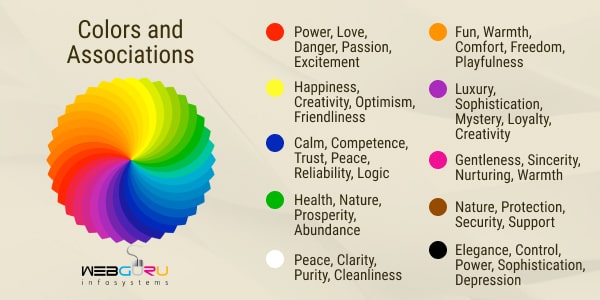
Color psychology refers to the effect that colors may have on a person’s emotions, feelings, and behaviors. While the rules here are not set in stone, people are partly drawn to certain colors because of how they make them feel. Context here is very important. Red can mean fear and danger to some, and passion and excitement to others. When using color in website design, it needs to integrate seamlessly with all the other elements of the site – typography, copy, and images.
Here are some colors and their associated emotions. Once again, while not set in stone, these are general associations, and have a genuine influence on the audience. This should help you make color choices based on how you want your audience to feel, and what actions you want them to take.
- Red: power, love, danger, passion, excitement
- Orange: fun, warmth, comfort, freedom, playfulness
- White: peace, clarity, purity, cleanliness
- Blue: calm, competence, trust, peace, reliability, logic
- Purple: luxury, sophistication, mystery, loyalty, creativity
- Pink: gentleness, sincerity, nurturing, warmth
- Green: health, nature, prosperity, abundance
- Brown: nature, protection, security, support
- Yellow: happiness, creativity, optimism, friendliness
- Black: elegance, control, power, sophistication, depression
2. Cultural Context
While different colors may have different meanings to different people, sometimes colors also come with cultural significance. In many western countries, black is associated with death and mourning, while the same color is white in many Eastern countries. Similarly, the color red is associated with attention and urgency in Western cultures, whereas many Eastern cultures associate it with luck. Context is critical to color selection. Often, you may want to choose your brand’s colors depending on the market you wish to target. Depending on where your market is based, the colors on your website may send considerable different messages.
Of course, this isn’t necessarily the case, especially when it comes to significantly large and popular brands whose images are already ingrained into our general psyche. The red of Coca Cola or KFC, for instance, will generally not bring with them any negative connotations anymore considering how popular and well known they are.
Basics of Color Theory
Color theory is a set of principles which are helpful in understanding and creating complimentary color palettes and combinations. These fundamental principles can really help you create a palette that will suit your brand’s exact needs.
– Primary Colors – These are 3 in number – red, blue, and yellow.
– Secondary Colors – These are created by mixing primary colors – green (yellow + blue), orange (yellow + red), and purple (blue + red).
– Tertiary Colors – These are combinations created by mixing primary and secondary colors.
– Tints, Shades, Tones – All the colors mentioned above are termed as “pure colors”. However, these colors can be further worked with to create additional ones. You create tints by adding white to the pure colors, making them lighter and less intense. You create shades by adding lack to them, making the colors heavier and more intense. You use both black and white in varying degrees to create tones from pure colors.
– Contrast – Contrast is the perceived difference between two colors when placed side by side. Higher the contrast, the more two colors stand out from each other. This is a very important principle, as varying levels of contrast can create a world of difference to your website. Colored text on a low contrast background may cause readability issues. Contrast can also draw attention to specific elements (or even draw attention away from specific elements if used smartly) in your web page, and make them visually stand out.
Color Models
In graphic design, colors are also described using color models. This is because there are millions of colors, and it is impossible to name all of them separately. These standards were created to let us easily describe colors using values.
– RGB Model – This is the model used when one is working with on-screen designs. RGB stands for Red, Green, and Blue. Each of these colors are assigned a value ranging from 0 to 255, and the various combinations bring us the various colors. The colors are often presented as color codes – 6-digit hexadecimal code numbers. It is an “additive” color model.
– CMYK Model – This model is used for print purposes. It stands for Cyan, Magenta, Yellow, and Black, and each color is described by its percentage of these constituent colors. It is a “subtractive” color model.
– LAB Model – LAB stands for Lightness, A Channel, and B Channel. It is a slightly more complex model. It consists of a lightness factor that ranges from 0 to 100, an A component on the green-red axis, and a B component on the blue-yellow axis. This makes the color description much closer to human approximation as compared to the RGB or CMYK models.
Creating Color Palettes
The first color that you choose for your website is the main color of your brand (Red for Coca Cola, for example). This is where color psychology becomes particularly helpful. You use the color based on the emotions and personality you wish to convey. After that, you create a color palette by choosing harmonizing colors to your base color. This is where a color wheel comes into play.
– Color Wheel – The color wheel is a tool used to show the relationship between colors. It is basically an abstract illustration that organizes various color hues in a circle.
With the help of a color wheel, there a 5 main kinds of color palettes that you can create –
– Analogous Palette – Analogous colors are placed next to each other in a color wheel. They have a low contrast with each other, and fit together well providing a subtle effect.
– Monochromatic Palette – These palettes are based on a single color that stands out, paired with elements of different shades and tints. This palette can be very pleasing to look at. However, to prevent a monotonous feel, it might be a good idea to include complimentary and even contrasting colored elements to the web page.
– Triad Palette – This palette uses 3 colors that are spaced evenly apart on the color wheel. This technique needs to be used smartly, not just to choose colors that will go well together, but also to use them in a way that doesn’t look too cluttered and noisy.
– Complementary Palette – This palette uses colors from opposite ends of the color wheel. This can be used effectively to create high contrast art styles that draw attention to specific sections of your webpage.
-Split-complementary Palette – This palette is similar to complementary palettes, but with an additional color that is placed next to one of the complementary colors on the color wheel. When used smartly, this style is effective in creating a more natural look without too much noise.
Useful Tools for Inspiration
Inspiration for new color palettes can be found everywhere, from rival websites to nature and the great outdoors. It also helps to stay updated on latest branding trends. Here are a few helpful tools that can get you started with new color ideas immediately.
– Pinterest – Pinterest holds an impressive number of color palette ideas created by various designers around the world. These can serve as a great source of inspiration.
– Pantone – Pantone is the industry leader in the field of color. It uses a physical color index that identifies all kinds of hues of all the separate colors. All the latest color trends across design and fashion generally come from pantone.
– Color-Scheme Creation Websites – There are numerous dedicated color sites for designers that will help you make color combinations and explore between palettes any way you like. This is a great way to experiment and come up with new palettes yourself. Websites like Adobe Color Wheel, Color Collective, and Design Seeds are great for instant inspiration.
Conclusion
While color alone isn’t the be-all end-all of website design, it surely plays a major role. When used correctly, the color(s) you portray may become an identifier for your brand. With the tips and tricks mentioned above, you should have no issues strategically using color in your website design with the best effect.
The post Using Color Strategically in Website Design first appeared on Read Our Blog – Webguru Infosystems.
]]>The post Web Design 3.0 – A Complete Overview first appeared on Read Our Blog – Webguru Infosystems.
]]>Many web designers assert that the era of web design 3.0 is approaching. If you are not yet introduced to this evolutionary web design yet, it’s high time that you do! This blog is just about that. As a professional website development company, we took it upon ourselves to outline what this web design trend has to offer. But before that, we need to trace the transformation from web design from 1.0 to 3.0 for a better understanding.
Web Transformation – The Journey towards Web 3.0
The website design before 2000 is classified as website design 1.0 or library web. These websites were mainly text-based with minimal graphic. These had very limited interactive element and scope of sharing.
After 2000, web design gradually made a shift towards a streamlined manner of information sharing, personalization, better connectivity, etc. That’s how web 2.0 or the social web came to the forefront. The table-based format of web 1.0 gave way to grids and layouts. Bootstrap further accelerated the speed of web development by simplifying the process of designing various interactive elements. 2008 onwards, template-based web designs took the market by storm. Millions of websites were built using such themes.
As the market was filled with readymade themes, many started questioning the necessity of custom website design services. People started asking: “Is web design dead”? Curiously, this question is persistent even to this day! Check the image below.
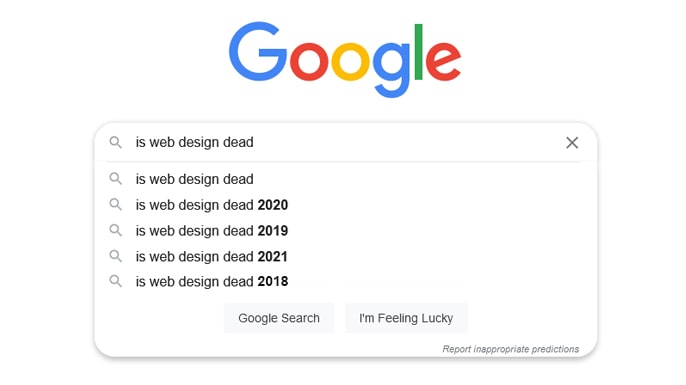 And from these queries, web 3.0 takes birth! Now, even web 2.0 is taking a backseat with the advent of artificial intelligence and high-end technologies. These are supporting the evolution of web 3.0. The concept of web 3.0 is based on the implementation of AI, machine learning, and peer-to-peer networks that offer a superb user experience.
What is Web 3.0?
Web 3.0 seeks to offer a smart user experience with its overlapping element, breaking of the limitations of grids, contextual information (not just keyword-stuffed content), high-end security, and AI-driven design.
However, web 3.0 is not at its peak yet. It is here but at an initial stage. The concept of web 3.0 is built on a decentralized and semantic web vision that is yet to be achieved.
Futuristic Trends of Web 3.0
Artificial Intelligence
AI has transformed the realm of web development. From enhanced personalization to increased interactivity – AI ensures it all. Here are a few ways AI is used in web design:
AI as a designer – ADI (Artificial Design Intelligence) tools can bring a fundamental change in the way websites are created. These tools are effectively leveraged by web designers to create dynamic web designs. These help to reduce the number of repetitive tasks they have to perform.
AI for analytics – A variety of analytics tools is integrated into a website to identify the customers’ behaviour, requirement, and experience. These insights help to fix the issues and improve website UX.
AI for communication – Many websites have integrated chatbots for efficient communication. The latest chatbots use sophisticated NLP (Natural Language Processing) systems to continue a meaningful conversation with the users and guide them. (more on this later)
AI for voice search optimization – Optimizing website content for voice search has become a trend these days as the usage of voice-activated devices is rapidly increasing. There are various AI tools that help to create voice search optimized content by showing the questions people are asking. The Natural Language Processing system in the AI-powered tools further helps to maintain a conversational tone.
Internet of Things
Internet of Things (IoT) is changing the way we interact with the digital realm and web design 3.0 demands optimization of the user interface for various connected devices. At the same time, the websites need to have a robust backend to suit the capabilities, functionalities, and commands of different devices.
Further, the most important point to bear in mind while integrating web design with IoT is that there should be no loophole for a potential security threat. These web designs should be strategized in a way that consumes less power usage as many of the IoT devices run on battery.
AR/VR Integration
AR/VR is turning out to be the driving force of web design 3.0. These technologies help to provide an experience-based interaction and thus enhance brand reliability.
The usage of augmented reality and virtual reality create an immersive user experience. For instance, Lenskart leverages these technologies to enable the users to try different eyewear. Gucci has added an AR feature to let the users try on sneakers. Ikea Place employs VR to allow the users to find out the right piece of furniture for their space.
As you can see, AR/VR is not only a design element but also improves user interaction with the site and increase the transparency level of the brand.
Chatbot
We have briefly discussed this above but we need to elaborate it further. Chatbot has already been in use for quite some time now. So, how is it different in web design 3.0? The following sections will answer this question.
Web design 3.0 is all about providing a semantic experience to the users and chatbots also aim towards that. For instance, many web developers recommend using the latest technology like GPT-3.
GPT-3 or Generative Pre-Trained Transformer-3 is basically an AI tool that is trained with the necessary data and can create content with a natural language structure. No wonder that such a chatbot can enhance the user-friendliness of a website – a significant objective of web design 3.0.
Closing Thoughts
As you can understand, the aim of web 3.0 is to create a frictionless web design and take user experience to the next level. It is taking web design to a height that was unimaginable even a few years back. From creativity to user-friendliness – web design 3.0 has a lot of potentials yet to be unfolded.
The post Web Design 3.0 – A Complete Overview first appeared on Read Our Blog – Webguru Infosystems.
]]>